13
Installation and Commissioning
SET-UP DEVICE USING AGD TOUCH-SETUP
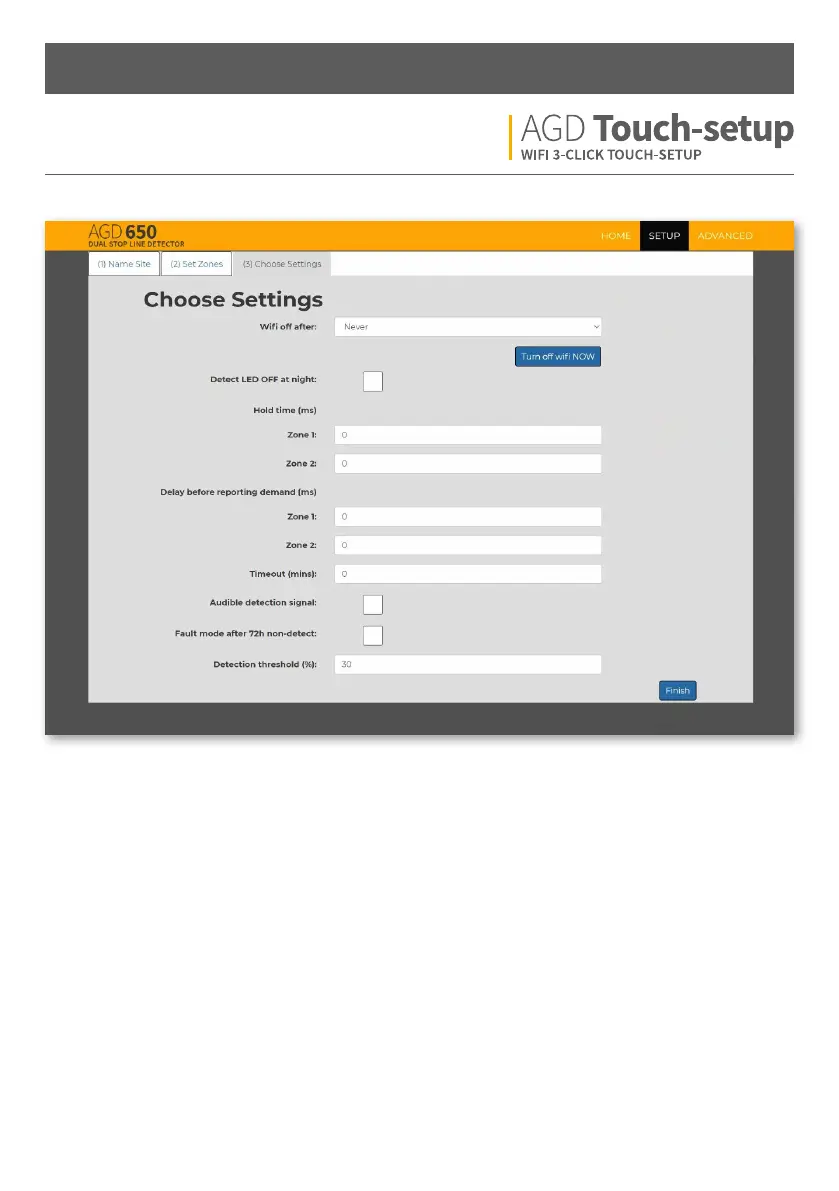
STEP 3 – CHOOSE SETTINGS
WiFi o aer - Select how long you would like the WiFi to
stay on aer you have disconnected. The device will need
to be power cycled to have the WiFi network viewable
aer the selected period.
Input range = 0 - 48h. Default = Never
Detect LED OFF at night - Select to disable red LED
at night
Hold time (ms) - The amount of time the detection
output is held on aer a valid target leaves zone 1 or 2.
Input range = 0 - 120,000ms. Default = 0ms
Delay before reporting demand (ms) - The amount of
time the detection output is not reported aer a valid
target enters zone 1 or 2.
Input range = 0 - 5,000ms. Default = 0ms
Timeout (mins) - The amount of time the detection
output is permitted to stay ON. Once the set timeout
figure (mins) is reached the detector will go into a NON
DETECT state until that vehicle has moved and another
vehicle enters the detection zone
Input range = 0 - 120mins. Default = 0, OFF
(never times out)
Fault mode aer 72h non-detect - If no valid targets are
seen/reported in any defined detection zone for 72h then
the detector will revert to a permanent detect state.
Detection threshold (%) - The threshold value at which
the detector will report a valid target. Percentage figures
can be seen on the home screen when looking at the live
traic view.
Input range = 0 - 100%. Default = 30 (recommended)


 To Next Page