18 Power Hoe 6000 Edition 11.98
3. Devices and Operating Elements
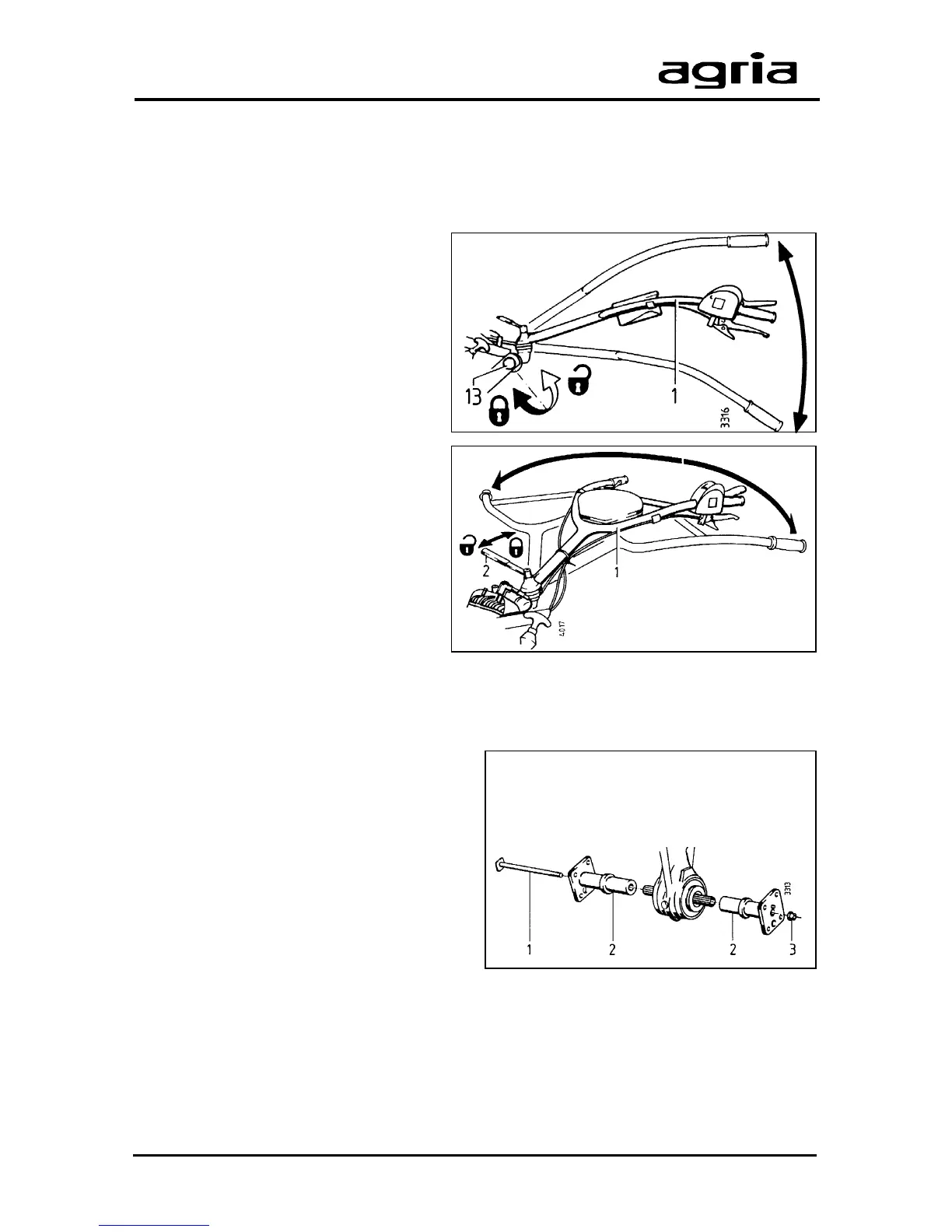
1 Anchoring bolt
2 Wheel hub
3 Locking nut
Steering Handle
Steering handle height
adjustment
l
Undo hex bolt (13) until the teeth are
exposed.
l
Adjust the handlebars to the desired
height and notch the teeth into the
proper teeth of the pivoting joint.
l
Tighten the hex bolt.
Steering handle side
adjustment
l
Undo tommy screw (1) until the
teeth are exposed.
l
Move the handlebars to the proper
position.
Drive-Wheels
A choice of hubs are available to be
mounted to the drive-wheels:
l
one pair of wheel hubs to suit a rigid
wheel shaft;
l
one pair of latch hubs to give easier
turns.
One pair of wheel hubs
(rigid version)
Assembly
l
Attach wheel hubs (2) to both ends of
the hoeing shaft.
l
Guide the anchoring bolt (1) through
the hubs and the shaft as shown in the
illustration.
l
Attach locking nut (3) and tighten it
(100Nm).



 To Next Page