DocNo.FM5505issueDPage20
15.WCCALL
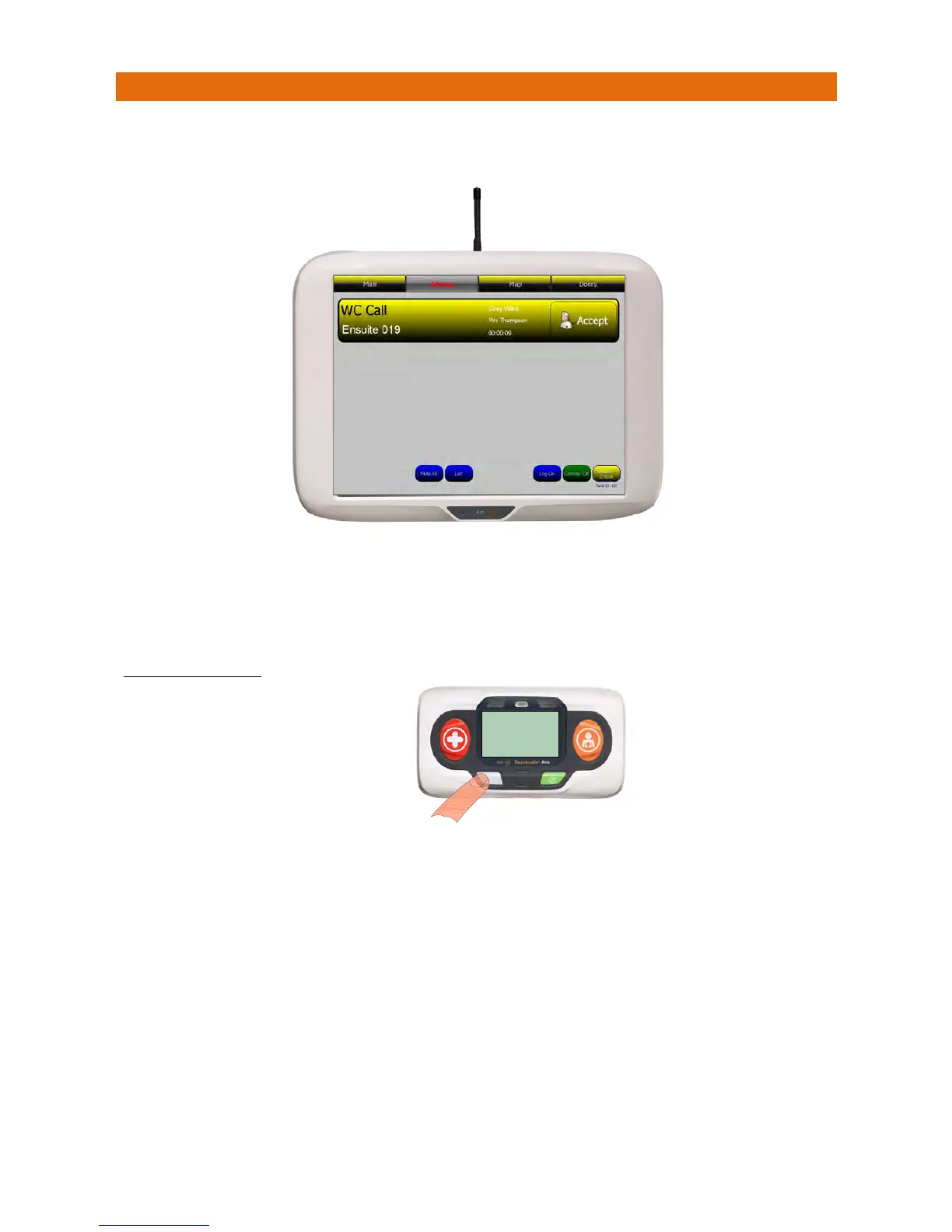
IftheOrangeNurseCallbuttonispress ed(ortheOrangecordispulled)onaCallPointfittedinaWC(i.e.
toilet)thiswillbedisplayedonthepanelasshownbelow;
ThescreenbannerisyellowforaWCcall.
Touchthebanner
todispl
ayClientNotes.
PresstheAcceptbuttononthebannertosilencethealarmandnotifyallotherpanelsthecallisbeingdealt
with.Thescreenbannerchangestopurplewhenacallisaccepted.
TOCANCELTHECALL
Iftheunithasadisplayitwillfirstshow“CALLING‐CANCEL”then“ACKNOWLEDGED”whenthecallhas
beenreceivedandcancelledofftheNursecallpanel.
Ifthereisanothercallwaiting(withinthesameZone)thedetailswillbedisplayed,ifmorethanonecallis
waitingtheonewithhighestprioritywillbedisplayed.
CALLING
CANCEL
HC.345ID.001
YoumustvisittheCallPoint
andpresstheLIGHTGREY
buttontocancelthecall



 To Next Page