DocNo.FM5505issueDPage9
8.SYSTEMCONFIGURATION
EDITDETAILS
PANELSETTINGS
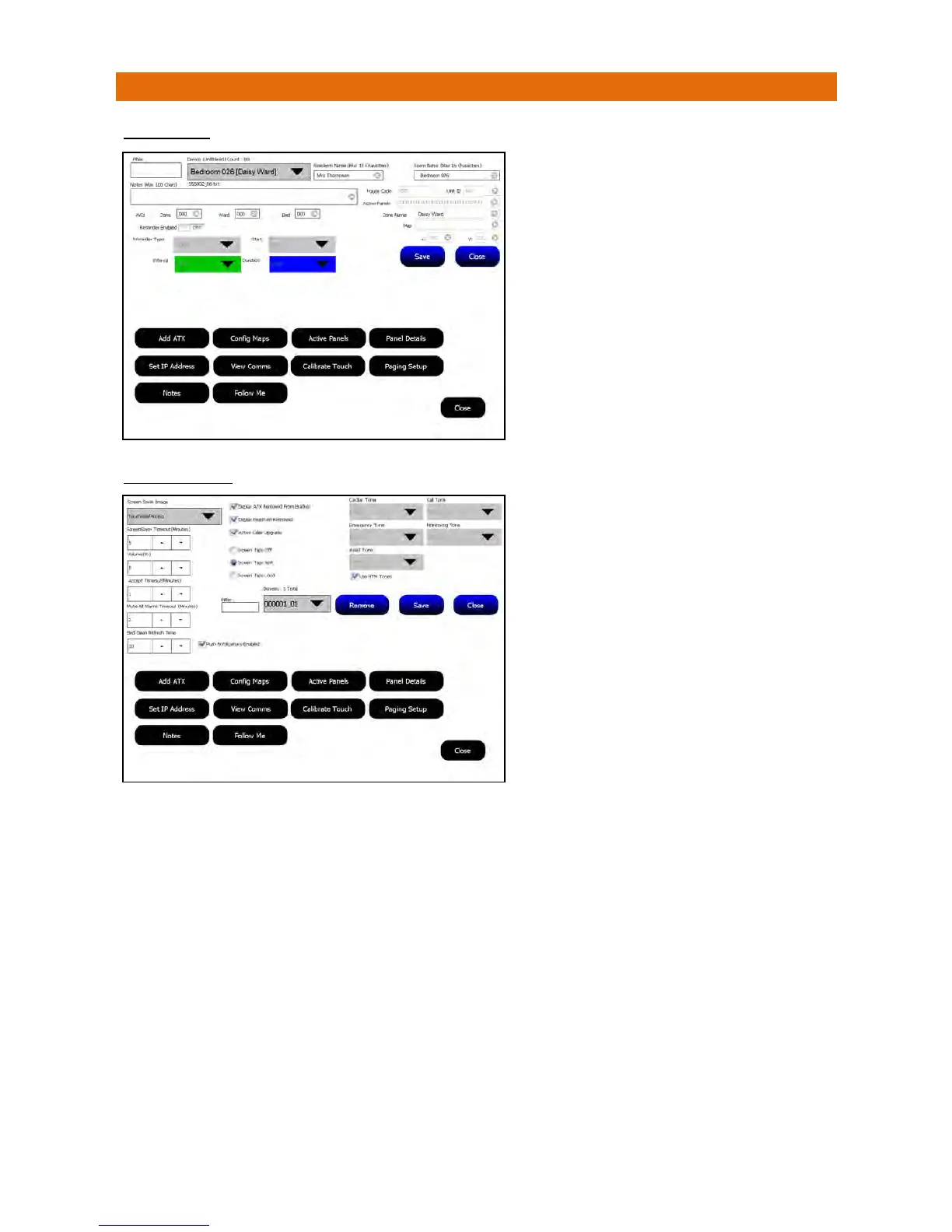
DisplayATXRemovedFromBracket–ifaCallPointisremovedfromitswallbracketanalarmwillbedisplayedonthepanel(s).
DisplayPearPushRemoved–ifaPearPushisunpluggedfromitsCallPointanalarmwillbedisplayedonthepanel(s).
ActiveCallerUpgrade–audibletonesontheAVI’sandPanelswillbeupgradedtothenextlevelofcallevery120seconds.
ScreenTaps–selectoneof3options(off/soft/loud)forthesoundthatismadewhenthescreenistouched.
UseHTMTones–ifcheckedthesystemaudibletonesforalarmsareplayedfromtheprocessor.Ifuncheckedthesystemwillplay
.wavfile
sfromthewindowsoperatingsystem.Defaulttoneswillbeplayedforeachalarmlevelunlessanalternativetoneis
selectedfromthedropdownboxes.
Remove–thiscanbeusedtoremoveadevicethathaspreviouslybeenonthesystemandhasreportedthroughasafaultor
cannotberemovedfromthescreenforsomeotherreason.Thenumberofactivedevicesonthesystemisshownabovethegrey
pull‐downbox.Inordertoreducethenumberofoptionsincludedinthepull‐downboxaFilterisprovided. Forexampleifafailed
unitisfromHouseCode123,thenentering123intotheFilterboxwillshowonlydevicesthatstartwith123.Whenthedesiredunit
isselected;presstheRemovebutton.An“AreyousureyouwanttoDeleteprompt”willappear,if‘Yes’isselectedthedevicewill
beremovedfromtheActiveDeviceListuntilanewalarm/pollisreceivedfromthedevice.Thiswillpreventtheunitfromreporting
throughasa“PleaseTest”every2hours.Oncethisactioniscompleteyoucanremovetheeventfromthedisplaybypressing
‘Accept’ontheassociatedAlarmBanneronthemainscreen.If‘No’isselectedthedevicewillremainontheActiveDevicesListand
willreportasafaultevery2hoursuntilthefaultisre
ctified.
PushNotificationsEnabled–thePushNotificationfeaturecanbeenabled/disabledbytheManagerusingthischeckbox.IfPush
NotificationsareenabledintheEngineersSetupthentheywillalways bere‐enabledwhenthepanelisrestarted.
TouchSavewhendonethenClosetoexit.
Thisallowstheeditingofaclient’sdetails.Note:edits
performedontheMasterpanelaresavedandsenttoall
otherpanelsontheNetwork.
SelecttheDevicetoeditfromthepull‐downbox(ortype
itsIDintheFilterbox).
UsethekeypadtochangetheResidents/RoomName.
TextenteredintheNotesboxwillbedisplayedon‐screen
bytouchingthebannerforacallorReminder.
SelectwhichZone/Ward/BedAVI’syouwanttooperate
withthiscallpoint.
SelectifyouwantaReminderEnabled,choosethe
ReminderTypeasFixed(forMedicationatfixedtimes)or
Variable(forRemindersatfixedintervals).SettheStart
timeforthefirstreminder,theIntervalbetween
remindersandDuration(timeuntillastreminder)from
thepull‐downboxes.Seesections27&28forexamples.
TouchSavewhendonethenClosetoexit.
SelecttheScreenSaverImagefromthepull‐downbox
andsettheScreenSaverTimeoutintheboxbelow.
SettheVolumeofthepanelalarmtonesfrom0(off)to
100%(fullvolume)in20%increments.
SettheAcceptTimeout‐thisthedurationforwhicha
callcanbeinthe‘Accept’stateduringwhichtimethe
associatedaudibletonesaresilencedandthealarmhas
alowerpriority.
SettheMuteAllAlarmsTimeout‐thisisthedurationfor
whichallaudibletonescanbesilenced.
SettheBedCleanRefreshTime‐thisistheintervalat
whichthe“BedToBeCleaned”eventwillbereported.
Itcanbesetas10,20or30minutes;
Ifsetas10itwillreportat00,10,20,30,40&50
Ifsetas20itwillreportat00,20&40
Ifsetas30itwillreportat00&30



 To Next Page