MyChron4 660
User Manual
Release 1.03
www.aim-sportline.com
38
4 – MyChron4 660 and the PC
MyChron4 660 is designed to interface with a PC. Using a DataKey it is possible
to download the data stored in your MyChron4 660 to your PC for analysis using
the QMAn analysis software.
4.1 – Downloading data with MyChron4 660
To download the data stored in the gauge memory, follow this procedure:
• Turn off your MyChron4 660.
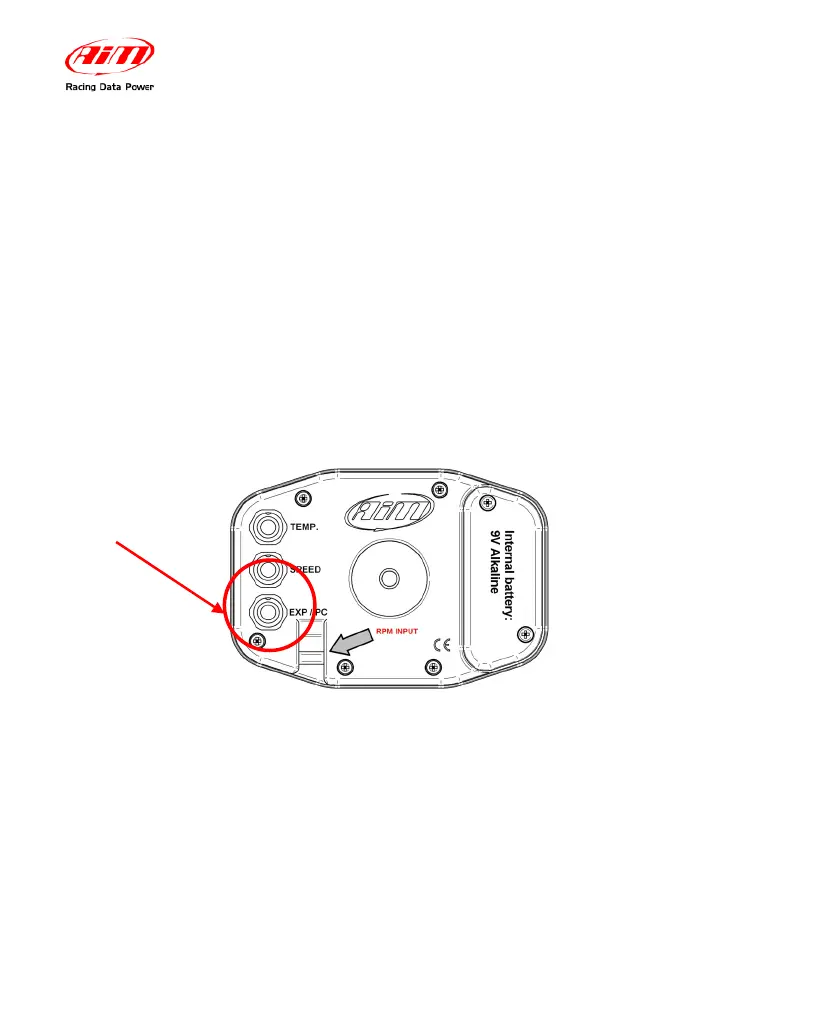
• Connect the DataKey to the EXP/PC port on your MyChron4 660
• Turn on your MyChron4 660
• Automatically the data will be downloaded to the DataKey.
• Connect the DataKey to the PC USB port and run QMAn sofware.
• Double click on Download in the upper left hand corner of the screen.
Data Analysis will be explained later in Section 3.4 8QMAn Data Analysis).
Connect here
the DataKey
cable


 To Next Page