MyChron4 660
User Manual
Release 1.03
www.aim-sportline.com
46
After the first installation a new icon is created on the PC desktop.
Here on the right you see the default icon of QMAn software.
Please refer to the software user manual for further information. Once the first
installation is successfully completed, QMAn software updating (remember to
periodically check www.aim-sportline.com) will skip the steps regarding the USB
driver installation.
4.3.2 – Troubleshooting
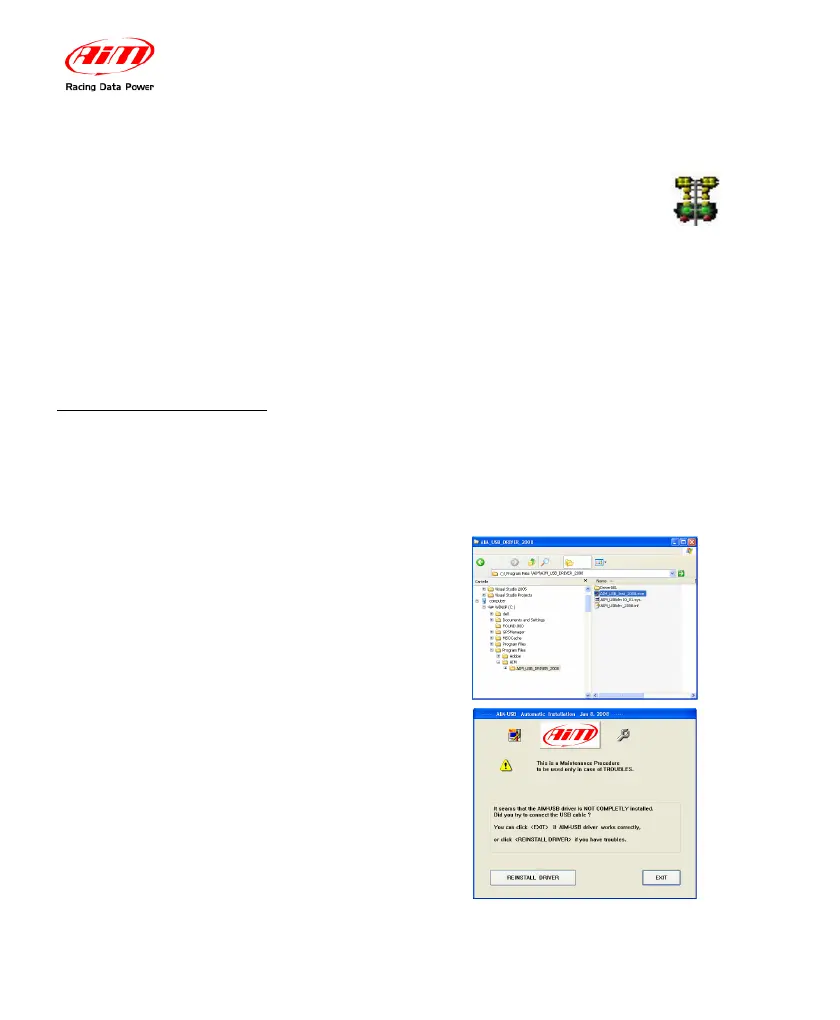
If USB driver installation procedure ended incorrectly you can start the “Repair
Procedure” by double clicking on AIM_USB_Inst_2008. To find this maintenance
file, please follow this path: C:\Program Files\AIM\AIM_USB_DRIVER_2008
Run AIM_USB_Inst_2008.exe file.
When this panel appears click on
the “
Reinstall Driver” and a
procedure similar to the first
installation starts.


 To Next Page