Air Techniques, Inc.
Page
32
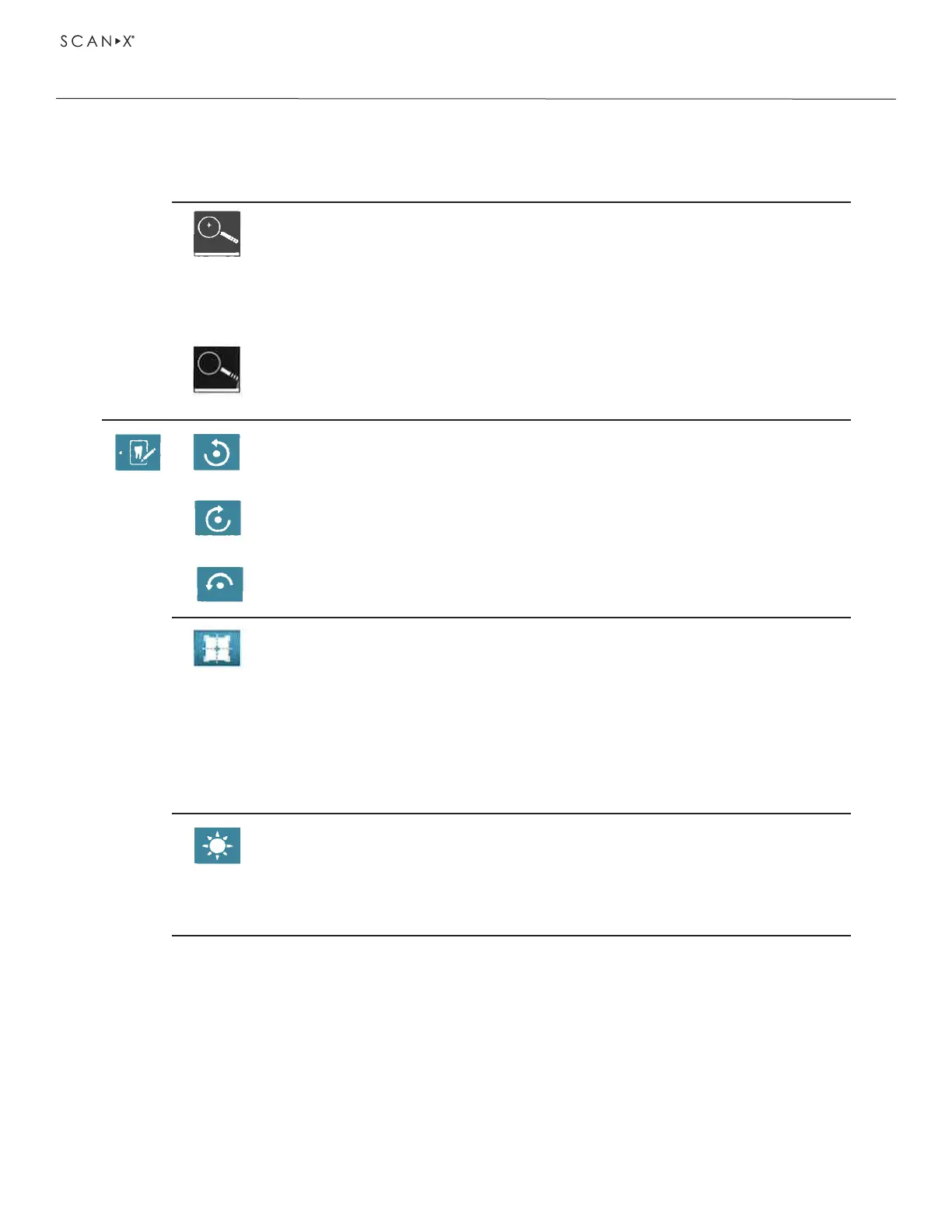
Magnify or reduce the image
Touch the magnifying glass icon until the display ± appears in the magnifying
glass.
To magnify the image, wipe across the X-ray image from left to right. The size
ratio is displayed on the right next to the magnifying glass.
To reduce the image, wipe across the X-ray image from right to left.
Movethemagniedimagesection
Touch the magnifying glass symbol until the display ± disappears.
Touch the X-ray image and move to the required image section.
Rotate the image anti-clockwise by 90°
Rotate the image clockwise by 90°
Rotate the image clockwise by 90°
View the histogram for the selected image section of the X-ray image
The measurement area is within the square.
The number displays the maximum gray value in the center of the
measurement area.
The red line displays the vertical grey value distribution.
The green line displays the horizontal grey value distribution.
Touch the histogram and move to the required image section.
To deactivate the histogram, touch the histogram pictogram in the menu.
Edit the brightness of the image.
To increase the brightness, move the controller to the left or touch the left arrow
several times.
To reduce the brightness, move the controller to the right or touch the right arrow
several times.
OPERATION
Image editing
• Touch Edit or touch the X-ray image twice in quick succession (double click).


 To Next Page