45
3.15 Mail Service Settings
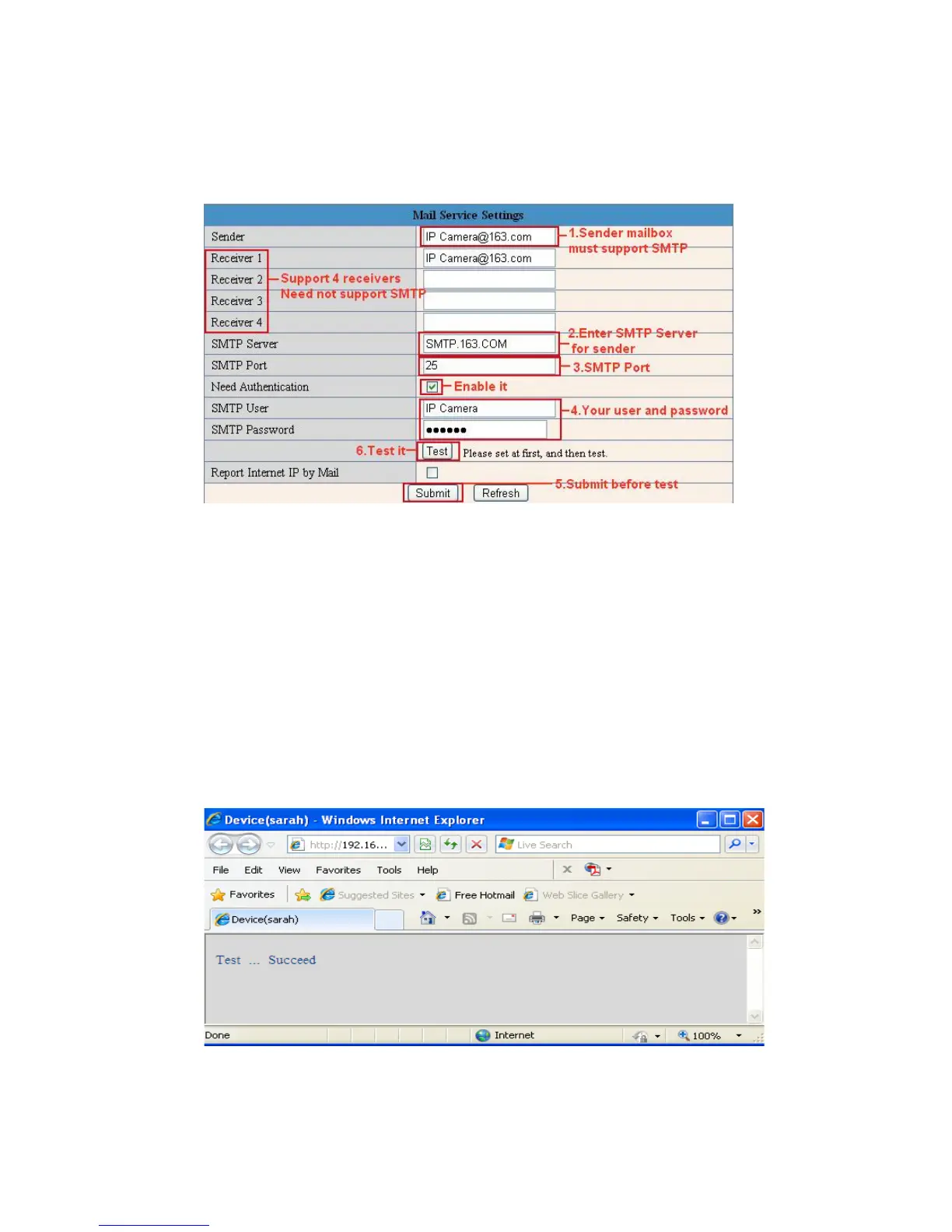
Set Mail Service Settings to enable the camera to send e-mail alerts when motion is detected.
Fig
ure 9.0
Sender: Make sure the sender mailbox server provider supports SMTP, and the mailbox should not enable
SSL or TSL encryption.
Receiver: Here you can set four receivers. For receiver, there is no SMTP limitation.
SMTP Server: The sender’s SMTP Server.
SMTP Port: The sender’s SMTP Port, usually is 25, some SMTP server have its own port such as 587.
Need Authentication: If there is SMTP user & password, please select authentication.
SMTP User: Input correct SMTP User here. Some SMTP User is the sender’s full email address, such as
test@qq.com, some are without suffix, only the username, such as test.
SMTP Password: Input correct SMTP password here.
NOTE: Click Submit first before choosing Test.
You will see the test result after you click Test.
Fig
ure 9.1



 To Next Page