59
Free Space/Available Space: Display the free space of SD card
State: Display the state of SD card.
Format: Click it to delete all data and format the SD card. (All data will be lost if formatted).
Open Auto cover: Set SD card auto cover when it’s full.
Open Pre-recording: Set Pre-recording function (Record the video before alarm triggered).
Pre-recording Time: Set the Pre-recording time, can be from 1 to 6 seconds.
Record Stream: Choose the stream here.
Manual Rec.: Set as Open, this means when you click record, the SD card will also start recording at the same
time.
Manual Rec. Pack Time: Set the record time. Min: 10 mins, Max: 60 mins.
4.18 Local Settings for IE browser
N
ote: Local Settings shows under IE ActiveX mode only.
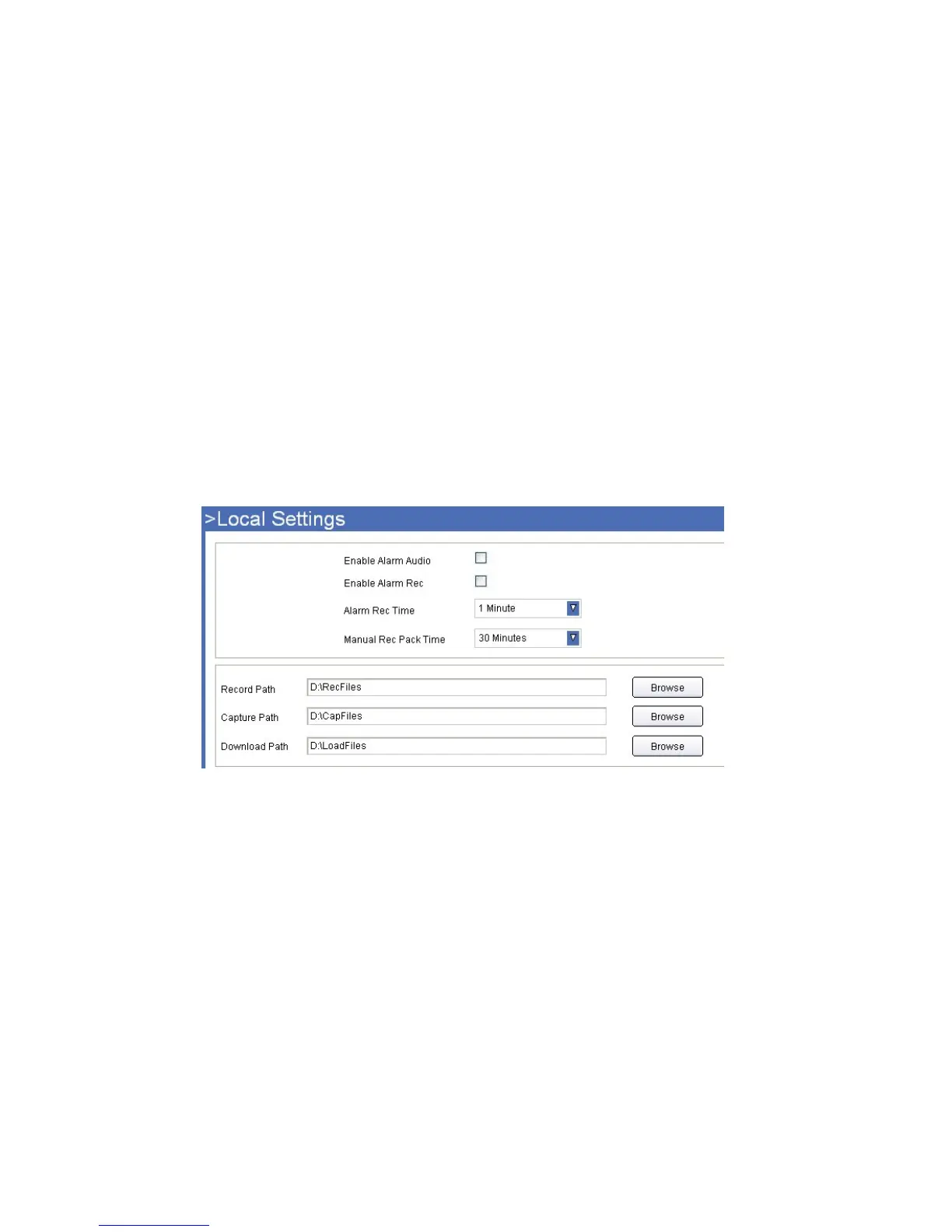
Click Local Settings to enter the interface:
Figure
13.3
Enable Alarm Audio: Set audio ON/OFF once alarmed.
Enable Alarm Rec: Set alarm record function ON/OFF.
Alarm Rec Time: Set alarm record duration time, can be 30s, 1min, 2min, 3min, 5min.
Manual Rec Pack Time: Set the manual record file pack time, can be 30min, 1h, 2h, 3h, 5h.
Record Path: Set the path for record file saved.
Capture Path: Set the path for snapshot saved.
Download Path: Set the path to download video from the SD Card to your PC. You can then search for these in
Playback mode.



 To Next Page