9
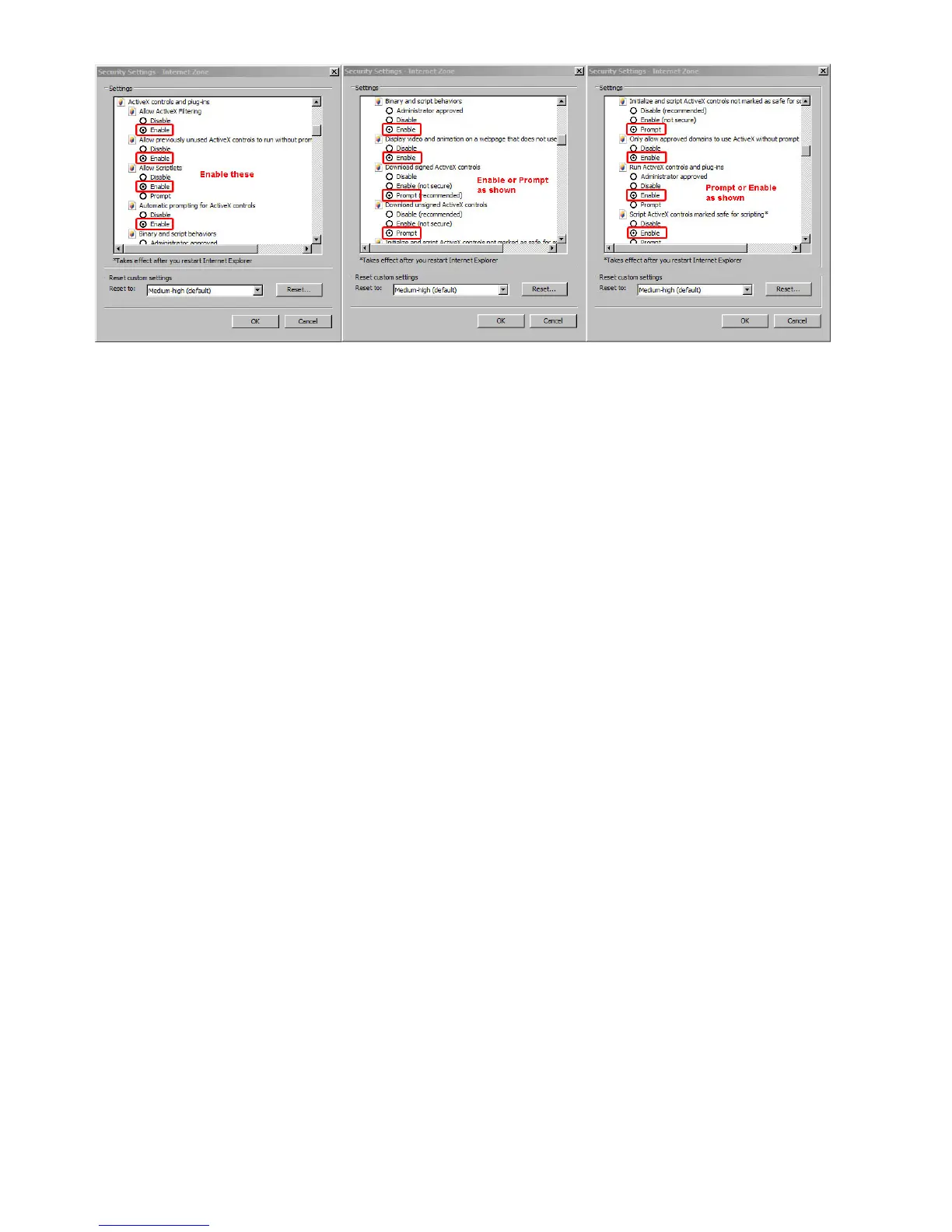
Figure 1.4
Click OK and restart the browser.
Yo
u can also click the Start menu then Internet Explorer, and choose Internet attributes, or via Control Panel
select Internet Explorer to access Security settings.
NOTE: Make sure that your firewall or anti-virus software doesn’t block the software or ActiveX. If you couldn’t see
live video, please close your firewall or anti-virus software, and try again
.
2.3 UPnP Service
U
PnP could help you to find your camera’s IP more quickly. For Window XP, from Control Panel > Add or remove
applications > Add or remove Windows component > Network service > Detailed data > UPnP users
interface, the factory default settings is disabled. Enable it, then it can allow your operating system to support
UPnP.
You can also click the Start menu then Internet Explorer, and choose Internet attributes, or via Control Panel
select Internet Explorer to access Security settings.



 To Next Page