33
NETWORK CABLING
ProST interfaces with the subscriber's network through the IDU (i.e. typically the SDA-1 Type II, or
optionally through the SDA-4S Type II, SDA-4S/VL Type II or SDA-4S/DC). The ProST also receives
DC power from the IDU.
This section describes the ProST network cabling:
Connecting ProST to IDU
Connecting IDU to a Computer
Note: Use CAT5 unshielded cable only.
Connecting to IDU
The ProST typically interfaces with the subscriber's network using the indoor SDA-1 Type II adapter.
However, optional IDU adapters (SDA-4S Type II, SDA-4S/VL Type II or SDA-4S/DC) are offered
that provide multiple LAN ports for interfacing with the subscriber's network.
Using the SDA-1 Type II
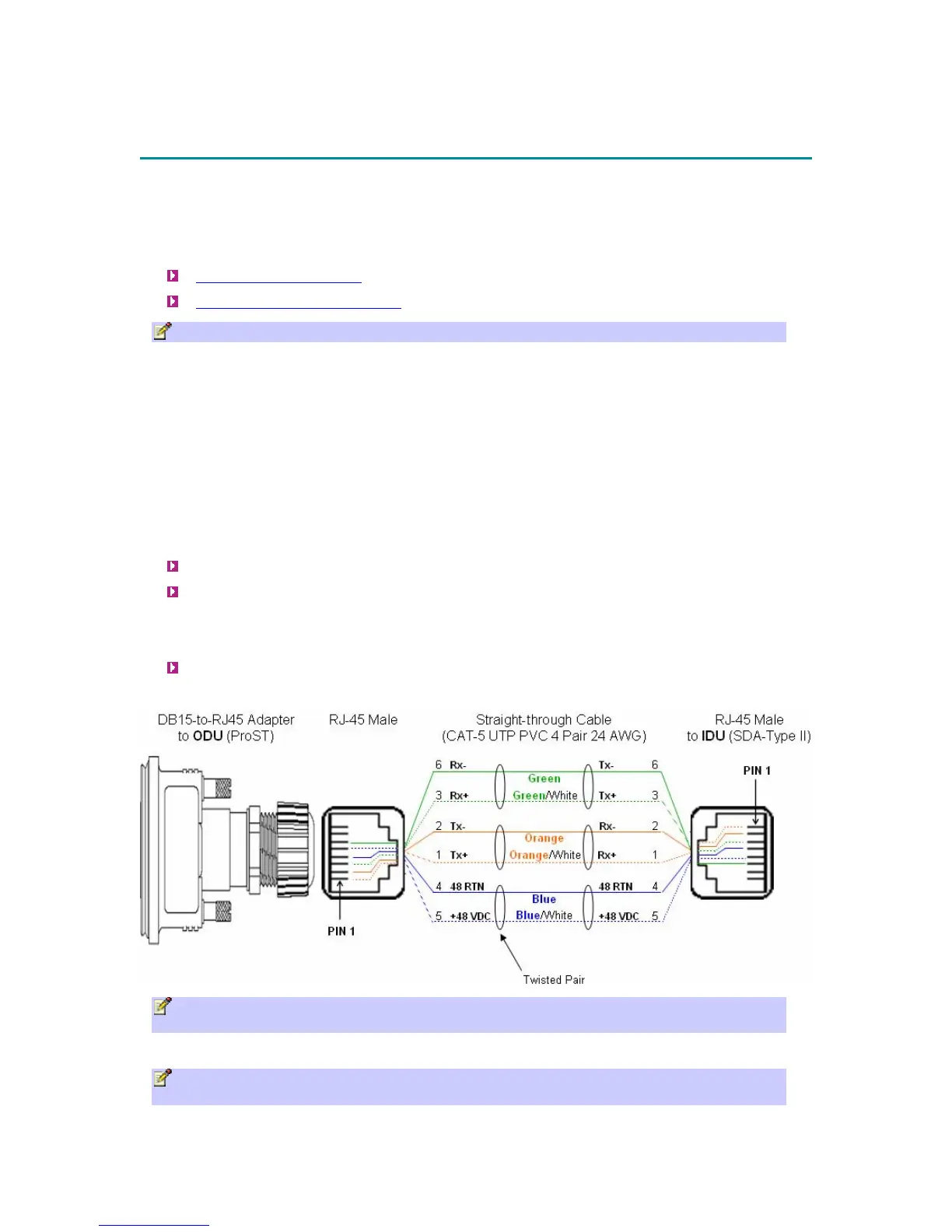
The ProST connects to the SDA-1 using a CAT 5 cable with 8-pin RJ-45 connectors on either
end. The ProST provides a 15-pin D-type port for interfacing with the SDA-1. However, for
allowing the use of RJ-45 connectors, your ProST kit includes a DB15-to-RJ45 adapter that can
easily be attached to the ProST's 15-pin D-type port.
The cable setup for ProST-to-SDA-1 connectivity is as follows:
Cable: Straight-through CAT 5 Ethernet cable
Connectors:
o ProST: DB15-to-RJ45 adapter
o CAT 5 cable with 8-pin RJ-45 male connectors on either end
Connector pinouts:
Note: The SDA-1 Type II is protected in the event power is inadvertently inserted to the
radio port so as not to damage the Ethernet card.
Note: A DB15-to-RJ45 (gray colored) adapter for plugging into the ProST's 15-pin D-type
port (pins 7 & 8 disconnected) is included, replacing previous (black colored) adapter.



 To Next Page