Network Cabling
35
The SDA-4S Type II, SDA-4S/VL Type II or SDA-4S/DC Type II adapters (referred hereafter as
SDA-4S) provide one 15-pin D-type female port for interfacing with the ProST (which also
provides a 15-pin D-type female port).
The ODU-to-IDU connectivity implements a CAT 5 cable with 8-pin RJ-45 connectors at either
end. However, for allowing the use of RJ-45 connectors, your ProST kit includes two DB15-to-
RJ45 adapters that can easily be attached to the 15-pin D-type ports of the ProST and SDA-4S.
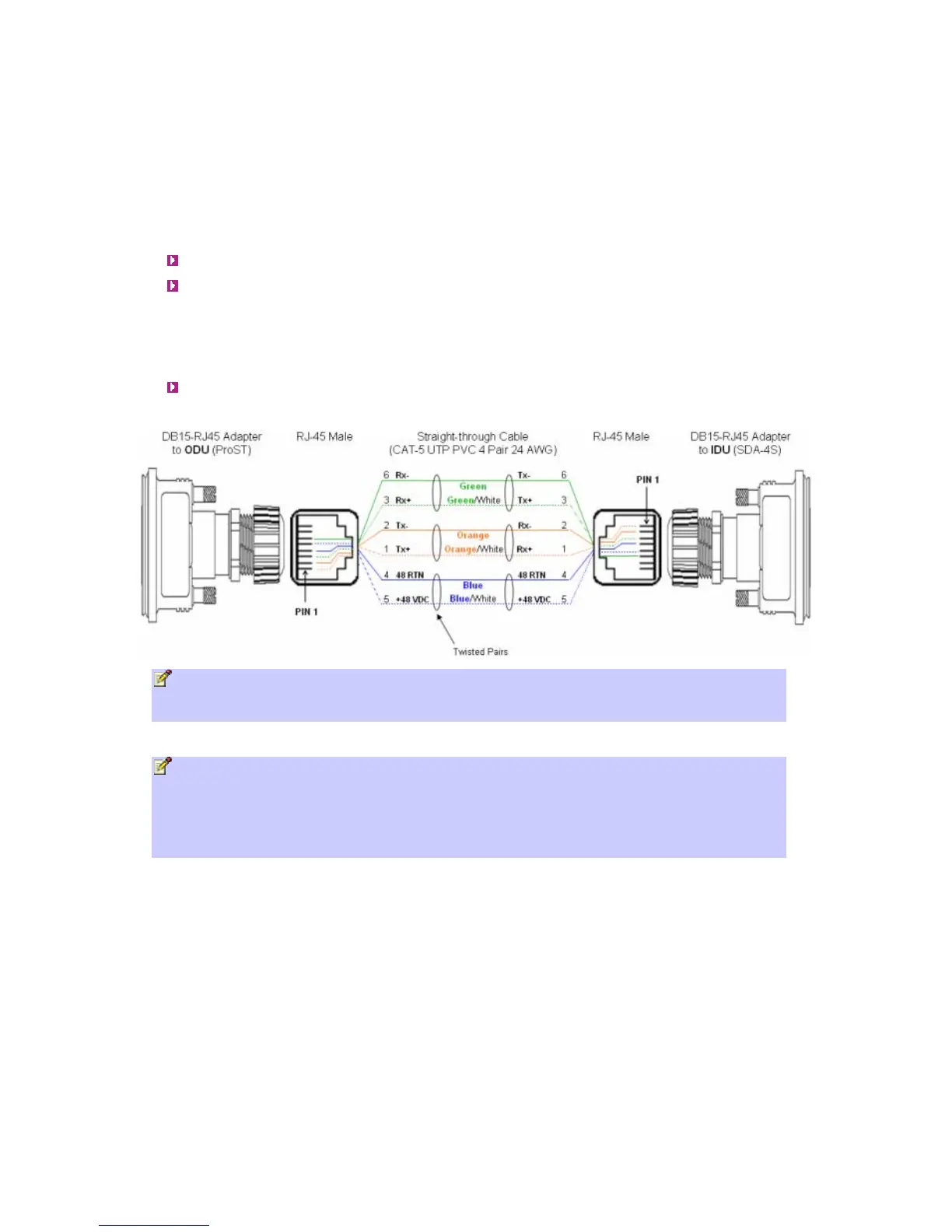
The cable setup for ProST to SDA-4S connectivity is as follows:
Cable: Straight-through CAT 5 Ethernet cable
Connectors:
o ProST: DB15-to-RJ45 adapter
o SDA-4S: DB15-to-RJ45 adapter
o CAT 5 cable with 8-pin RJ-45 male connectors on either end
Connector pinouts:
Note: The standard ProST/ProST-WiFi kit does not include the SDA-4S Type II, SDA-4S/VL
Type II or SDA-4S/DC adapters. For pricing and ordering of either the SDA-4S Type II, SDA-
4S/VL Type II or SDA-4S/DC adapter, please contact your nearest Airspan dealer.
Notes:
• The wire color-coding described in the table is Airspan's standard for wire color-coding.
However, if you implement your company's wire color-coding scheme, ensure that the wires
are paired and twisted according to pin functions listed in the table above (e.g. Rx+ with Rx-
).
• The maximum CAT 5 cable length for ODU/IDU connectivity is 100 meters.
To connect the ProST to the SDA-4S:
1. Attach the DB15 side of the DB15-to-RJ45 adapter to the ProST's 15-pin D-type port
(female), labeled DATA & PWR.
2. Attach the DB15 side of the second DB15-to-RJ45 adapter to the SDA-4S's 15-pin D-type
port (female).
3. Plug the RJ-45 connector, at one end of the CAT 5 cable (not supplied), into the RJ-45 port
of the DB15-to-RJ45 adapter located at the ProST.
4. Plug the RJ-45 connector, at the other end of the CAT 5 cable, into the RJ-45 port of the
DB15-to-RJ45 adapter located at the SDA-4S.



 To Next Page