Use of commands/options
7 USE OF COMMANDS/OPTIONS
7.1 How to navigate the command menu
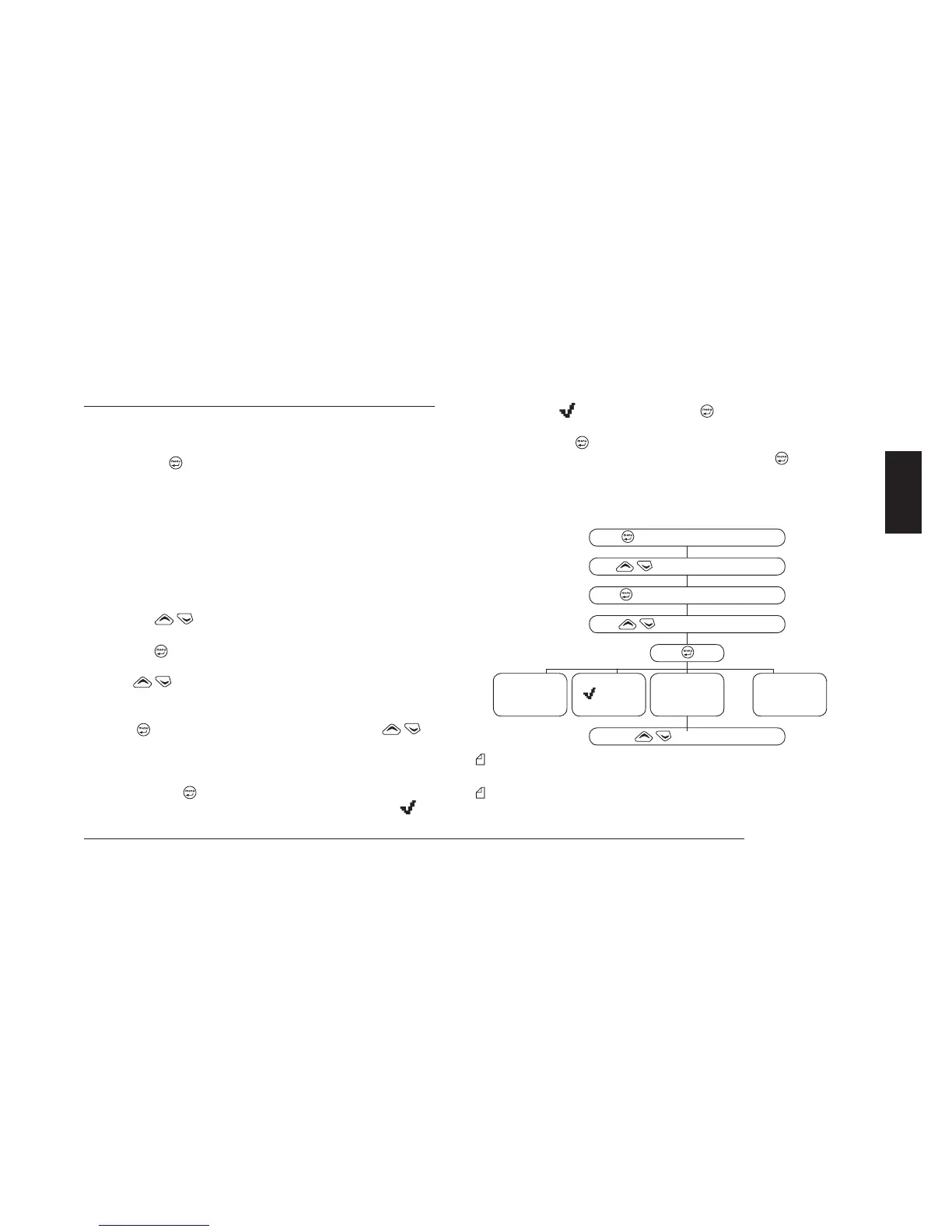
Refer to the following diagram.
1) Pressing the
button once opens the command menu and di-
splays the five main menus:
• Radio Param – settings/activation of primary radio parame-
t
ers
• Calls – emission of selective calls
• Scan – performs scanning functions
• Home Chan – recall of home channel (your most frequently
used channel)
• LCD&Keypad – settings for display and keypad
• Switches – activates switching for various options
2) Press the
buttons to scroll through main menus and hi-
ghlight the desired menu.
3) Press the
button to access the menu and view the available
sub-menus.
4) Press
again to scroll through the sub-menus and highlight
the desired one:
• If you have selected an adjustment (e.g. squelch level), press
the
button to access the sub-menu and use the to
make changes.
• If you have selected an option with two values (e.g. high or low
output power), you can switch from one value to another by
pressing the
button.
• If you have selected an option (activate or deactivate), a
will
appear on the display when the option is activated. Insert/re-
m
ove the
symbol by pressing the button.
• If you have selected a selective call, begin transmission by
pressing the
button.
5) If necessary, confirm the change once more with the
button
(e.g. in the case of variable selective calls)
6) Exit the sub-menu by pressing the F4/ESC button, then press it
a second time to exit the main menu and return to the standby
screen.
You can exit the menu/sub-menu at any time, without changing
settings, by pressing the F4/ESC button.
The main menu Home Chan has a sole purpose of recalling the
priority channel; therefore, it does not have a sub-menu.
to access the command menu
to highlight the main menu
to access the highlighted menu
to highlight the sub-menu
change value of
parameter
(Hi or Lo)
to make changes
insert/remove
(activate/
deactivate)
access change
functions
send selective
call



 To Next Page