Parts of the radio and their use
3 PARTS OF THE RADIO AND THEIR USE
3.1 Front panel
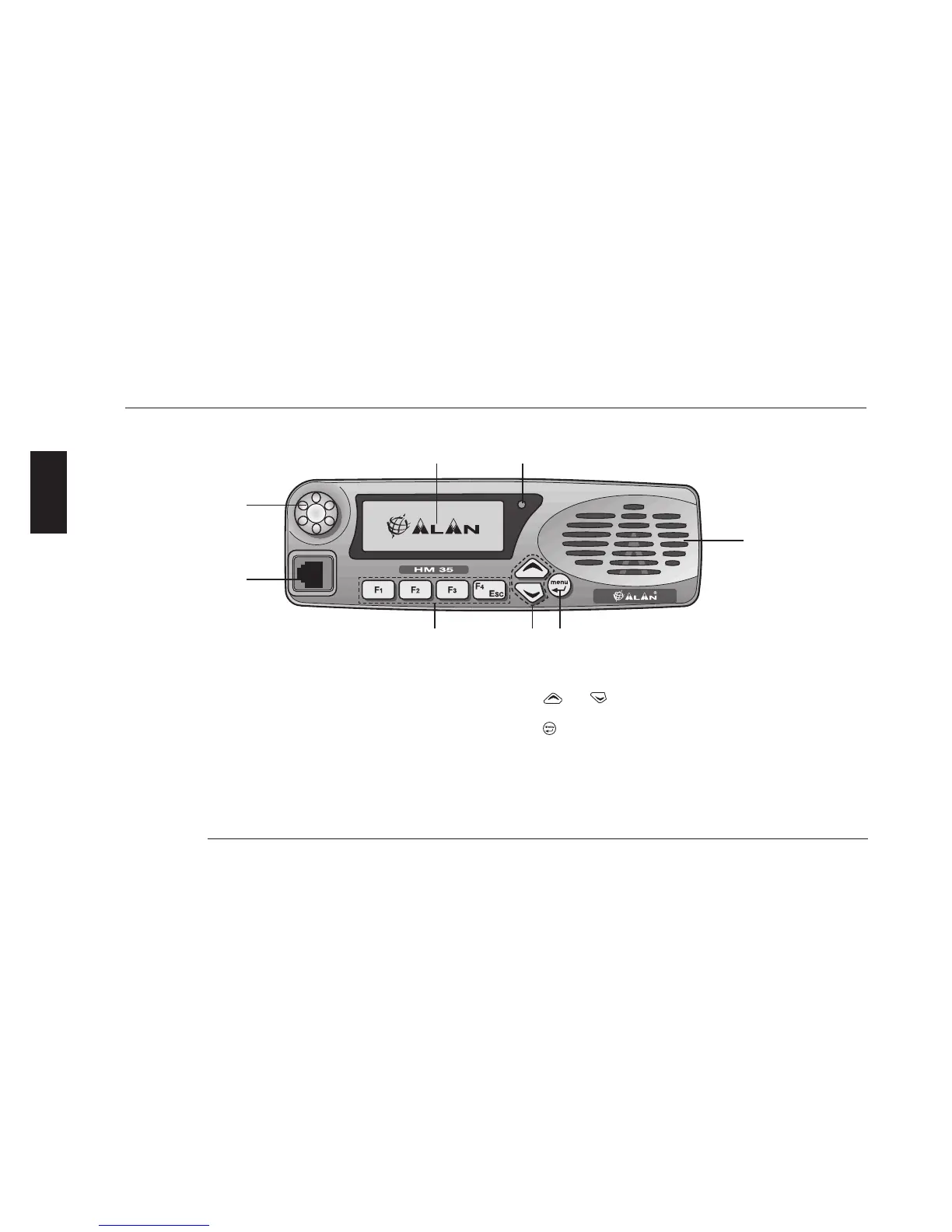
[1] Display - constantly displays the operating status of the device
and guides the use of various functions through a series of icons
and messages.
[2] On/Off-Volume knob – used for turning the radio on/off and for
adjustment of reception volume.
[3] Microphone socket – this RJ type socket connects the standard
hand-held (MK06/35) or keypad microphone (MK06/35-K) to the
radio.
[4] Programmable function keys F1, F2, F3 and F4/ESC enable the
user to recall commonly used functions or can be programmed
with fixed selective calls.
The F4/ESC button is also used for exiting a menu (ESC).
[5]
(up)/ (down) buttons – for channel selection and naviga-
tion of the command menu.
[6] button – for accessing the command menu and confirming
the option shown on the display.
[7] Internal speaker.
[8] Status LED – is lit with different colours to indicate the radio’s
status (transmission, busy channel, etc.)
1 8
4 5 6
3
2
7



 To Next Page