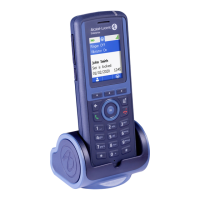
8212 DECT Handset
Quick guide
www.al
-enterprise.com
8212 DECT Handset
SIP
Quick guide
Related Documentation - Other languages for these Safety and Regulatory Instructions and User Documentation are available at the following Web site https://www.al-enterprise.com/products.
The Alcatel-Lucent name and logo are trademarks of Nokia used under license by ALE. © Copyright 2022 ALE International, ALE USA Inc. All rights reserved in all countries. 8AL91447ENAAed01.
The status icons are displayed on the welcome screen and indicate the status of the
telephone.
Battery charge level ( > > > ).
In charge (Flashing icon).
New event(s) - callback request, voice mail, text mail, missed call.
Loudspeaker on (in conversation).
Mute on (in conversation).
Radio reception quality - Normal power mode.
Radio reception quality - 50 mW Power mode.
You can obtain details on the status icons from the tooltips that appear
on the welcome screen when you use the navigator.
It provides access to all the functions available on your system.
When selected, the icons are displayed in white on a blue background: → .
Messages:
Consulting your voice mailbox.
Call log:
Access the call log.
Contacts:
Manage your personal directory and access the company directory.
Settings:
Access the general settings such as time and date, Language, key
programming, etc.
Ring:
Access the ringing, key sound and warnings settings.
Install:
Installation settings (Password protected).
Answered incoming calls.
Redialing (Long press).
Send the call.
Calling from your personal directory (PersSpDial).
Programming your personal directory (PersSpDial).
Call from call log (All incoming, outgoing, missed or
unanswered calls are displayed in the call log).
Consulting your voice mailbox.
Define the number of your voice mailbox.
Choose the tune.
Adjusting the ringer volume.
Locking features on your terminal.
Access the handset settings menu (Device info., Security, Auto
answer, Reset settings, …).











 To Previous Page

