17
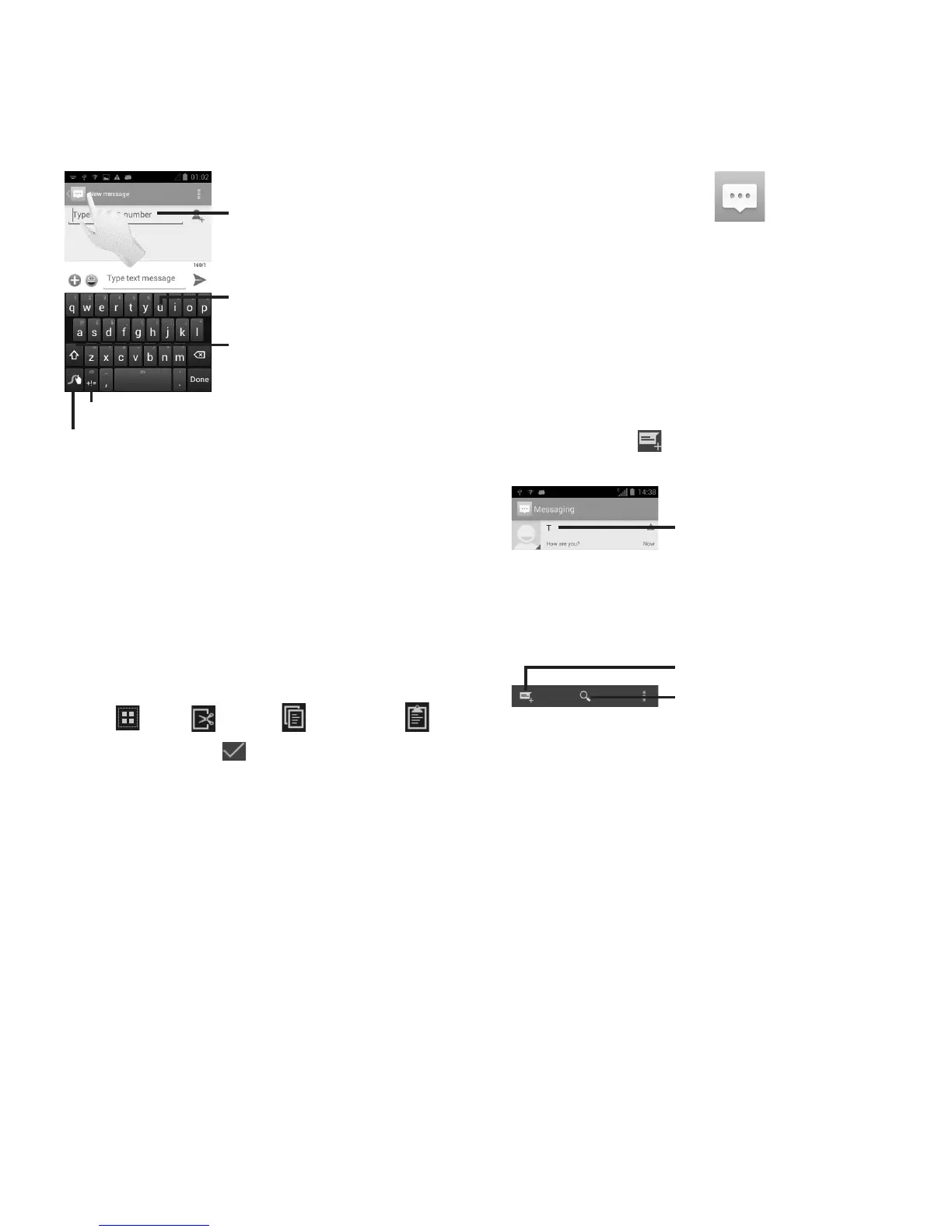
Touch and hold to enter multiple
choices mode
Touch to enter text or numbers
Touch to switch "abc/Abc/ABC"
input mode
Touch and hold for Swype settings and additional information
Touch to enter numbers, symbols, etc.
Text Editing
You can edit the text you have entered.
Touch and hold or double-tap within the •
text you would like to edit.
Drag the tap to change the highlighted •
selection.
The following options will appear: • Select
all
, Cut , Copy and Paste .
Touch the icon •
to confirm.
Messaging 6.
You can create, edit, send and receive SMS
and MMS with this mobile phone.
To access this feature, touch Messaging from
the home screen.
Creating a Message
On the message list screen, touch the new
message icon to create text/multimedia
messages.
Touch to create a new message
Touch to search in all messages
Touch to view the whole message •
thread
Touch & hold message threads to •
delete messages










 To Next Page