24
Music 13.
Using this menu, you can play music files
stored on your phone or microSD card.
You will find four categories in which all songs
are classified: Artists, Albums, Songs and
Playlists. Slide left and right to view all.
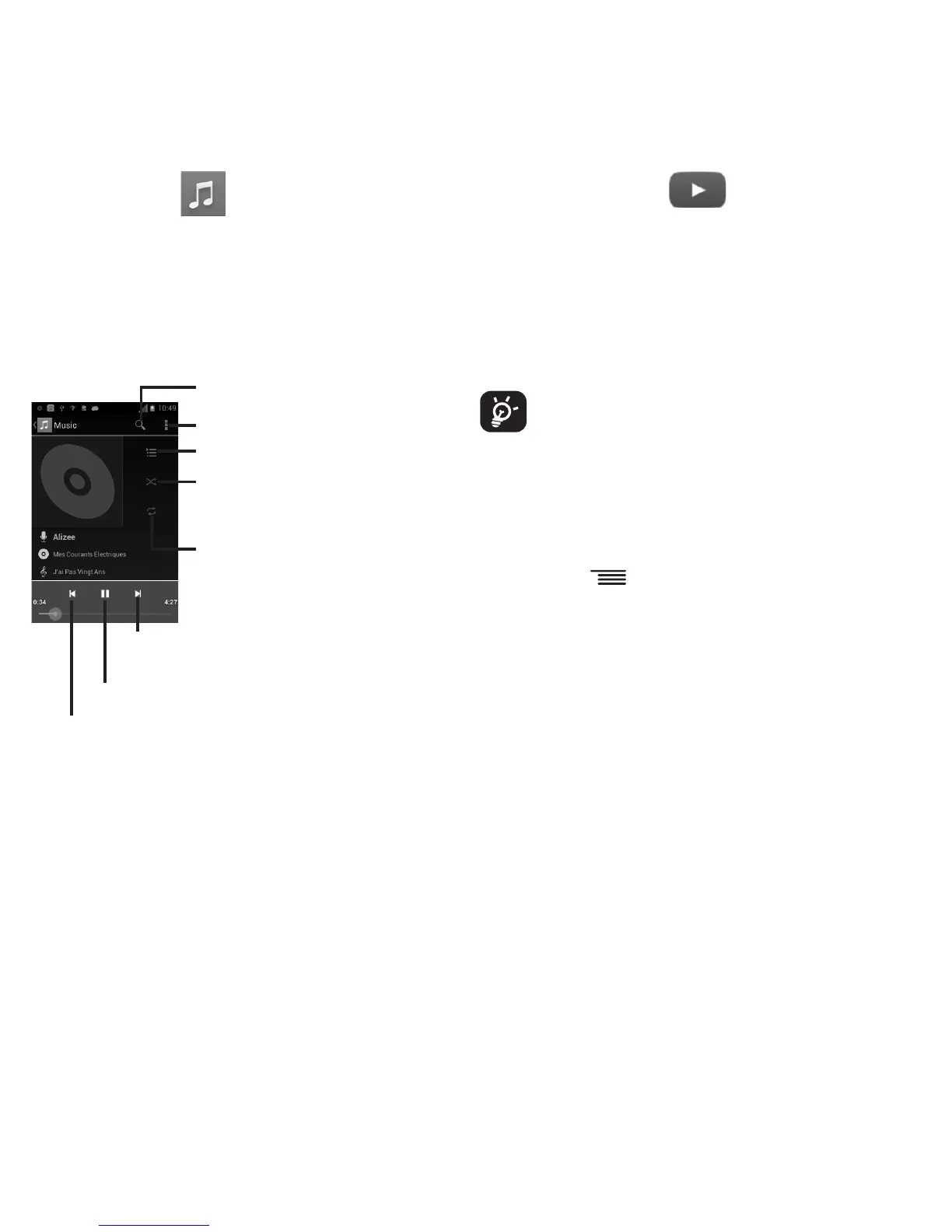
Search music
Further operations
Touch to show the displayed song
Touch to play the current playlist in
shuffle mode (tracks are played in
random order)
Touch to select repeat mode: Re-
peating all songs, Repeating current
song, or Repeat is off
Touch to skip to the next track in the album,
playlist, or shuffle
Touch to pause/resume playback
Touch to skip to the previous track in the album, playlist,
or shuffle
YouTube 14.
YouTube is an online video-sharing service
where the user can download, share and view
videos. It supports a streaming function that
allows you to start watching videos almost
as soon as they begin downloading from the
Internet.
As an online video service, your phone
must have a network connection to
access YouTube.
All videos in YouTube are grouped into
several categories, like Most Popular, Most
Discussed, Featured Videos, etc.
By touching
from the YouTube screen,
you can set General settings and Search
settings for YouTube. For details about these
features, please visit the YouTube website:
www.YouTube.com










 To Next Page