6
1.3.3 Search bar
The search bar can be used to find information located on the phone or
the web.
Search by text
• Touch Search bar from the Home screen.
• Enter the text/phrase you want to search for.
• Touch the Enter/Search key on the keyboard to begin search.
• Use the bottom menu bar with filters to view search results from Web,
Images, News, Maps, Shopping, Videos, Books, Apps, or Phone.
Search by voice
• Touch from Search bar to display a dialog screen.
• Speak the word/phrase you want to search for. A list of search results
will display for you to select from.
• Use bottom menu bar with filters to view search results from Web,
Images, News, Maps, Shopping, Videos, Books, Apps, or Phone.
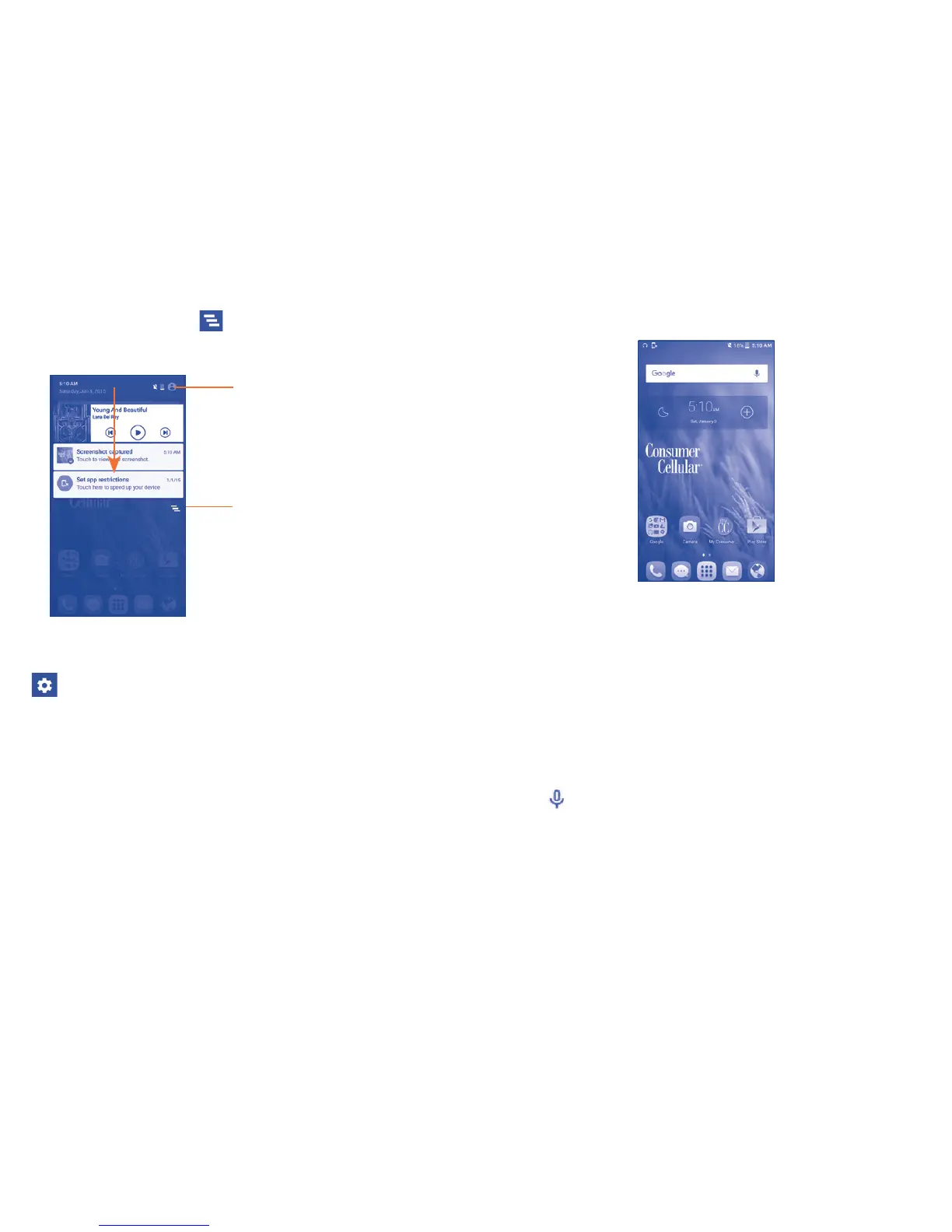
Notifications panel
Touch and drag down the Status bar to open the Notifications panel.
Touch and drag up or touch to close it. From the Notifications panel,
you can view wireless service information, access reminders/notifications
and open apps.
Touch to clear all event–based
notifications (other ongoing
notifications will remain).
Settings shortcut panel
• Touch to get quick access to
various phone setting options.
Touch a notification and swipe to the left or right side to delete.
Touch and drag the status bar further down, then touch the Settings icon
to access all Settings.
The Notifications panel is also available for viewing even if the screen
is locked.



 To Next Page