2
Menu Key
• Touch to view recently used applications.
• Touch to close any application.
• Touch the brush icon on the bottom of the screen to
close all applications.
Power Key
• Press: Lock the screen/Light up the screen.
• Press and hold: Show the pop-up menu to select from
Power off/Restart/Airplane mode.
• Press and hold the Power key and Volume down key to
capture a screenshot.
• Press and hold the Power key for 8 seconds to power
off or hold it for 10 seconds or more to force reboot.
Volume Keys
• In call mode, adjusts the earpiece or headset volume.
• In Music/Video/Streaming mode, adjusts the media
volume.
• In general mode, adjusts the ringtone volume.
• Mutes the ringtone of an incoming call.
• In camera mode, press Volume up or down key to
take a photo.
1.2 Getting started
1.2.1 Set-up
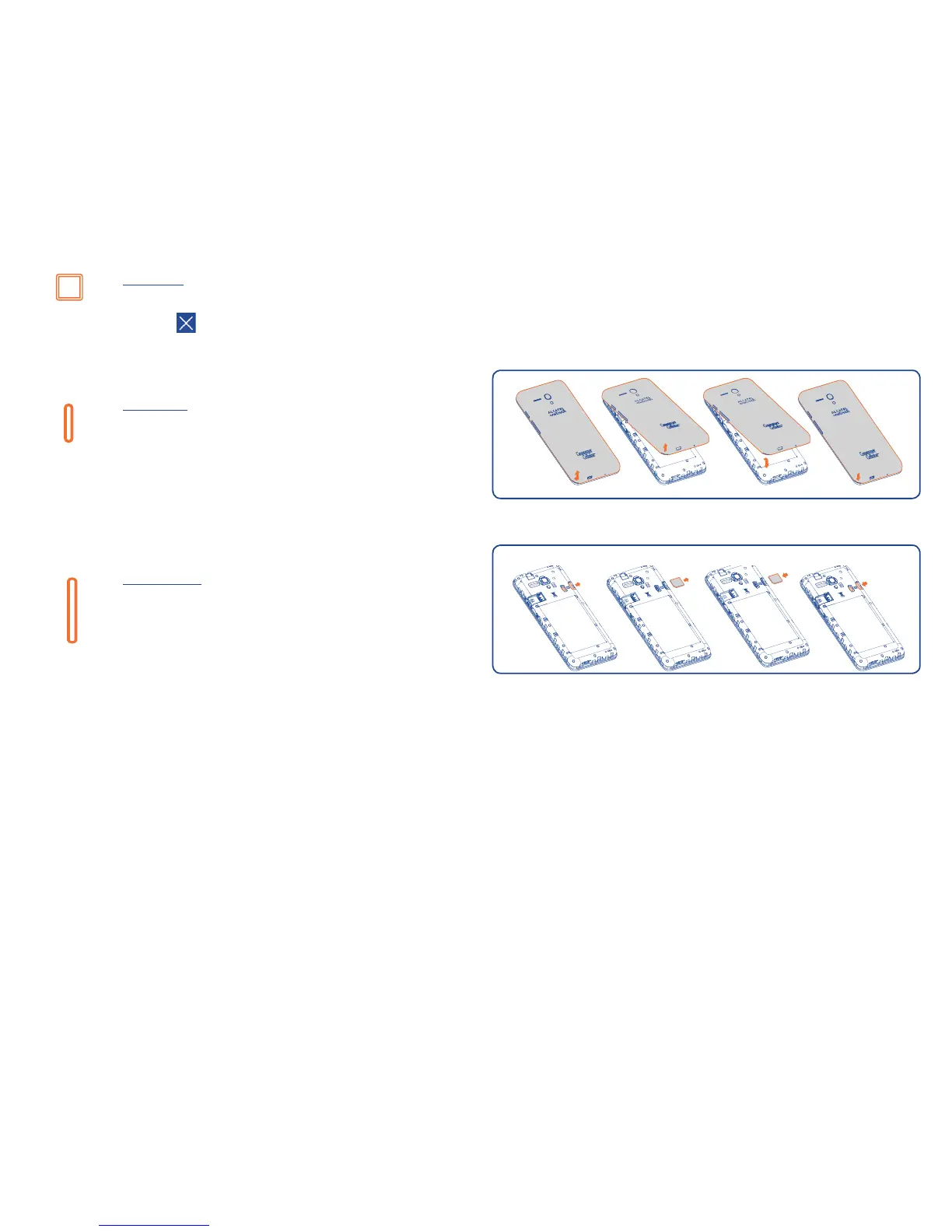
Attaching or removing back phone cover
(1)
Inserting or removing the SIM card
The SIM card and battery are normally pre-installed for you. Follow these
instructions should you ever need to access them yourself. To remove the
card, please take it out directly from the slot.
Inserting memory card
1. Locate the microSD card slot on the left side of phone, opposite to
SIM card slot.
2. Insert the microSD card upward into slot with the gold contacts facing
downward and gently push in microSD card until it locks into the slot.
(1)
Don't forget to detach USB and headset cables before attaching or
removing the back cover to prevent damages.











 To Next Page