12
3
Phone calls, Call history
log and Contacts
3.1 Call...................................................
3.1.1 Placing a call
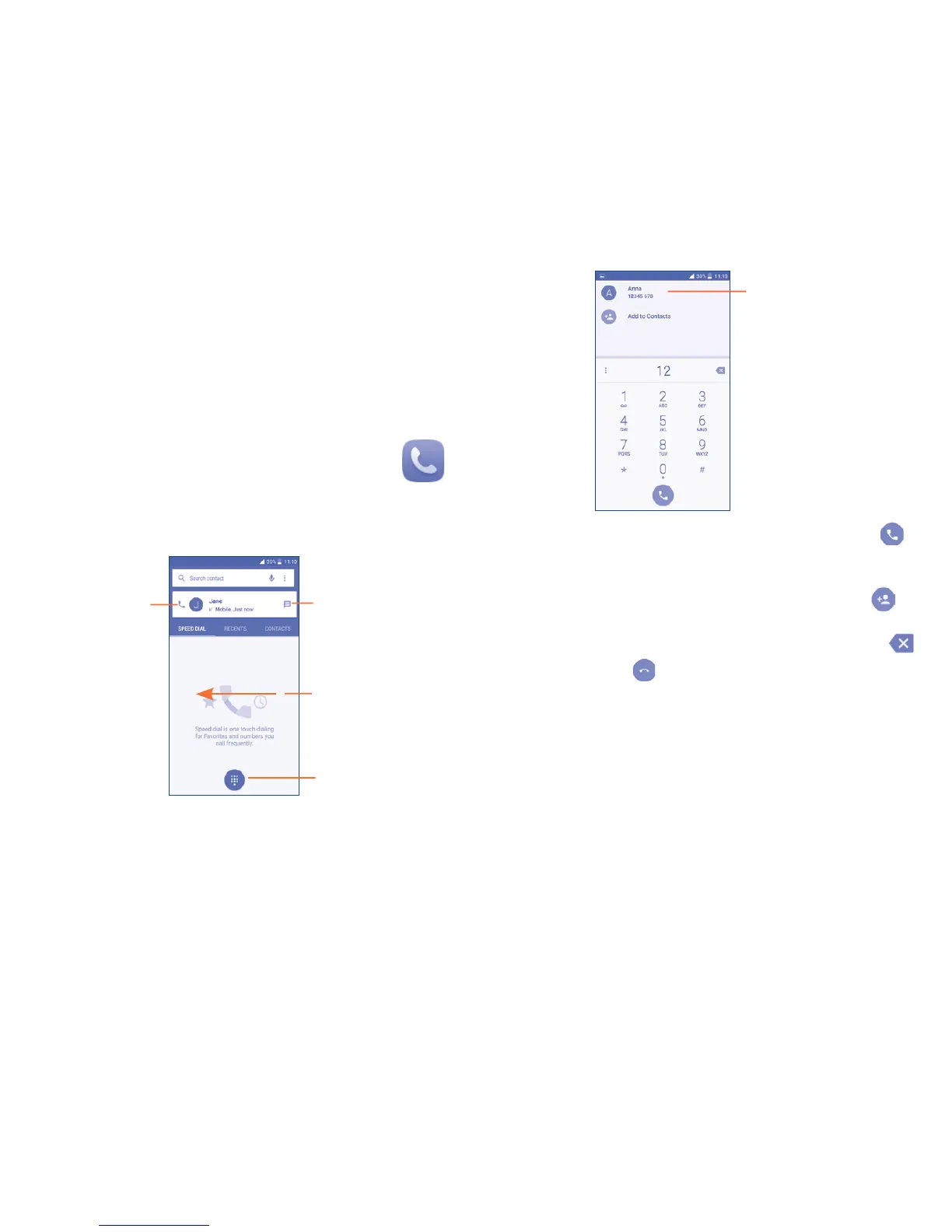
You can easily place a call using Call. Touch the Application tab from the
Home screen and select Call.
Touch to send
message to the
previewed number.
Touch to call
the previewed
number.
Touch to hide/
display keyboard.
Slide to access
the Recent and
CONTACTS.
Display the
suggested
number(s).
Enter the desired number from the keyboard directly and touch to
place the call or select a contact from CONTACTS or RECENT by sliding or
touching tabs, then choose your target contact to make the call.
The number you entered can be saved to Contacts by touching and
then touching Create new contact.
If you make a mistake, you can delete the incorrect digits by touching .
To hang up a call, touch .
International Calls
To learn more about how to make international calls, please visit:
ConsumerCellular.com/Int











 To Next Page