22
CUSTOMIZING YOUR KIT
You may wish to customize your kit to your desired playing
style. You can quickly switch the sounds that the pads are
triggering by changing the MIDI Note Number that the pad is
assigned to. To do so, make sure that you are in Pad Note
Number mode by pressing the function button until the LED
next to Pad Note Number is lit. Then strike the pad that you
want to change and use the
Tand S buttons to scroll to a
different Note Number.
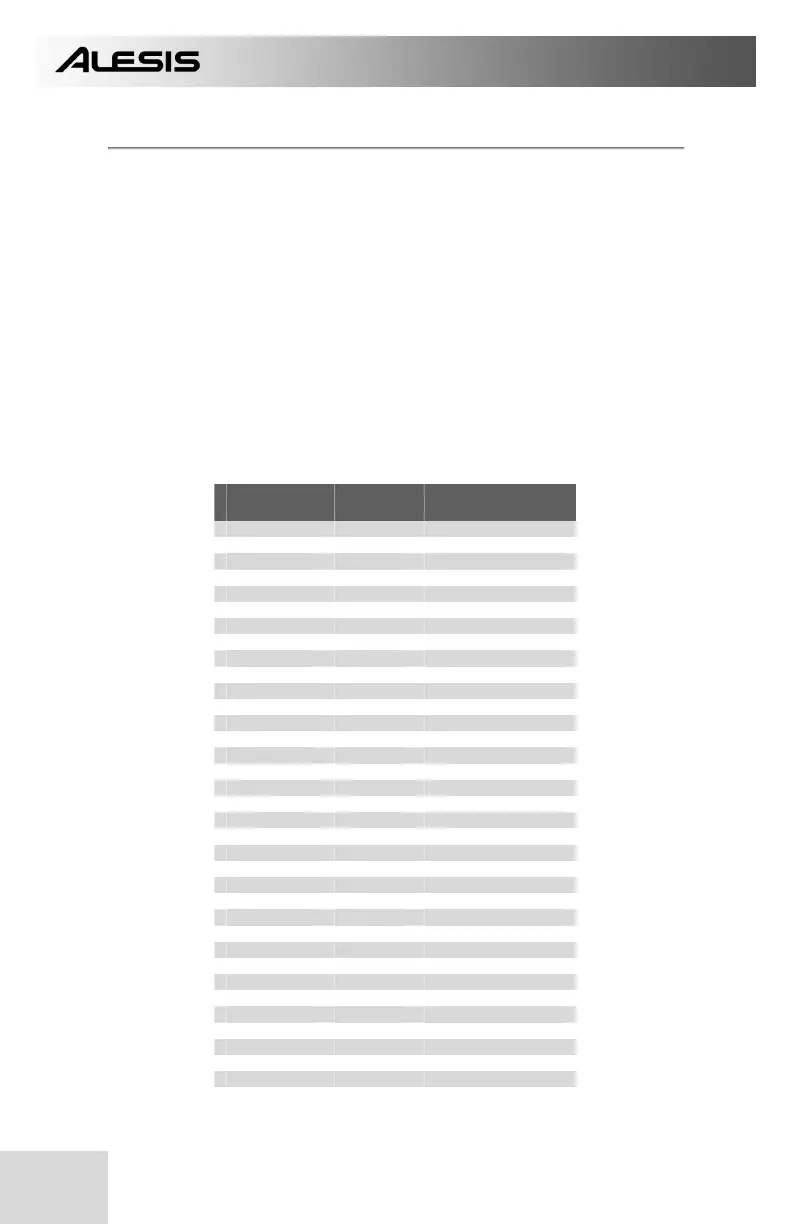
Below is a list of the default Note Number mappings in BFD
Lite. To use one of these sounds with a pad, you will need to
assign the specific Note Number to the pad by following the
procedure in the paragraph above.
NOTE
NUMBER
KIT
PIECE
HIT STYLE
56 CYM2 BELL
55 CYM2 HIT
54 CYM1 BELL
53 CYM3 BELL
52 HIHAT HALF SHANK
51 CYM3 HIT
50 HIHAT HALF TIP
49 CYM1 HIT
48 HIHAT CLOSED SHANK
47 TOMH HIT
46 HIHAT OPEN TIP
45 TOMM HIT
44 HIHAT PEDAL
43 TOMF HIT
42 HIHAT CLOSED TIP
41 SNARE FLAM
40 SNARE RIM
39 SNARE DRAG
38 SNARE HIT
37 SNARE SIDESTICK
36 KICK HIT
35 KICK NO SNARE
24 HIHAT VARIABLE TIP
33 HIHAT ¾ TIP
32 HIHAT ¾ SHANK
31 HIHAT ¼ TIP
30 HIHAT ¼ SHANK
29 SNARE2 FLAM
28 SNARE2 RIM
27 SNARE2 DRAG
26 SNARE2 HIT
25 SNARE2 SIDESTICK
24 KICK2 HIT
23 KICK2 NO SNARE
22 HIHAT VARIABLE SHANK


 To Next Page