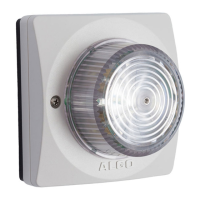
8128 SIP Strobe Light (G2)
Features
SIP Paging: Single 8128
The 8128 SIP Strobe Light can be registered as a third-party SIP extension with a
hosted or enterprise Communications Server supporting 3
rd
party SIP endpoints.
To register the strobe with the SIP server, use the Basic Settings > SIP tab in the
web interface to enter the Communication Server IP address, extension,
username, and password. This information will be available from the IT
Administrator.
If VLAN is used, navigate to the Advanced Settings > Network tab to set VLAN
options.
Important: once the strobe is using VLAN you will need to be on the same VLAN to
access the web interface.
The strobe may now be accessed by dialing its assigned extension from a
telephone, device, or client. The strobe will auto-answer and flash a light pattern.
There are a number of configurable strobe options:
• Flash Pattern
• Brightness
SIP Ring Event
Set Monitoring Mode to ‘Monitor Ring’ and enter credentials. When a call is made
to the SIP extension the 8128 will flash the selected light pattern. Often, the 8128
will be part of a hunt group or ring group to flash in conjunction with a telephone.
Multicast Overview
In addition to the ring and page features, the 8128 is able to both send and receive
IP multicast messages over the network to support larger deployment for both
paging and ring/notification. This provides a scalable and efficient method of
building large scale notification solutions.
An Algo 8128 can be configured as a Master endpoint. When the SIP Page
extension is dialed from a phone, the 8128 will auto-answer, and flash a light
pattern. Simultaneously, the registered 8128 endpoint broadcasts the audio over
the network using RTP multicast to any number/combination of Algo IP speakers,
paging adapters, and strobes as required.
Document 90-00100C
11/27/2019
Page 13
Algo Communication Products Ltd
4500 Beedie St Burnaby BC Canada V5J 5L2
www.algosolutions.com
(604) 454-3792
support@algosolutions.com


 To Next Page