Setting up the monitor | 33
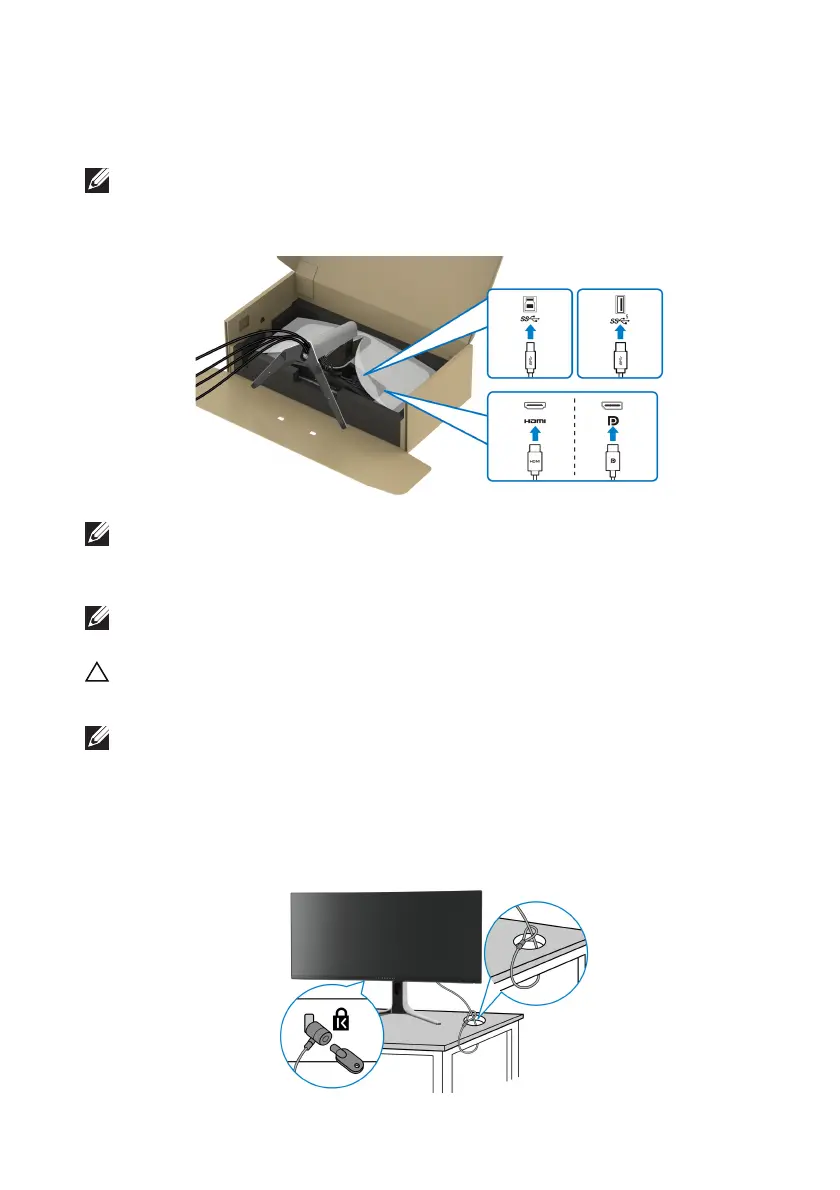
9. Rout
e the required cables through the cable-management slot on the
stand, such as HDMI cable, DisplayPort cable, USB 3.2 Gen 1 (5 Gbps)
u
pstream and downstream cables, and so on.
NOTE: The USB 3.2 Gen 1 (5 Gbps) cables are not shipped with your
display and sold separately.
10.Connect
the required cables to the monitor.
NOTE: Dell monitors are designed to work optimally with the Dell-
supplied cables inside the box. Dell does not guarantee the video quality
and performance when using non-Dell cables.
NOTE: Route each cable neatly so that the cables are organized before
the I/O cover is attached.
CAUTION: Do not plug the power cable into the wall outlet or
turn on the
monitor until you are instructed to do so.
NOTE: If you want to secure your monitor
to a table using the Kensington
lock, connect the Kensington lock cable to the security-lock slot at this
step. For more information about using the Kensington lock (sold
separately), see the documentation that is shipped with the lock. The
following image is for illustration purposes only. The appearance of the
lock may vary.















 To Next Page