Removing the Palm Rest Assembly | 65
7 Remove the power button board. See "Removing the Power Button Board" on
page 55.
8 Remove the display assembly. See "Removing the Display Assembly" on page 57.
9 Remove the status light board. See "Removing the Status Light Board" on page 61.
Procedure
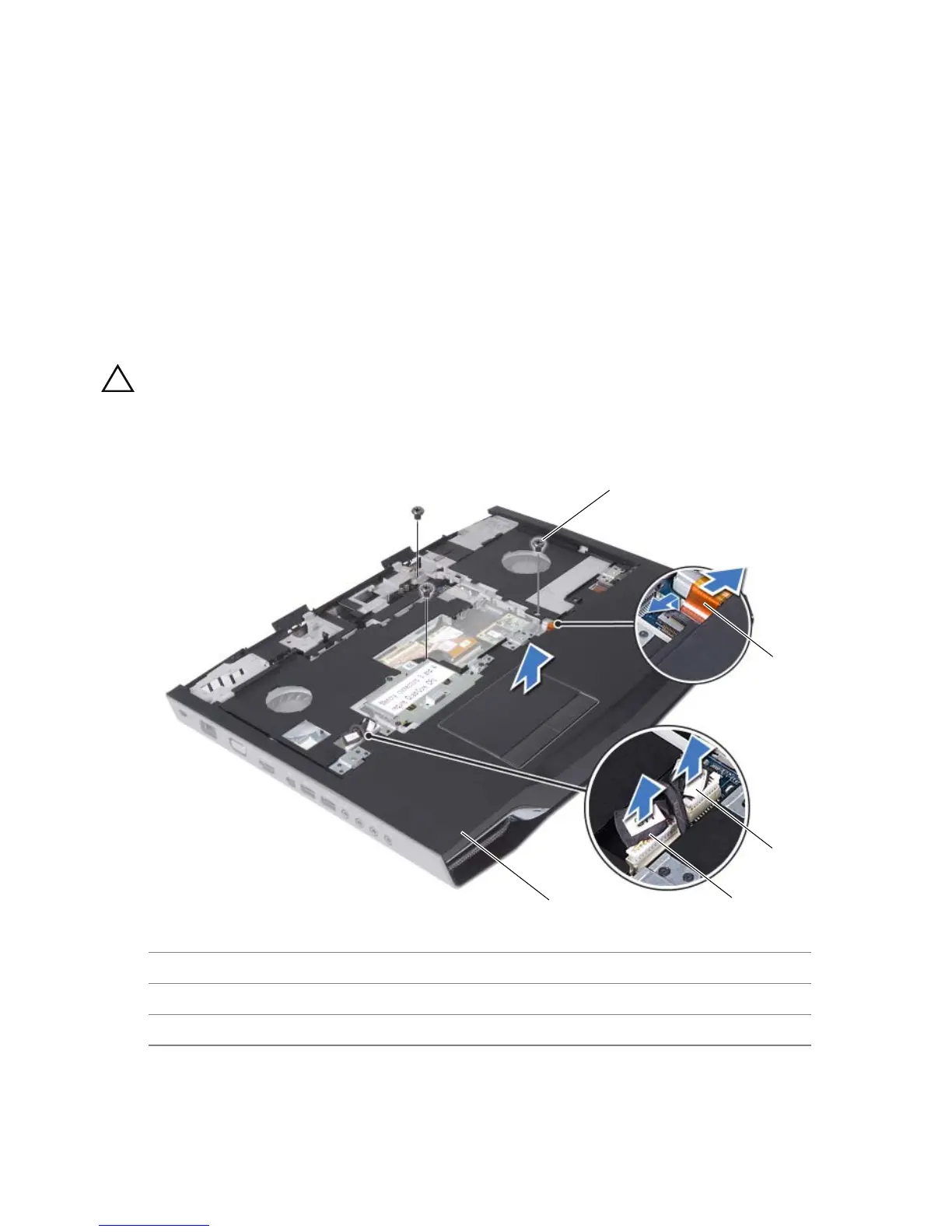
1 Disconnect the touch pad cable, LVDS cable, and Media Card Reader cable from the
connectors on the system board.
2 Remove the screws that secure the palm rest assembly to the computer base.
3 Carefully pry out the palm rest assembly along the rear edge and then ease the palm
rest assembly from the computer base.
CAUTION: Carefully separate the palm rest assembly from the
computer base to avoid damage to the palm rest assembly.
4 Lift the palm rest assembly off the computer base.
1 palm rest assembly 2 LVDS cable
3 touch pad cable 4 Media Card Reader cable
5 screws (3)



 To Next Page