11 / 31
ZYNQ FPGA Development Platform AC7015 User Manual
Amazon Store: https://www.amazon.com/alinx
Sales Email: rachel.zhou@aithtech.com
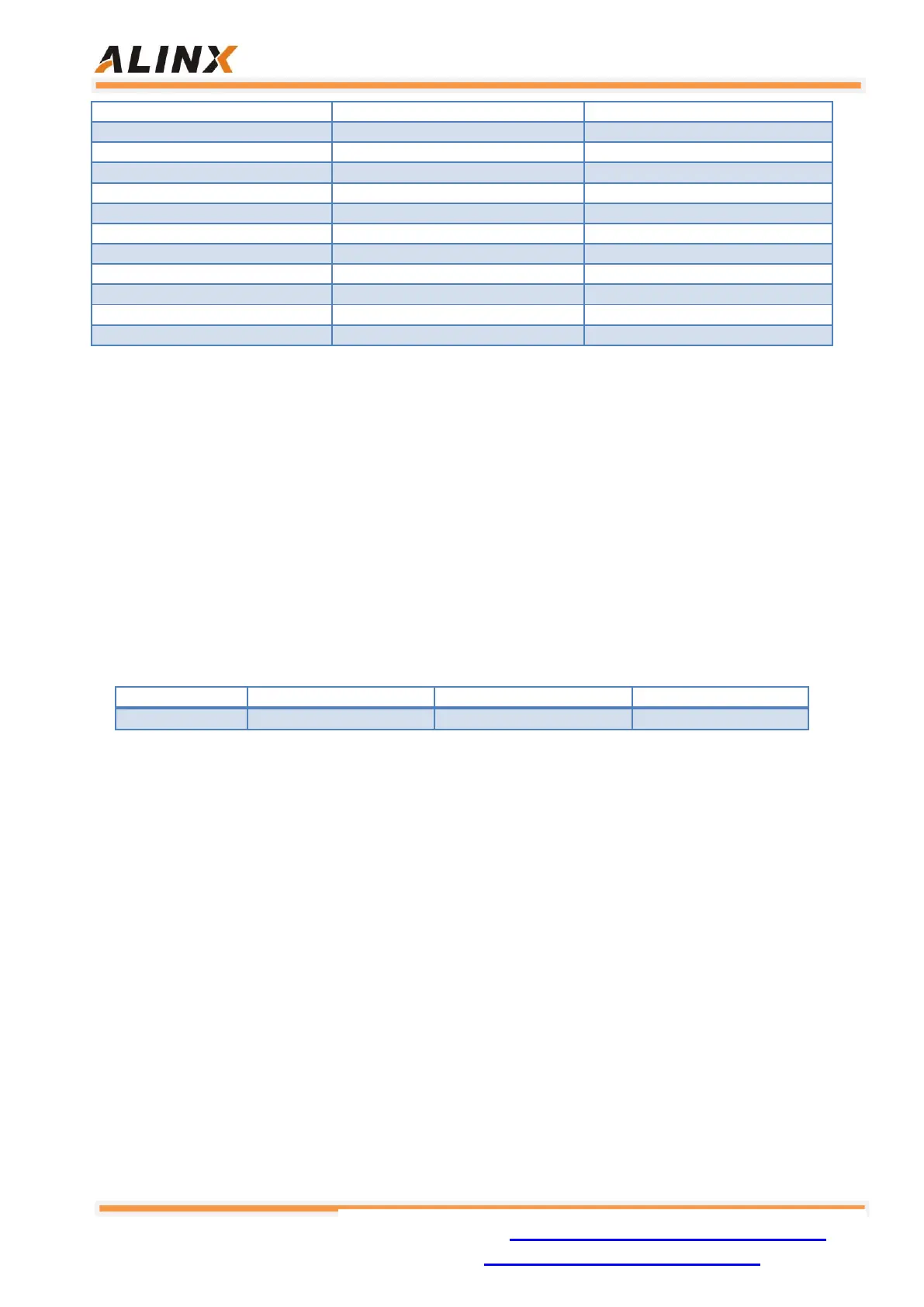
Table 3-2: DDR3 DRAM Pin Assignment
Part 4: QSPI Flash
The core board is equipped with a 256MBit Quad-SPI FLASH chip, model
W25Q256FVEI, which uses the 3.3V CMOS voltage standard. Due to the non-
volatile nature of QSPI FLASH, it can be used as a boot device for the system to
store the boot image of the system. These images mainly include FPGA bit files,
ARM application code, and other user data files. The specific models and related
parameters of QSPI FLASH are shown in Table 4-1.
Table 4-1: QSPI FLASH Specification
QSPI FLASH is connected to the GPIO port of the BANK500 in the PS section
of the ZYNQ chip. In the system design, the GPIO port functions of these PS ports
need to be configured as the QSPI FLASH interface. Figure 4-1 shows the QSPI
Flash in the schematic.


 To Next Page