The solar panel should be angled 15 degrees above the latitude of the installation site. For example, if the latitude of the
installation site is 45degrees then the solar panel should be installed at an angle 60degrees down from horizontal, as shown.
You can easily obtain the latitude of the installation site from mapping apps or websites, such as by doing an Internet search for
"latitude your_city" where your_city is the name of the city or region where the panel is being installed.
NOTE: For details about assembly and mounting of the solar panel and bracket, refer to the installation document
included with them. See also
Step 7:Connecting a solar panel to the StatTrak-E
on page10.
STEP 5:INSTALLING THE MOUNTING BRACKETS
The StatTrak-E comes with a pole mounting bracket that enables you to mount the device securely to virtually any type of pole.
To attach the pole bracket to the StatTrak-E (first-time setup only):
l
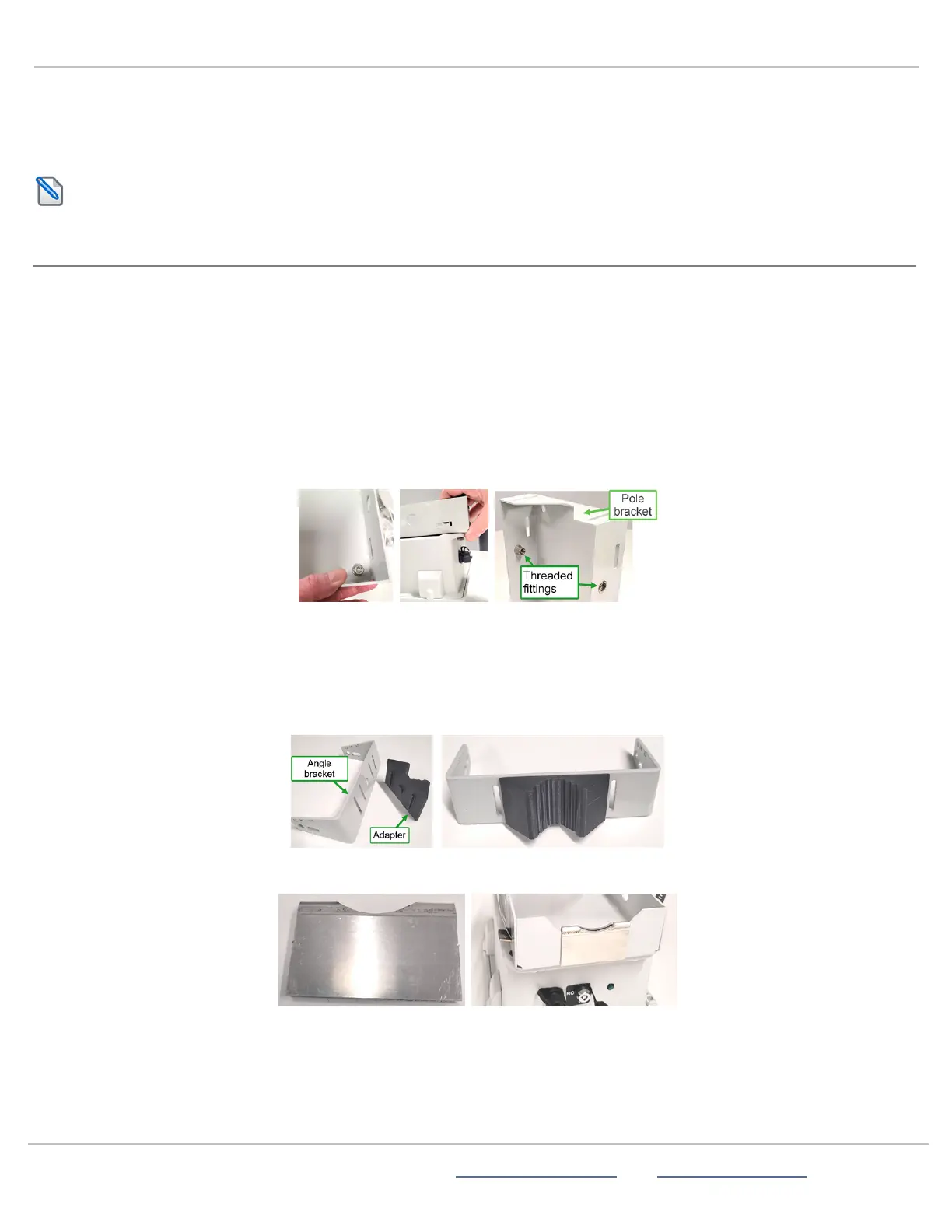
Attach the bracket to the back side of the StatTrak-E using the included hardware:
i.
Place the StatTrak-E face down on a workbench or other smooth, flat surface.
ii.
Place the pole bracket back to back with the StatTrak-E, aligning the top end of the bracket with the top back side of
the StatTrak-E. The top end of the bracket has the threaded bolt fittings for attaching the angle bracket, as shown.
The top of the StatTrak-E has the round antenna and the bottom has the key slot and charger port.
iii.
Install the bolts into each of the four bottom, corner holes on the StatTrak-E and the pole bracket, also as shown.
If you'll be installing the StatTrak-E on a Telespar-type pole:
For installations on Telespar-type square poles at the roadside, which require angling the device at 45 degrees to the flow of
traffic, you'll need to install the two included pole adapters as follows:
A.
Plug the larger adapter into the angle bracket by aligning it to the round middle slot and the inner banding strap slots and
pressing it into place, as shown.
B.
Slide the metal pole adapter clip onto the bottom notch in the back of the pole bracket, as shown here:
Insert the banding straps for pole mounting the StatTrak-E:
A.
Thread a stainless steel banding strap through the mounting slots on the pole bracket. Ideally, make sure the small buckle
on the strap is positioned to secure the loose end of the strap (as shown below right).
ATS | Chantilly, VA | USA | Tel: 1-866-366-6602 | Email: sales@alltrafficsolutions.com | Web: www.alltrafficsolutions.com
Copyright © 2024 |
StatTrak-E Quick Start Guide, TraffiCloud Subscriber Edition
, ver. 1.01 | 4800268 | All rights reserved.
Step 5:Installing the mounting brackets Page 7 All Traffic Solutions



 To Next Page