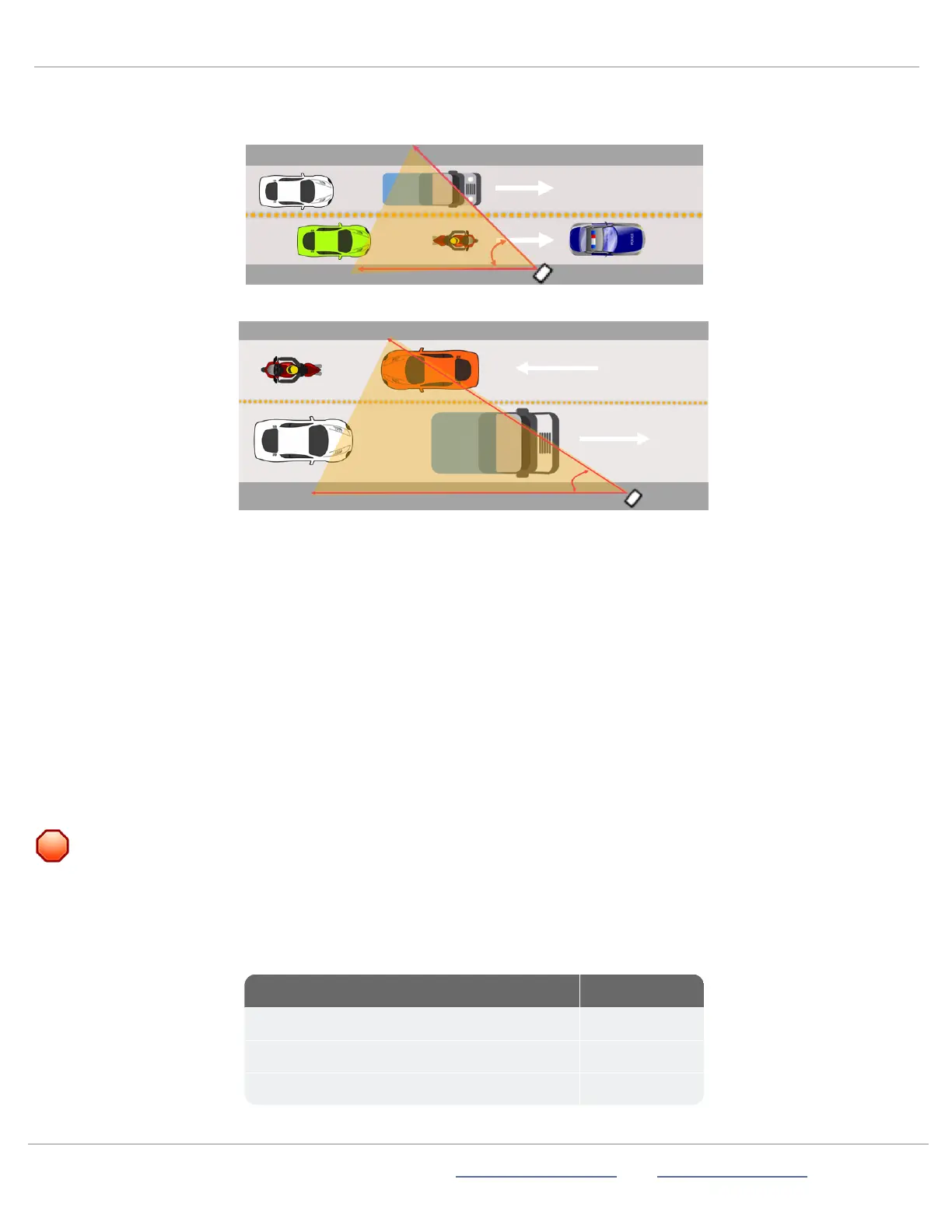
Step 6a:Positioning for roadside installations
Use one of the following approaches to set up roadside monitoring. For two-lane traffic moving in the same direction:
For bidirectional traffic:
If you use a smaller horizontal angle than 45 degrees (more directly facing the traffic), speed data will be improved, but vehicle
counts will not be as accurate.
These steps apply equally for two-lane traffic moving in the same direction or bidirectionally.
To monitor two lanes of moving traffic:
A.
Install the StatTrak-E closest to the incoming lane of traffic, as shown above.
B.
Position the device at a 45-degree angle to the traffic.
C.
Recheck the downward angle you set on the previous page to ensure it's at 17 degrees.
Step 6b:Positioning for median installations
Positioning for median installations
For median installations, you'll need to check the lane measurements and use the steps below.
WARNING: RISK OF INJURY OR FATALITY. Exercise caution and follow local traffic regulations when entering
roadways. If necessary, estimate the lane measurements.
Lane measurements
If safe to do so, check the following lane measurements at the installation site to ensure that they correspond with the defaults set
in the StatTrak-E mobile app (see
Using the mobile app
on page12). If it's not safe to enter the roadway, do your best to estimate
the lane measurements.
Lane measurement Default value
Distance to the middle of the first lane 13 ft. (3.6 m)
Distance to the middle of the second lane 23 ft. (7 m)
Lane width 13 ft. (3.6 m)
ATS | Chantilly, VA | USA | Tel: 1-866-366-6602 | Email: sales@alltrafficsolutions.com | Web: www.alltrafficsolutions.com
Copyright © 2024 |
StatTrak-E Quick Start Guide, TraffiCloud Subscriber Edition
, ver. 1.01 | 4800268 | All rights reserved.
Step 6:Mounting and aiming the StatTrak-E Page 9 All Traffic Solutions



 To Next Page