Publication 1761-UM006A-EN-P - February 2001
B-4 BOOTP Configuration Method (default)
2. Make one copy of the configuration template for each ENI in
your system.
3. Edit each copy of the template as follows:
a. Replace “sigma1” with the name of the ENI. Use only letters
and numbers; do not use underscores.
b. Replace “12.34.56.1” with the IP address to be assigned to the
ENI.
c. Replace “ha=0000BC1D1234” with the ENI’s hardware
address. Use only hexadecimal digits (0-9, A-F); do not use
the hyphens that separate the numbers.
4. Save, close, and make a backup copy of this file.
Example BOOTPTAB File
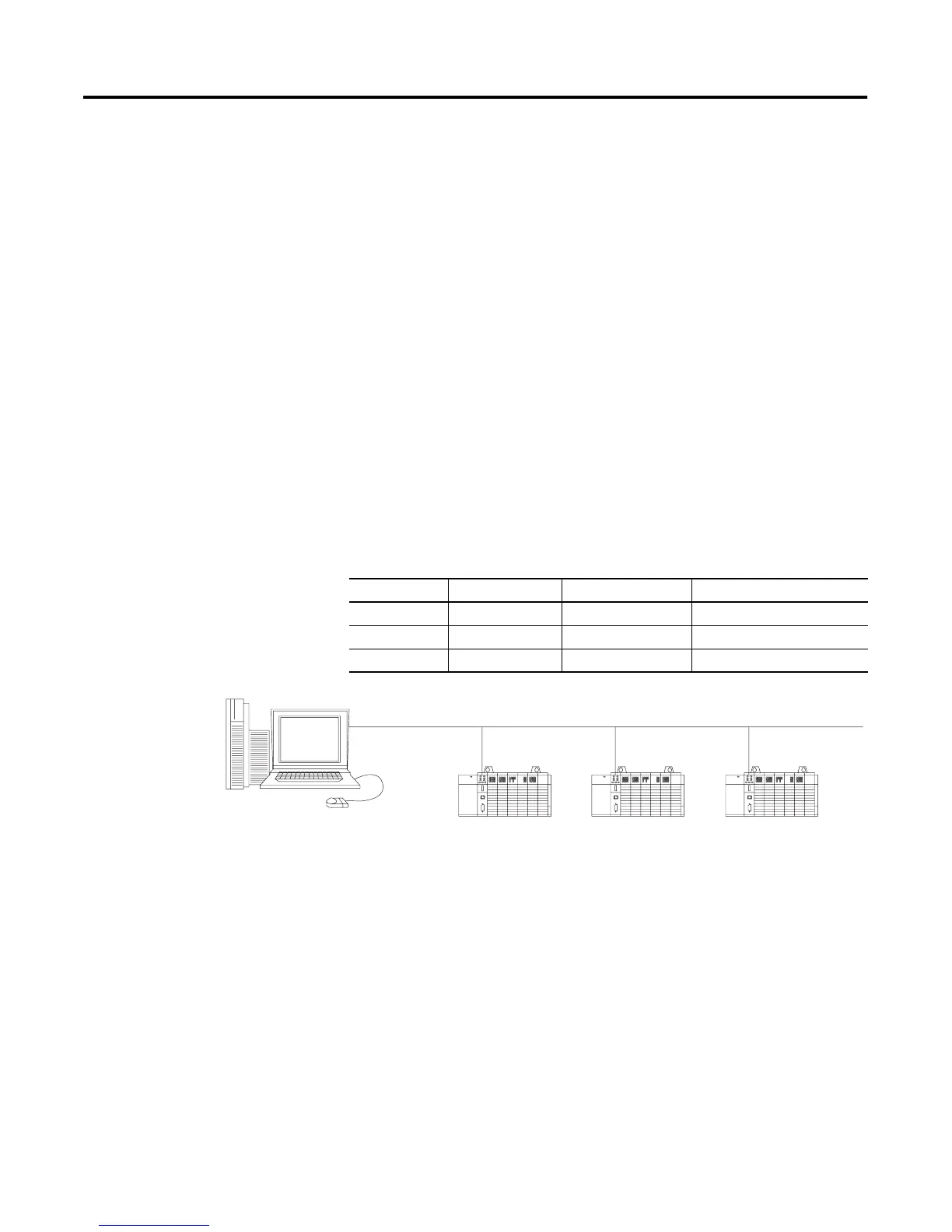
In this example there are three SLC 5/05 processors and an HP 9000
programming terminal. The names and hardware addresses are device
specific:
Device Name IP Address Hardware Address
SLC 5/05 sigma1 12.34.56.100 00-BC-1D-12-34
SLC 5/05 sigma2 12.34.56.200 00-BC-1D-56-78
SLC 5/05 sigma3 12.34.56.300 00-BC-1D-90-12
BOOTP Server
HP 9000
HP UNIX Computer
802.3 Ethernet (TCP/IP)
sigma1
SLC 5/05 Processor
sigma2
SLC 5/05 Processor
sigma3
SLC 5/05 Processor


 To Next Page
 Loading...