26 - English - Translated from the original language Manual 6-1624970M - rev. 1 - 11/01/2023
5.2 - DISPLAY MODE
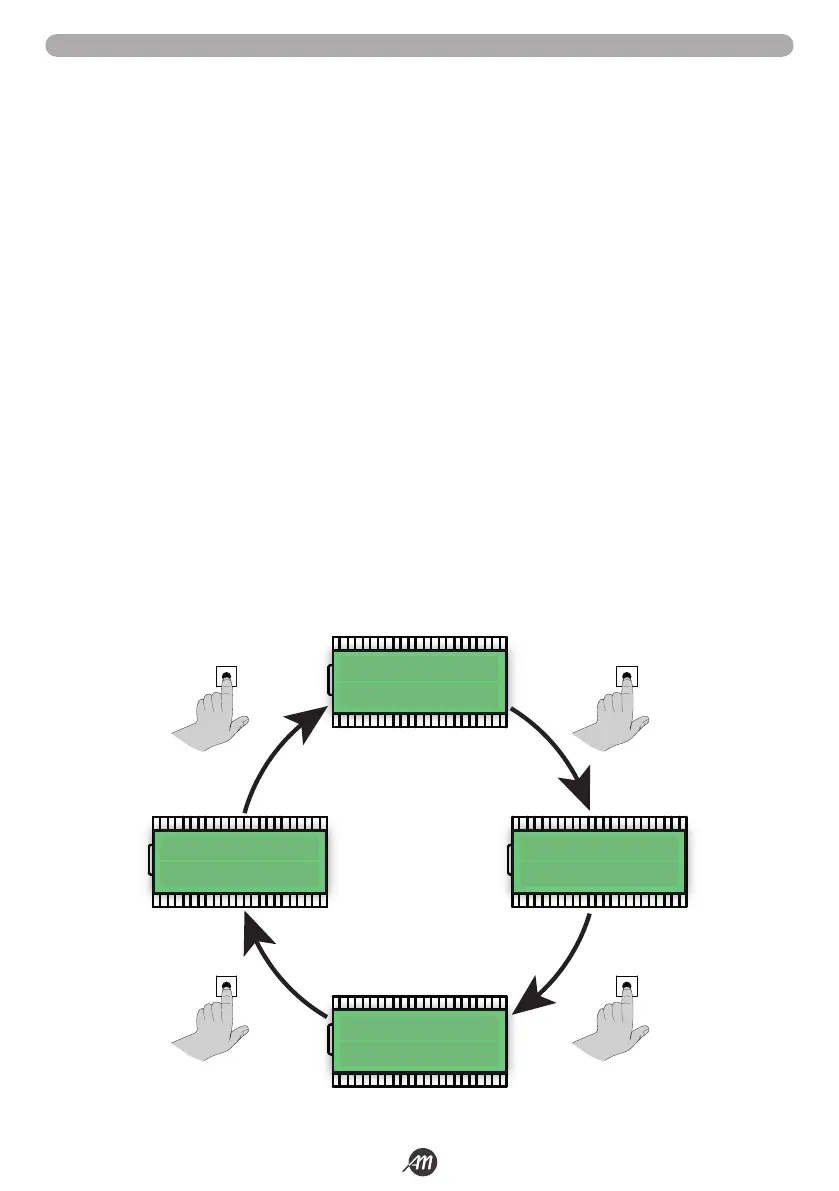
The display available in the control unit allows you to see a lot of information such as the status of the automation, the number of
movements performed, the anomalies detected, etc.
There are 4 types of views available.
To switch from one type to another press the DOWN button.
VIEW 1: STANDARD
In this mode you can view the automation status and error messages.
Refer to the next chapter for more information about the message type.
VIEW 2: NUMBER OF MOVEMENTS CARRIED OUT
In this mode you can see the number of cycles (opening and closing) performed by the automation.
The control unit will alternate two values: the first, without dots, indicates the thousands; the second, with dots, indicates the units.
For example:
001 = 1 thousand
02.0. = 20 units
Total = 1020 cycles completed.
VIEW 3: CURRENT ABSORBED BY THE MOTOR
In this mode you can see the current absorbed by the motor (mA).
VIEW 4: BOARD TEMPERATURE
In this mode you can view the temperature reached by the board expressed in °C.
view 1
view 3
view 2view 4
DOWN
DOWNDOWN
DOWN


 To Next Page
 Loading...