Instructions FMA03 26.04.2013 Page 7/21
3 The indicating and operational elements
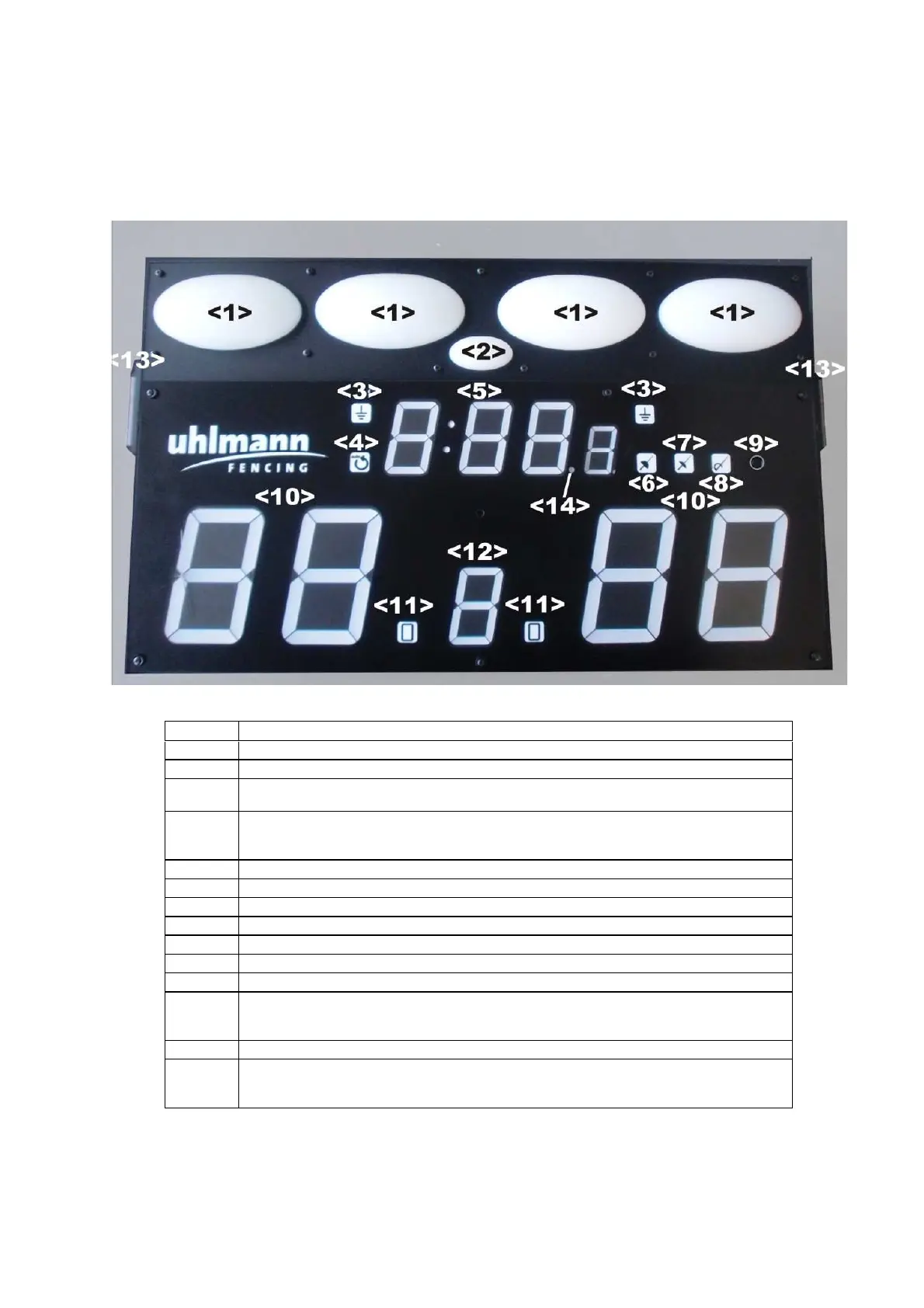
3.1 The front panel of the FMA03
All indication elements are located in the front part of the device
No.
Functional description
<1>
signalling lamps
<2>
service lamp
<3>
epee: grounding lamp
foil and sabre: yellow lamp (anti-block system)
<4>
automatic Reset of the signalling unit.
lamp on: automatic mode (active after switching on)
lamp off: manual mode
<5>
Chronometer including 1/10 of seconds (will only be activated after decision of FIE)
<6>
Mode of operation: epee (green when active)l
<7>
Mode of operation: foil (green when active)l
<8>
Mode of operation: sabre (green when active)l
<9>
Operating Button (for setting of operation mode, programming etc. see below)
<10>
Score indicators
<11>
Warning: yellow card / red card
<12>
Indicator of the number of matches
Individual match: indication of the time segment (1...3)
Team event: indication of the match (1...9)
<13>
Connector for plug-on spectator lights (FMA-HL / option)
<14>
Chronometer: start / stop
Lamp on = chrono stopped
Lamp off = chrono is running



 To Next Page