Alltion (Guangxi) Instrument Co., Ltd.
Product functions | AM-5000 User's Manual
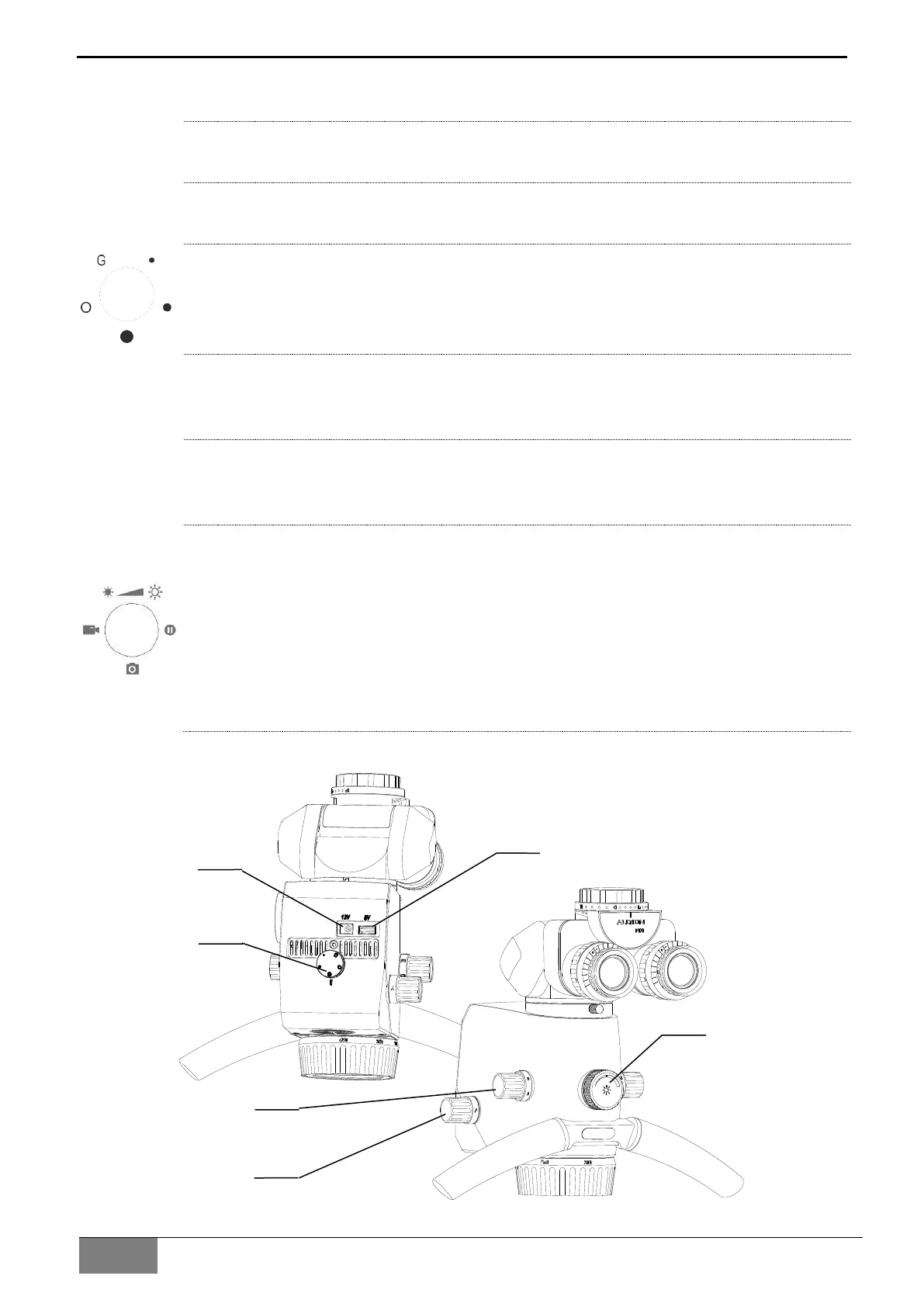
Main Body Lens of Microscope
1 USB 5V power supply interface
For 5V/2.0A DC output.
2 12V power supply interface
For 12V/1.0A DC output.
3 Lighting shift knob
For switching different illumination, "" means large spot without color filter, "" means
medium spot without color filter, "" means small spot without color filter, “G” means
green filter, “O” means orange filter.
4 Light source switch knob
Used to switch 5 different light sources, "W" is white mode LED light source, "F" is
fluorescence mode LED light source
5 Optical zoom knob
For manual adjustment of the optical magnification, and the numbers on the knob are
magnification factors.
6 Multifunction button
Rotating knob adjusts the brightness of the lighting;
Press the knob to the left side to enter the video, press it again to exit the video;
Press the knob to the right side to frozen screen, press it again to exit the frozen
screen;
Press the knob to the lower side to achieve photo.


 To Next Page