29Subject to technical amendments without prior notice | 83055400iUK – 2.1 | ait-deutschland GmbH
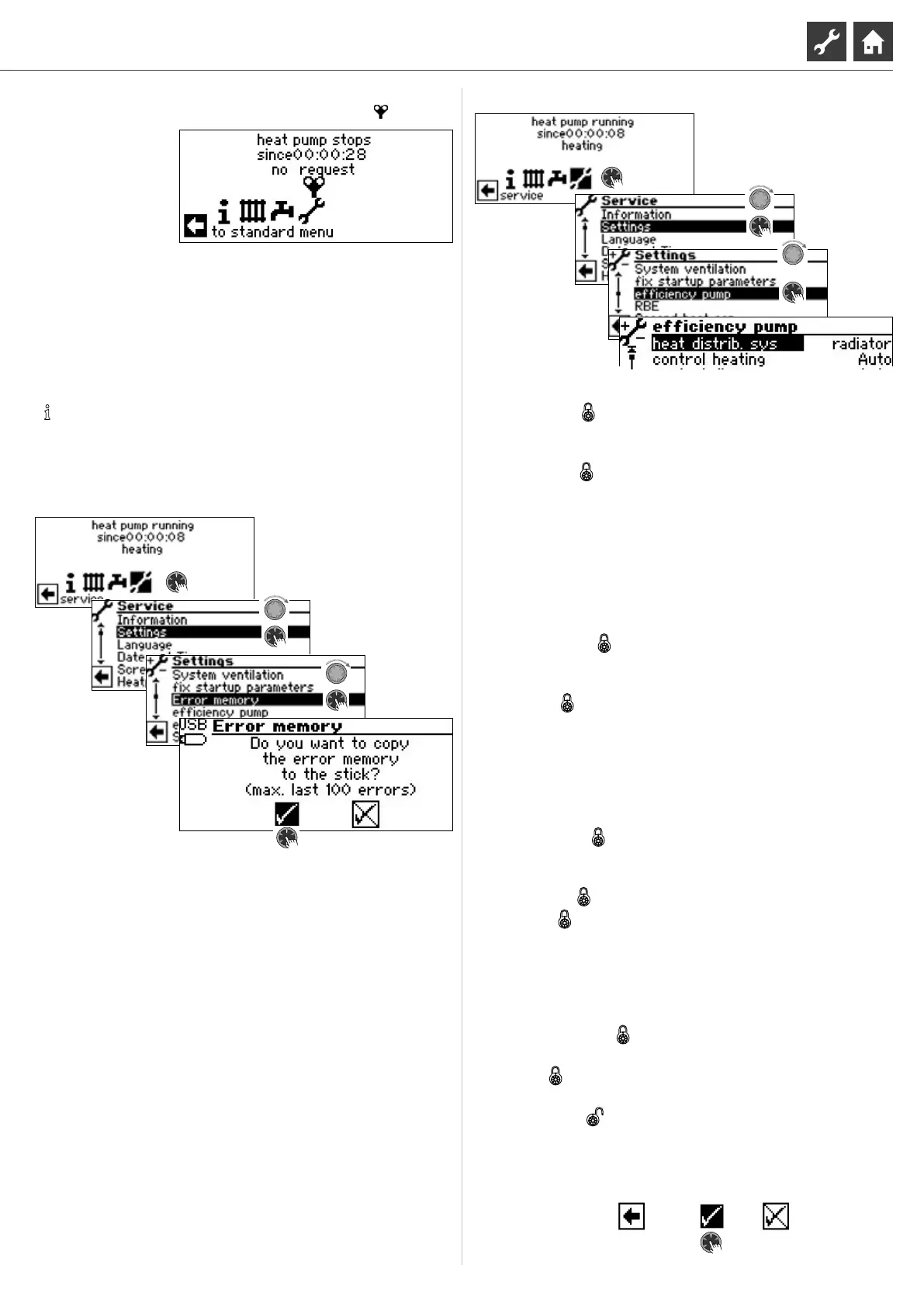
As long as the ventilation program is active, the corresponding
program symbol will appear in the navigation screen :
Fix startup parameters
page 11, “Fix startup parameters“
Back up error memory externally
NOTE
Use of the function requires customer service access.
The internal error memory of the heating and heat pump control-
ler can be copied to a USB stick. In doing so, a maximum of the
last 100 errors that occurred are copied.
Eciency pump
The menu is not shown in full here.
Heat distrib. sys
Heat distribution system
radiator Radiator(s)
oor heat Floor heating
control heating
Control of the heating circulation
pump
Auto Automatic control
Manual Additional menu entries visible:
output heat. nom.
output heat. Min.
Nominal and minimum power of the
heating circulation pump (limitation for
ow noise) can be manually adjusted
Output heat. max.
Maximum performance of heating
circulation pump (only with “control
heating = auto” visible and adjustable)
Control dhw
Control of the domestic hot water
charging pump
Auto Automatic control
Manual Additional menu entry visible:
output dhw.
Performance of the DHW charging
pump manually adjustable
output dhw max.
Maximum performance of dhw
charging pump (only with “Control
dhw = auto” visible and adjustable)
output cooling
Maximum performance of cooling
control VBO
Control of the brine circulation pump
Auto Automatic control
Manual Additional menu entry visible:
output VBO
Performance of the brine circulation
pump manually adjustable
output VBO (cooling)
Performance of the brine circulating
pump during cooling
dT cooling
Setting the cooling temperature
dierence in K
Set bypass valve
Setting the bypass valve
Control signal UWP Current value can be read o as %
Flow is Current value can be read o as l/h
Save settings.



 To Next Page