SYSTEM SETTINGS
7
100 - Settings
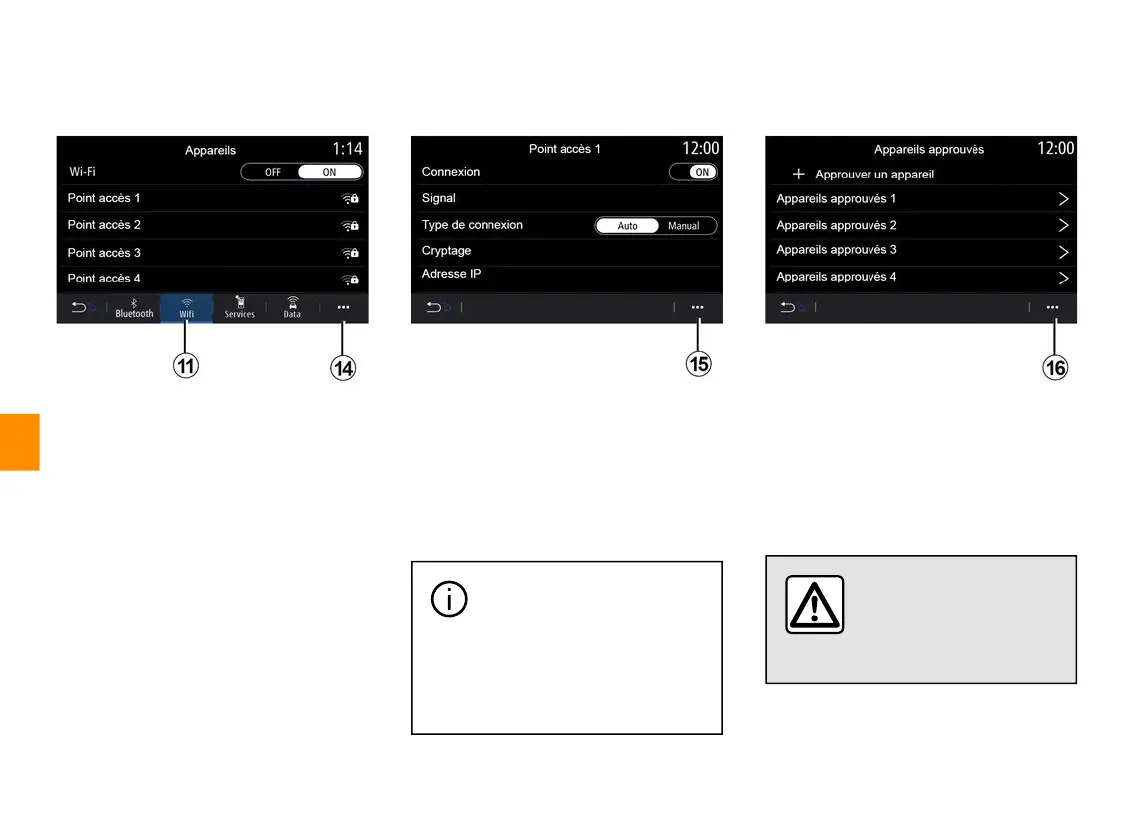
From the "WIFI" tab
11
, you can use
the internet connection provided by an
external device (hotspot) in a shop,
restaurant, residence or by a
telephone, etc.
From the pop-up menu
14
, you can:
– delete hotspots;
– use a hidden hotspot;
– access the connection procedure.
Select one of the WIFIdevices to
configure its connection.
A password will be required the first
time you connect to the multimedia
system.
From the pop-up menu
15
, you can
delete the access points.
When you use the
"Hotspot" function, the
transfer of mobile data
required for it to operate may lead
to additional costs not included in
your telephone subscription.
From the pop-up menu
16
, you can:
– configure different connections for
each authorised device;
– access the "Smartphone integration"
help;
– delete an approved device;
– delete all approved devices.
For safety reasons, carry
out these operations
when the vehicle is
stationary.



 To Next Page