SYSTEM SETTINGS
7
Settings - 101
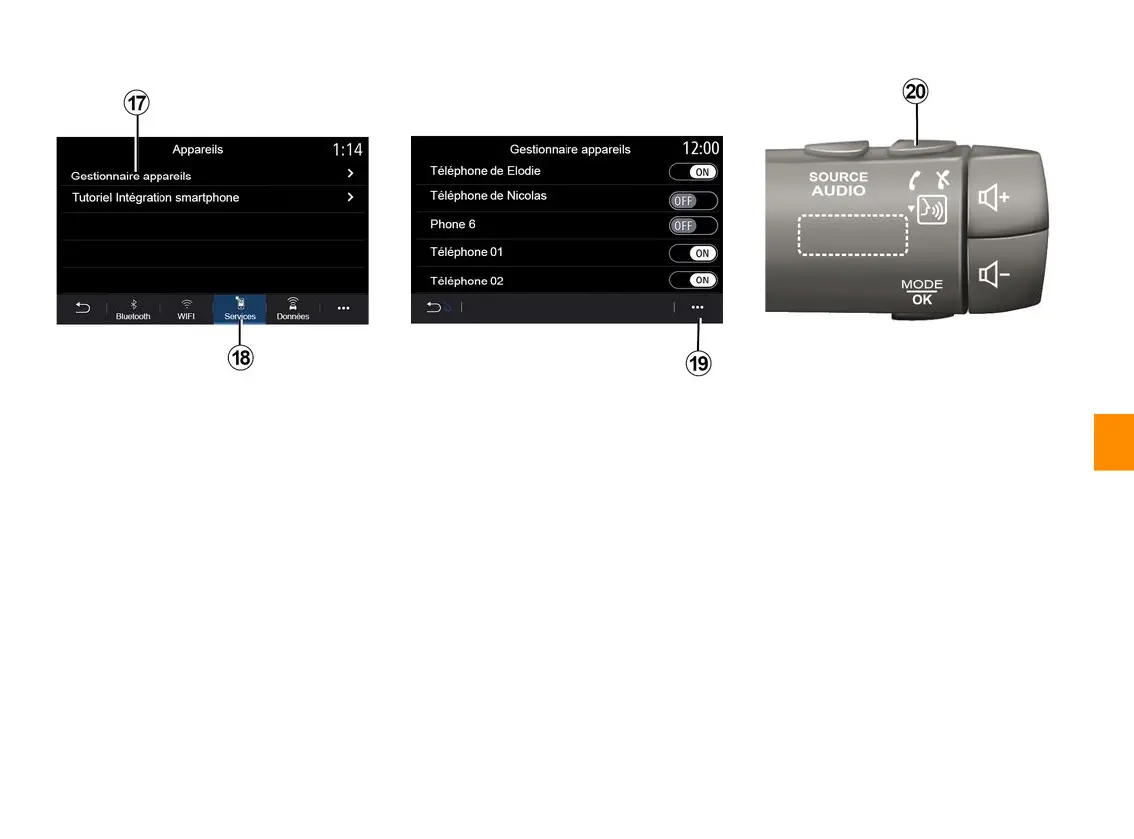
From the "Services" tab
18
, you can
configure the "Devices manager"
17
and access the "Smartphone
Integration tutorial".
Smartphone integration tutorial
This menu explains how to activate the
"Smartphone integration". Before
starting, make sure that:
– your smartphone is equipped with
the "Android Auto™" or "CarPlay™"
application;
– this application is updated and
compatible with your multimedia
system;
– your smartphone is connected to the
multimedia system.
For more information, please refer to
"Connecting, disconnecting a
telephone".
Using the "Devices manager" function
17
, you can select the smartphones
that you would like to connect
automatically to the "Smartphone
integration".
From the pop-up menu
19
, you can
delete devices.
Note: the list of settings may vary
according to the equipment.
Depending on the country where the
vehicle is sold, once the "Android
Auto™" application or the "CarPlay™"
service is working with your multimedia
system, you can use the voice
recognition button
20
in your vehicle to
control certain smartphone functions
by voice.
For more information, see the section
on "Using voice recognition".



 To Next Page