Computer S oftware
Precautions installation
The software can only be used under the Microsoft ® Wind ows® operating system.
Operating system: Windows XP, Windows Vista, Windows 7,Windows 8,Windows 10
CPU:1.6GHz or higher
Memory card: 1GB or high er
Hard Disk: 512MB or more free space
Computer screen resolution: 1280 *768 or higher
Before connecting t he H DP-D90 machine to the computer, please install the HDP-D90 computer
software correctly.
After installing the HDP-D90 s oftware, you can tune an d set th e HDP-D90 mac hine on the
computer.
*This function is mainly for manu facturers and distributors.
Computer Software Introduction
1
The host is powered on.
2
Connect one en d of the USB 2.0 cable to
the “USB” port of the host, and connect
the other end to the USB port of the
computer.
3
Double-click the HDP-D90 software icon to
open the software.
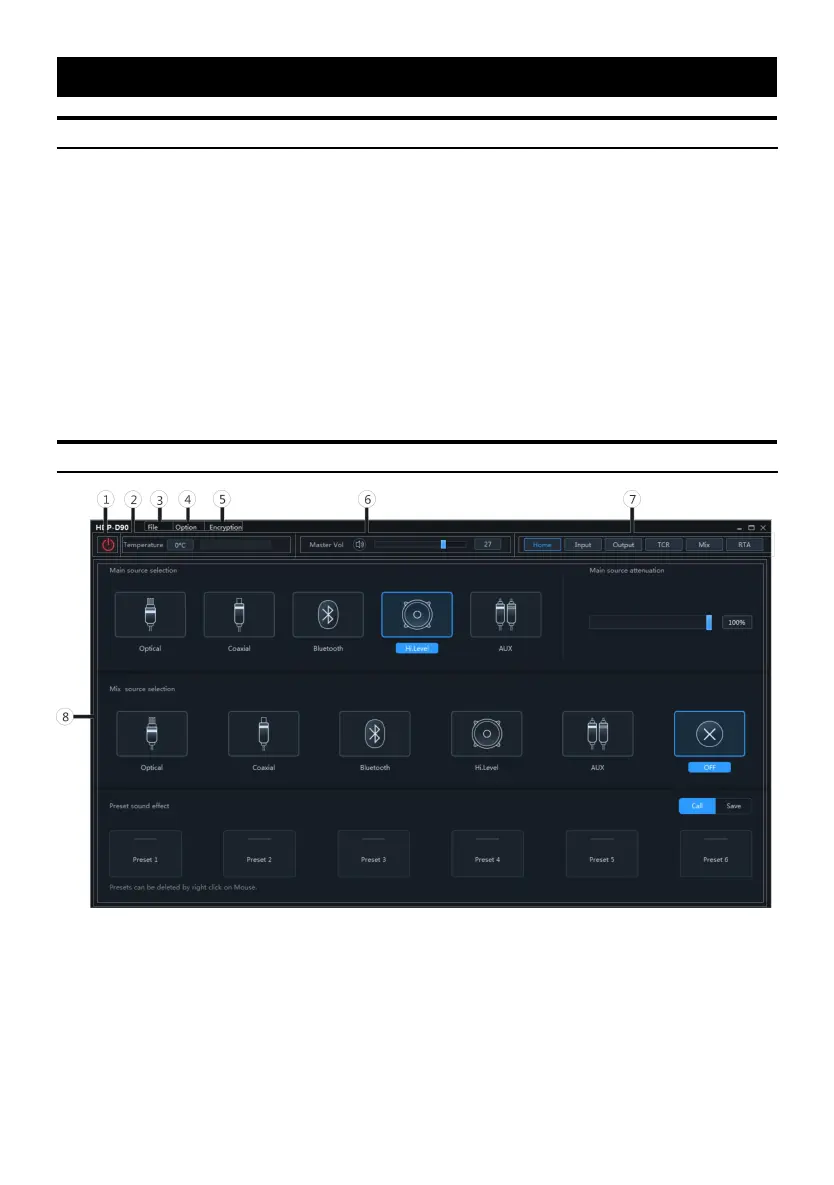
① Online switch.
② Temperature display.
③ Load or save the tuning file.
④ Select the function setting.
⑤ Encryption and decryption of tuning
data.
⑥ Adjust t he total volume.


 To Next Page