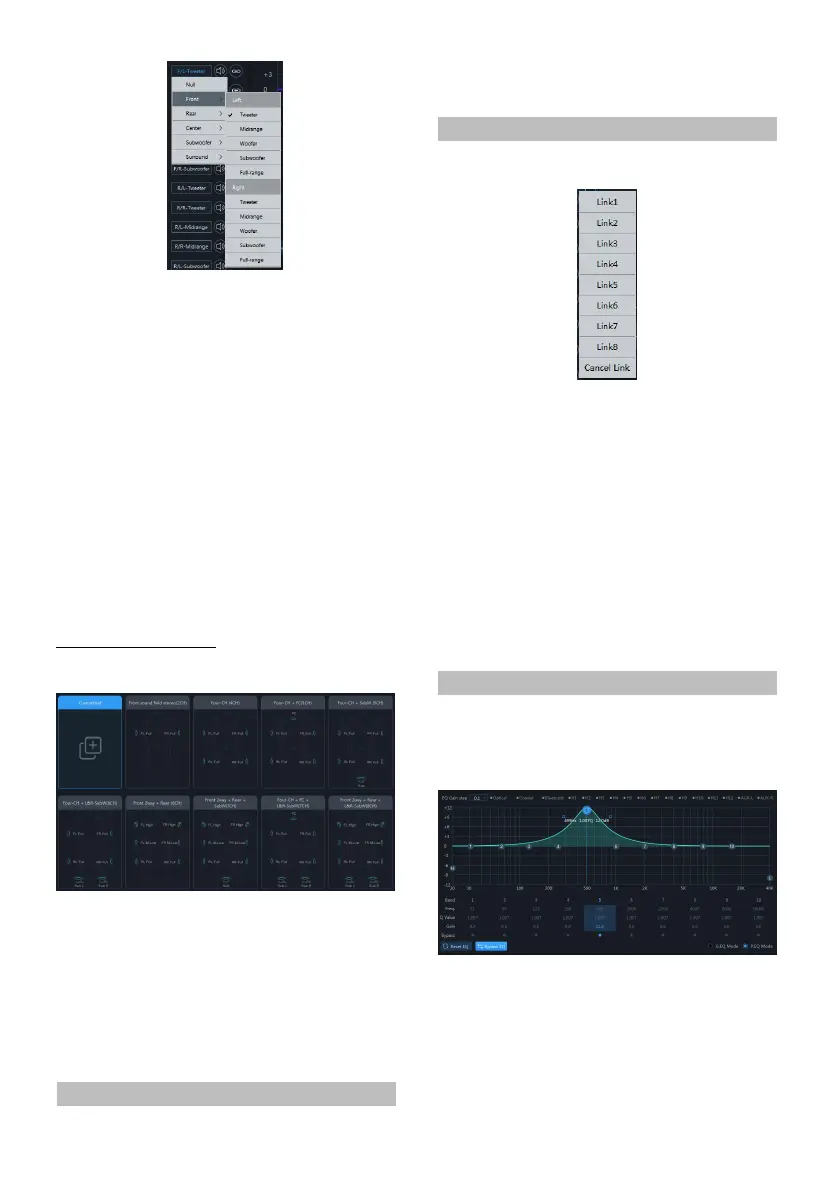
1 Click th e chan nel t ype custom box.
2 Sele ct the input chan nel type in the pop-up
window. Set th e input type in t he input type
setting dia log box. Th ere are tweeter,
midrange, woofer, subwoofer and full-range
options in th e front; tweeter, mid range,
woofer, subwoofer an d full-range options
are available in th e rear ; F/C-tweeter,
F/C-midrange, R/C-tweeter and
R/C-midrange options are available in the
center; L-subwoofer, R-subwoofer a nd
C-subwoofer options are available in the
subwoofer; L-surro und and R-surround
options are a vailable in the surround;
Input type selection
Input type selection page
1 Select the desired channel t ype.
2 Click the [Enter] button to configure th e
channel type. At this time, the inpu t chan nel
type is fixed a nd cann ot be configured.
3 Select Customized or [Clear] to clear all input
channel ty pes. At this t ime, you can
customize the inpu t ch annel types.
Channel Mute Setting
Setting items:Channel mut e
Setting content:Mute/off
Link Settings
Link group page
1 Select the input link fun ction in the options,
refer to "Inp ut link settings" (refer to page
10).
2 Click th e link button.
3 Select the link group on the link selection
page.
Setting items:Link
Setting content:Joint debugging 1/
joint debugging 2/ joint 3/j oint 4/j oint 5/join t
6/joint 7/ joint 8/cancel link
EQ Adjustment
The input h as 10 bands of EQ adjustable, and
there are two i nterfaces of graphic equalization
and parametric equa lization.
PEG page


 To Next Page