Signal G enerator Settings
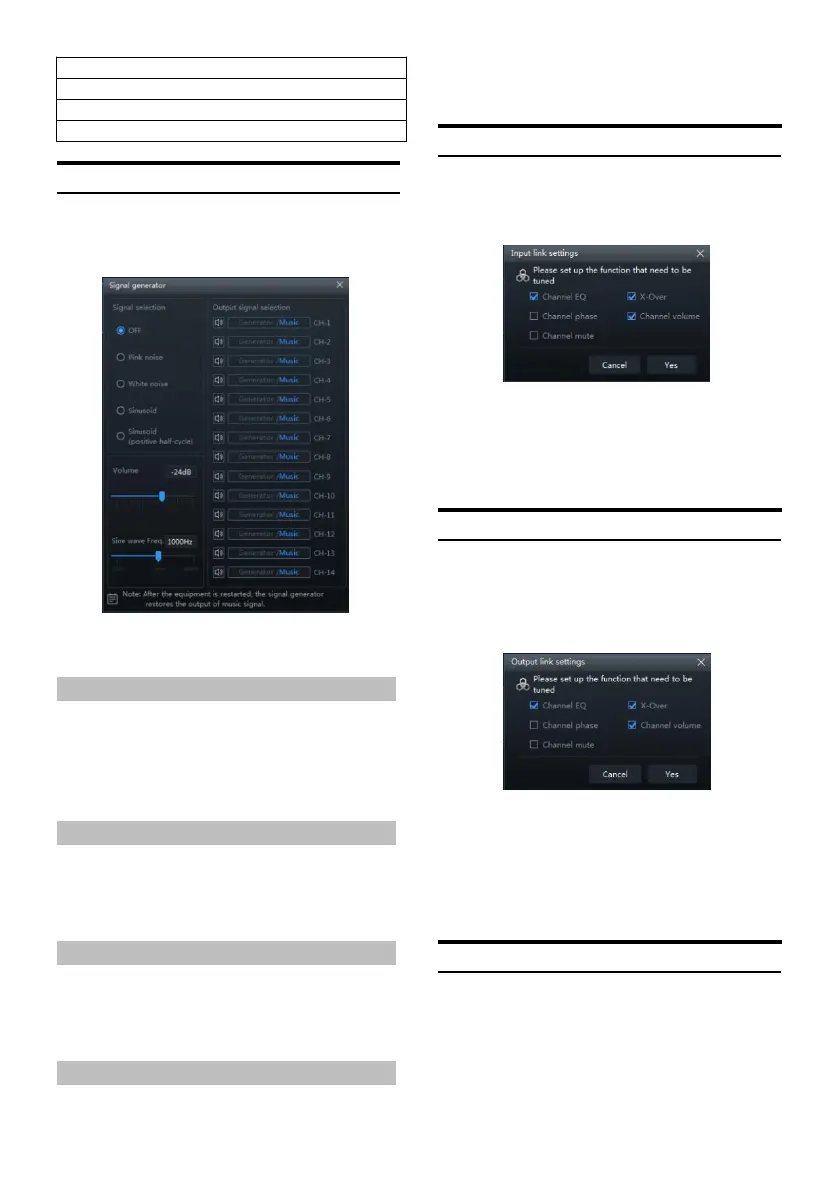
Select [Signal Generator] from the option page
to enter t he si gnal generator setting page.
Signal generator page
Test whether the output signal is normal when
there is no mus ic playing.
Signal Selection
Setting item: sign al selection
Setting content: OFF (init ial setting)/pi nk
noise/white noise/sinuso id/sinusoid (positive
half-cycle)
Volume
Setting item: volum e
Setting content: -60dB ~0dB (Init ial setting:
-24dB)
Sine Wave Frequency
Setting item: sin e wave frequency
Setting content: 20Hz~40kH z (initial setting:
1000Hz)
Output Signal Selection
Setting item: out put signal select ion
Setting content: generator/music output
(initial setting)
Input Lin k Settings
Select [Input link settings] from the opt ion
page to enter th e inpu t link settings page.
Enter the input link settings page
Setting items: setting the functions t hat need
to be combined with input
Setting content: channel EQ/X-Over/chan nel
phase/channel volume/channel mute
Output Li nk Settings
Select [Output link settings] from th e option
page to enter the output link settings setting
page.
Output link settings setting page
Setting item: S et t he function th at needs to
be combined with the output
Setting content: chann el
EQ/X-Over/channel phase/channel
volume/channel mute
Built-in AMP
Select [Built-in AMP] from t he options page to
enter th e built-in power amplifier setting pa ge.


 To Next Page