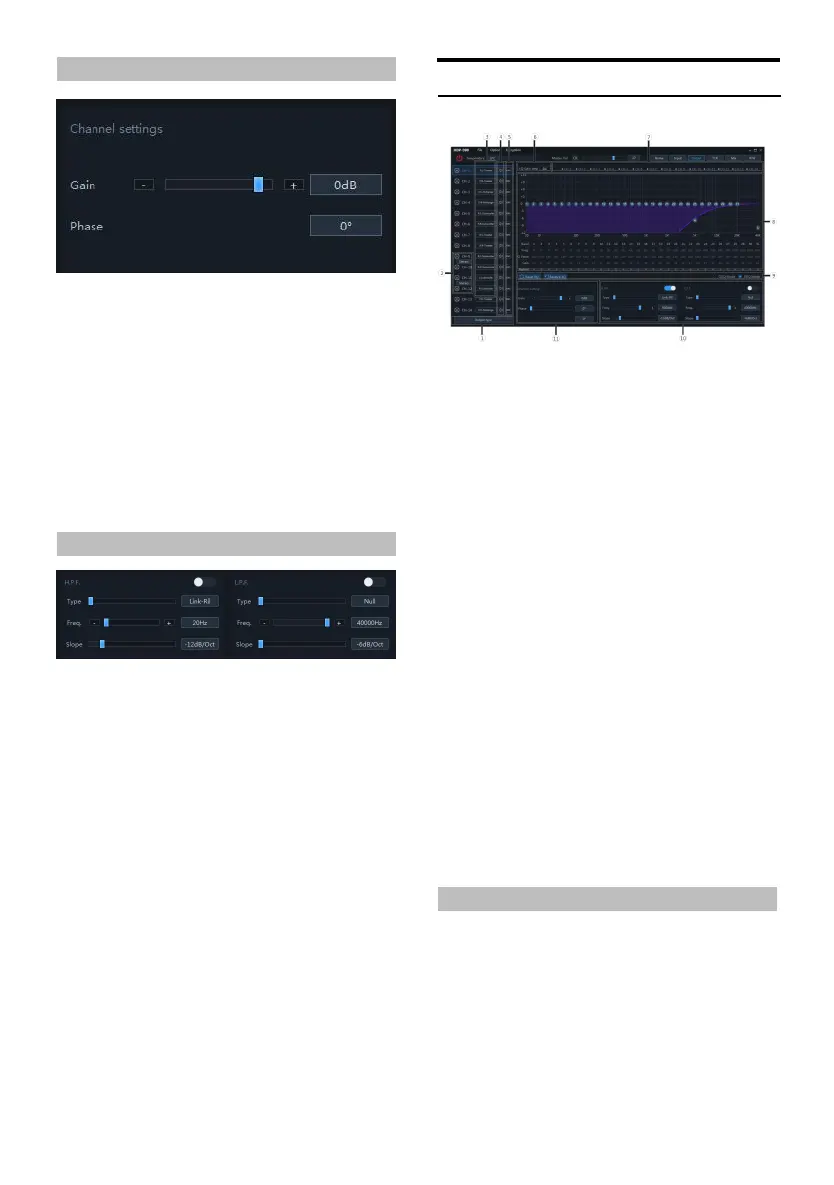
Channel Settings
Setting items:Preset sou nd effect settings
Setting content:Gain/phas e
1. Gain setting: The gain can be adjusted by
directly inpu tting the value, scrolling the
mouse wheel, the up and down keys on th e
keyboard, or clicking "-" or "+". A djustable
range: -60dB~6dB.
2. Phase s etting: normal phase or reverse
phase s witch.
X-Over
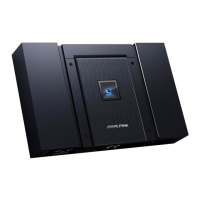
Setting items:X-Over settings
Setting content:Type/frequency /slope
1. Type settings: Link-R il, Besse l a nd Butter-W.
2. Frequency setting: The frequency can be
adjusted by directly in putting the value,
scrolling the mouse wheel, the up and down
keys on the keyboard, or clicking "-" or "+".
Adjustable range: 20Hz~40000Hz .
3. Slope (slo pe) setting: the drop-d own menu
options are -6dB /Oct, -12dB /Oct, -18dB/Oct,
-24dB /Oct, -30dB /Oct, -36d B/Oct, -42 dB/Oct ,
-48dB/ Oct is optional.
Note: When t he slope is -6 dB/Oct, t he type
is displayed as "Null".
Output EQ
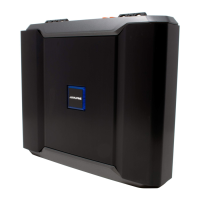
Output EQ page
Setting items:Output EQ
Setting content:Ty pe select ion/channel
mute/link setting /EQ adju stment/Bridge Mode
equalizer setting/channel setting/X-Over
setting
① Click to enter the output type select ion box.
② Stereo and handover switch.
③ Customize the output ch annel type.
④ Mute bu tton.
⑤ Joint debugging button.
⑥ EQ gain step selection.
⑦ Chan nel display s election button.
⑧ EQ editing and display area.
⑨ Equalizer settings.
⑩ X-Over.
⑪ Chan nel settings.
Type sele ction of out put EQ settings, channel
mute, joint tunin g settings, EQ adjustment,
equalizer settings, ch annel settings, filter
settings refer to "Input EQ Settings" (page 13 to
page 16)
Bridge Mode
The output channel 9 can be bridged with the
output channel 11, and the out put channel 11
can be bridged with the output channel 12. Th e
power can be increased in bridge mode.


 To Next Page