15
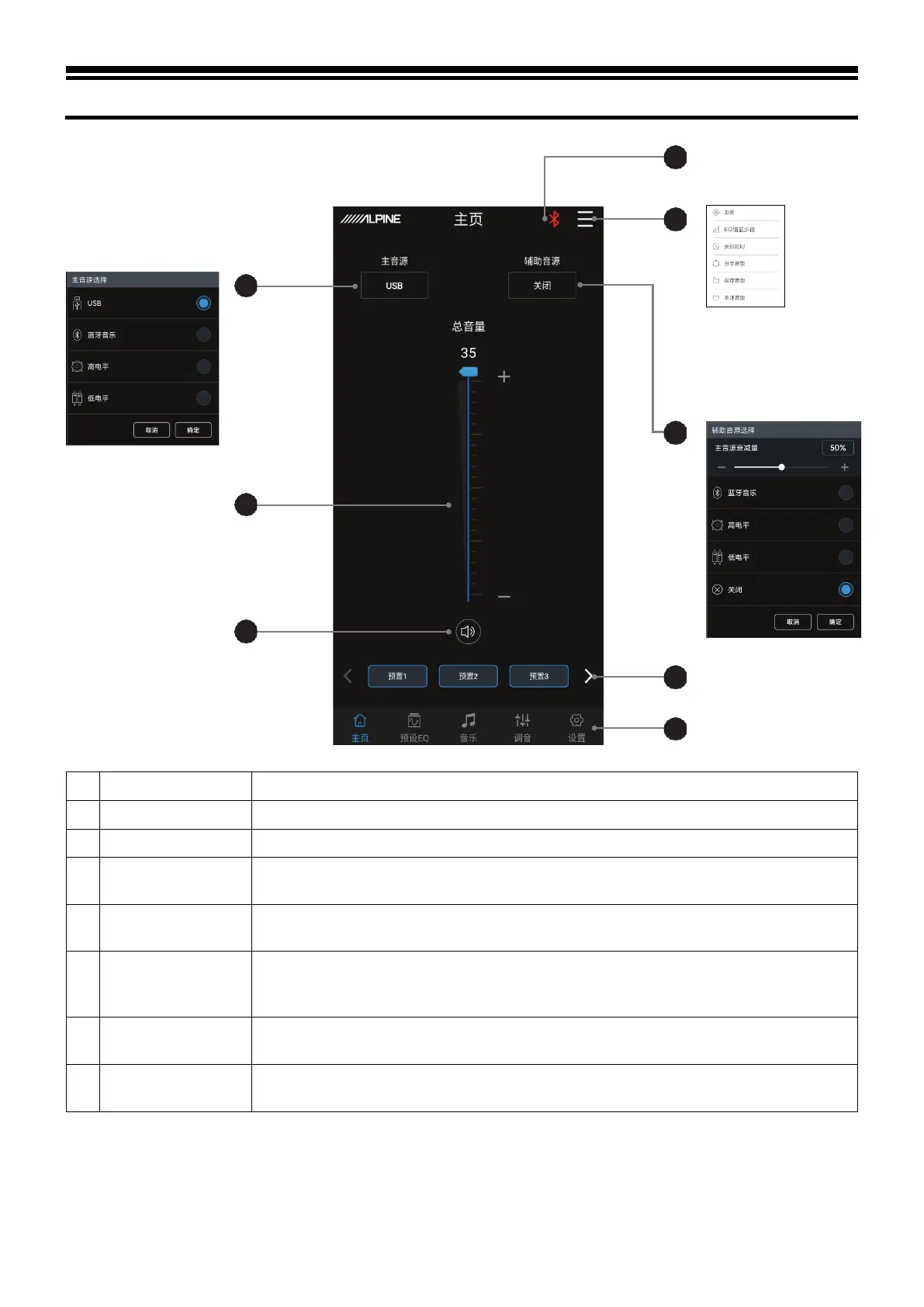
Description of mobile APP - Homepage
Pull the fader up and down to adjust the master volume.
Select the master audio source (USB, Bluetooth, High level and AUX).
4 Connection indicator
When the Bluetooth icon is red, the mobile phone Bluetooth is not connected; when it is
green, the mobile phone Bluetooth is connected.
5 Menu bar
You can select Data encryption, EQ gain step size, Switch-off delay, Share sound effect,
Save sound effect, and Local sound effect.
6
Auxiliary audio
source
Select the auxiliary audio source (Bluetooth music, High level, AUX and OFF), and adjust
the master source attenuation. The higher the attenuation of the master audio source, the
lower the master volume. The attenuation range: 0%~100%.
7 Pre-set sound effect
Save and call at most 6 preset sound effect settings. Slide left and right to select different
preset sound effect data.
8 Interface selection
There are 5 different functional interfaces, Homepage, Preset EQ, Music, Tuning, and
Setting, and the Homepage interface is the default interface.
3
2
1



 To Next Page