20
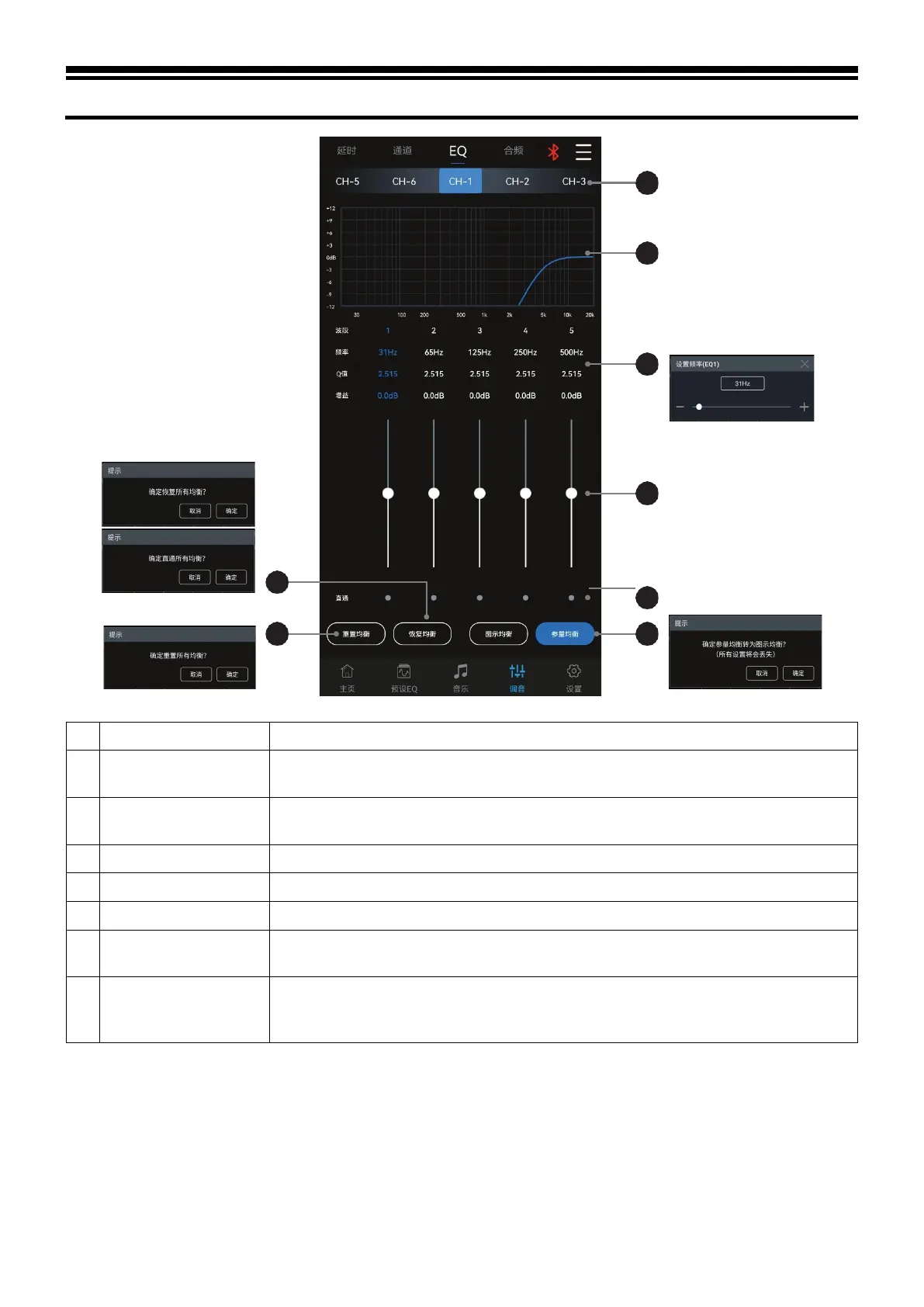
Description of mobile APP - EQ
2 Restore EQ, Direct EQ
Switch the tuned EQ data to direct state, click it again to restore the EQ data before Direct
EQ setting.
3 Output channel
Slide left and right to select the output channel for EQ adjustment. There are 6 channels
to choose from.
15 sections of EQ to display the EQ adjustment curve.
In the pop-up window, you can adjust the frequency and Q value of the output channel.
Pull the fader up and down to adjust the gain. The adjustable range is: -12.0dB~+12.0dB.
7 Waveband ON/OFF
Switch the tuned EQ data of the current waveband to the direct state, and click it again to
restore the EQ data before the Direct EQ setting.
8
Parametric EQ, Graphic
EQ
Switch between Parametric EQ mode and Graphic EQ mode. Mode switch would lead to
loss of all settings. Frequency, Q value and gain are all adjustable in Parametric EQ mode,
while gain is adjustable and frequency and Q value are fixed in Graphic EQ mode.



 To Next Page