9
EN
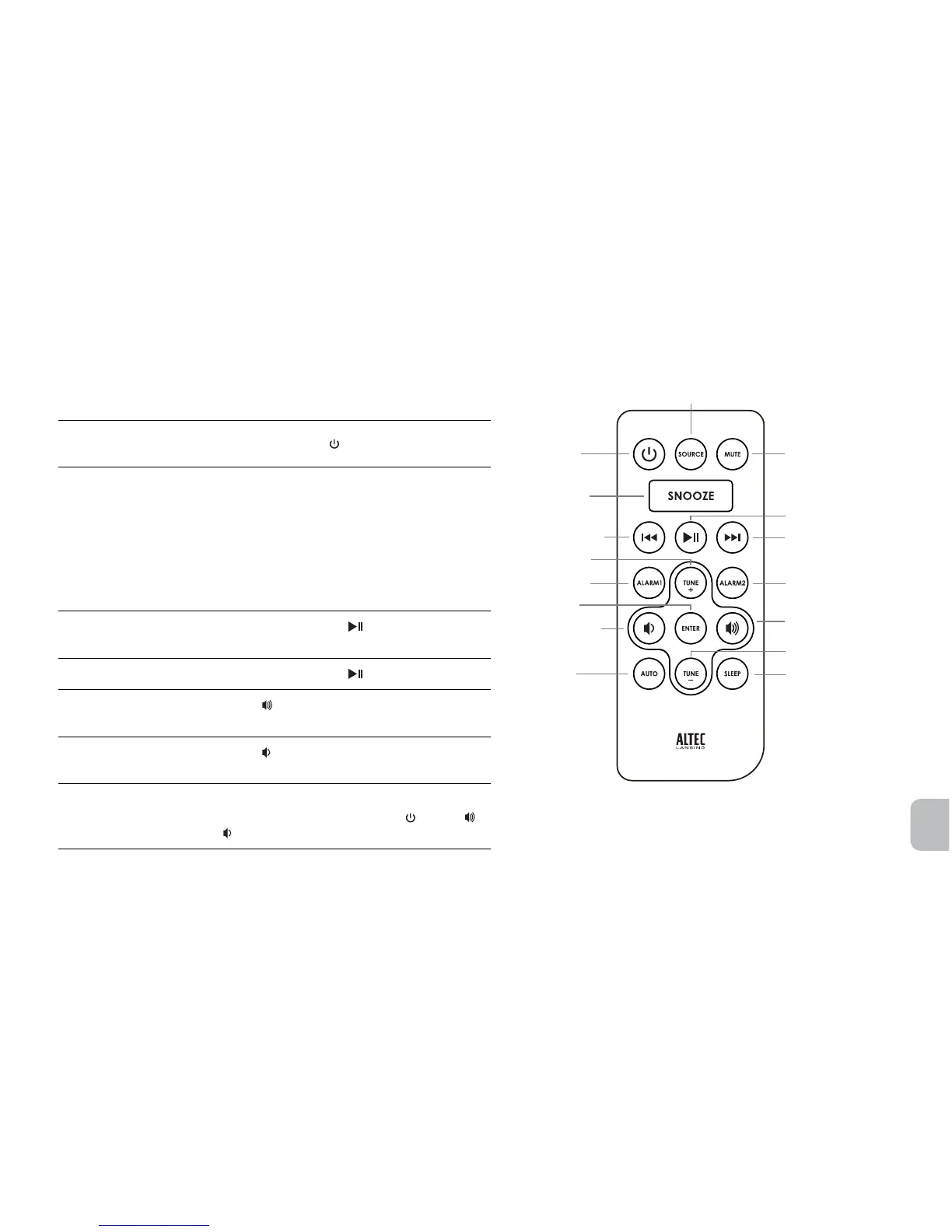
Wireless Remote Features
The wireless remote lets you operate many functions of your Altec Lansing
Moondance Home speaker system:
Turn on your speaker
system
Momentarily press the
button.
Changeaudiosource
PresstheSOURCEbuttontocyclethroughand
selecttheaudiosource:iPod,FMorAUX.
NOTE Ifyouarein“FM”or“AUX”modeand
you dock your iPod, the speaker system will
automatically change to “iPod” mode.
NOTE If you are in “iPod” mode and playing your
iPod, changing audio sources will automatically
pause your iPod.
Play a track from your iPod
In “iPod” mode, press the
button.Seethe
Listening to Your iPod section for more information.
Pause your iPod
In “iPod” mode, press the
button.
Turn up the volume
Press the
button. Press and hold the button to
quicklyadjustthevolume.
Turn down the volume
Press the
button. Press and hold the button to
quicklyadjustthevolume.
Mute the volume
Momentarily press the MUTE button.
NOTE To cancel the mute, press the
, MUTE, ,
or
buttons.
Mute button
Poweron/off
button
Sourcebutton
Play/pausebutton
Volume increase button
Volume decrease
button
Snoozebutton
Track back button
Track forward button
Auto button
Alarm1button
Tune up button
Tune down button
Sleepbutton
Alarm2button
Enter button



 To Next Page