EasyManua.ls Logo

Altec ATP-600 PRO - 4.4.5 Factory default; 4.5 File manager; To file list; Delete all files

Altec ATP-600 PRO
59 pages
Print Icon
To Next Page IconTo Next Page
To Previous Page IconTo Previous Page
Loading...
34
+31(0)78 - 615 20 33
info@altec.nl
www.altec.nl
+32(0)2 - 270 34 88
info@altec.
be
www.altec.
be
NL
BE
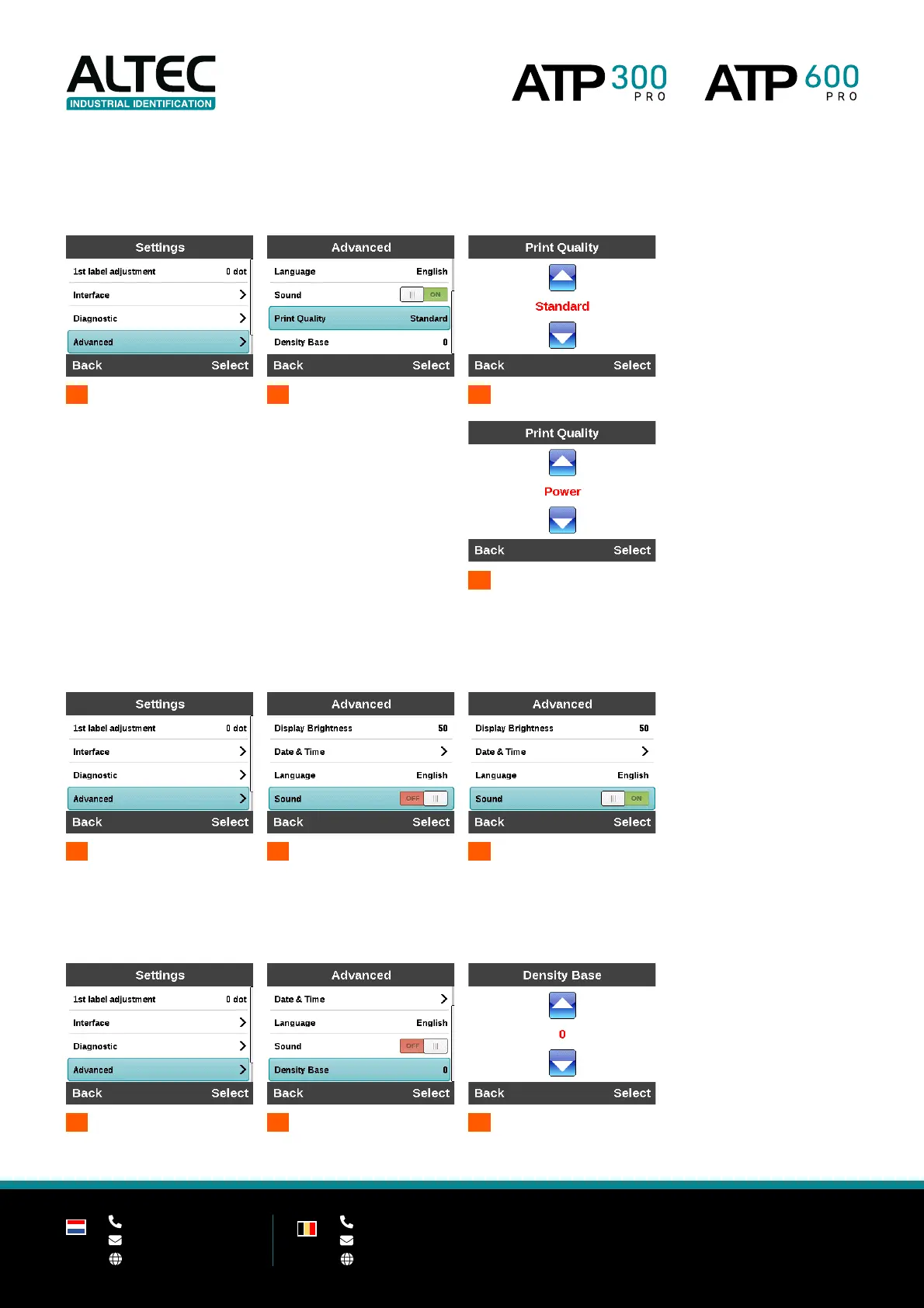
Print Quality (ATP-600 Pro only)
Set the print quality to Standard or Power mode. Power mode improves the print quality on specific label materials.
This setting is only available on the ATP-600 Pro.
1
Advanced
2
Print Quality
3A
Standard
3B
Power
Sound
Turn the printer sound on or off.
1
Advanced
2A
Sound OFF
2B
Sound ON
Density base
Increase or decrease the base density. Use this functionality only at the request of Altec.
1
Advanced
2
Density Base
3
Set
density base

Related product manuals