+31(0)78 - 615 20 33
info@altec.nl
+32(0)2 - 270 34 88
info@altec.
be
be
6 Printer management tool (TPM)
The Printer management tool (TPM) is a tool for Microsoft Windows to manage the ATP-300/600 Pro
printer. With TPM you can:
• Check the printer status
• Configure printer settings
• Manage multiple printers
To download this tool on your PC, use the following link:
https://www.altec.nl/fileadmin/user_upload/Support_downloads/Tools/Printer_management_tool.exe
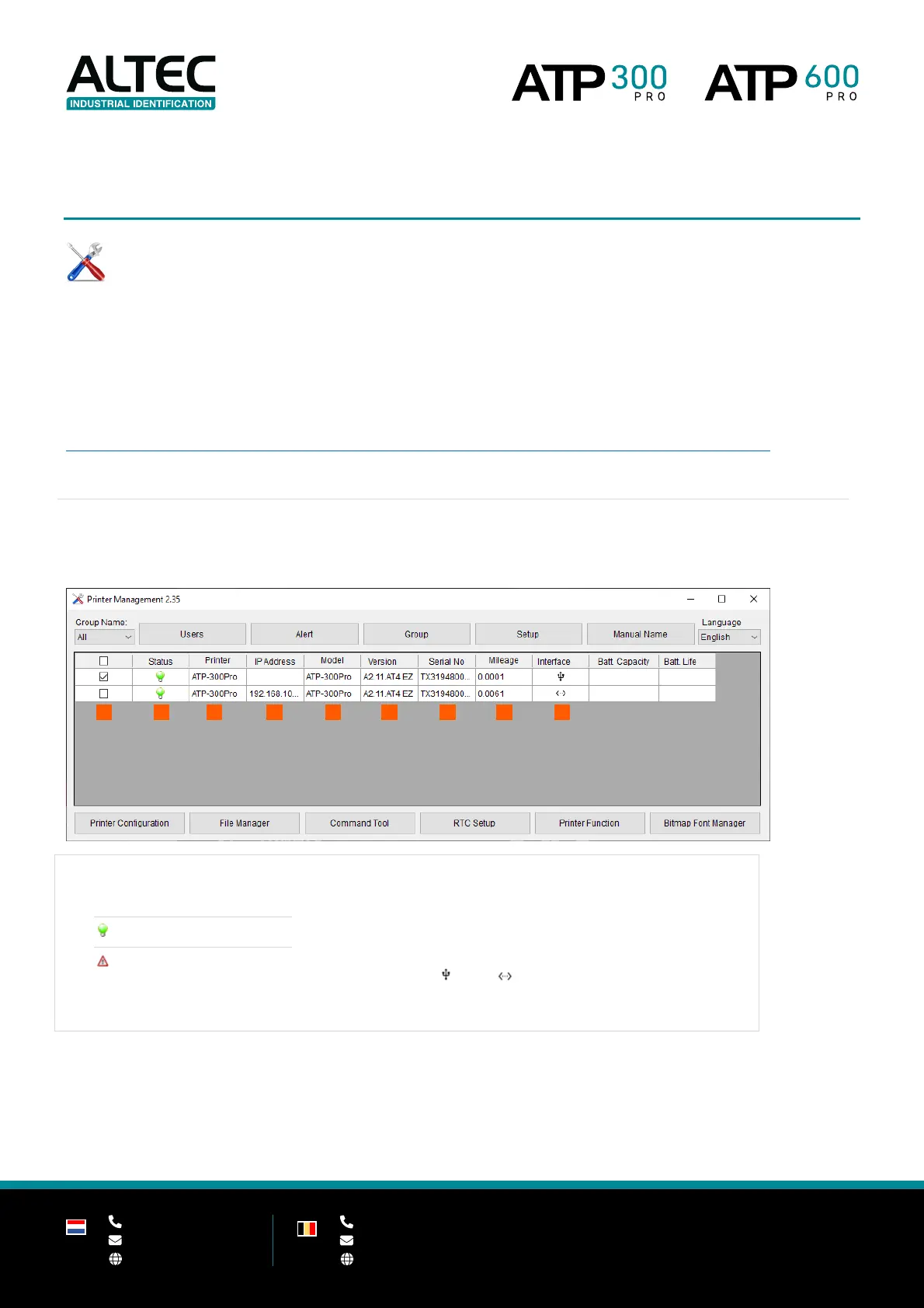
6.1 TPM overview
2. Printer status
3. Printer Printer name
4. IP Address When using Ethernet
5. Model Printer model name
6. Version Firmware version
7. Serial No Serial number
8. Mileage Printed mileage
9. Interface USB / Ethernet


 To Next Page