Replacing the Ribbon
To Remove:
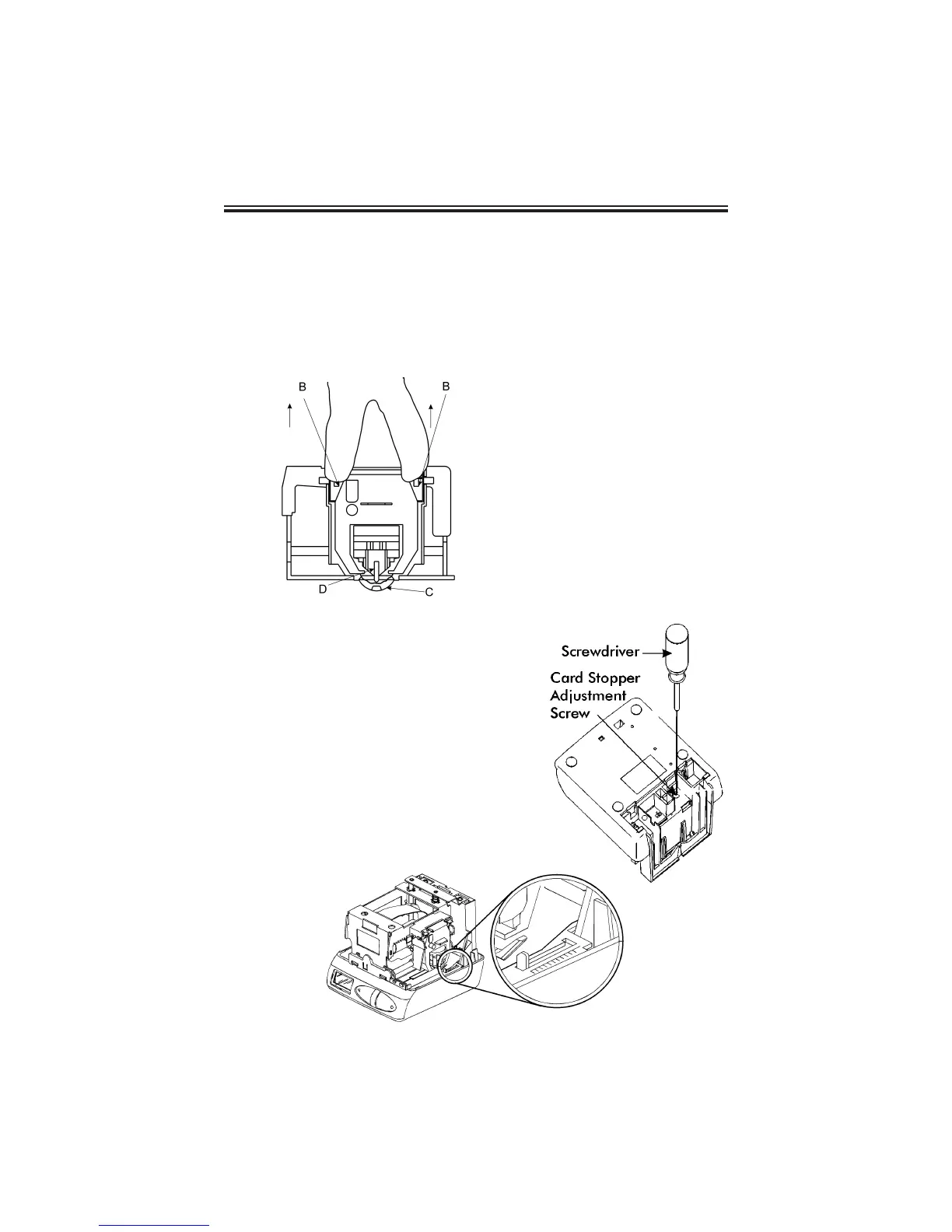
1. Pull the two catches upward
“B” and hold with index and
middle fingers. Remove the
ribbon cassette.
Adjusting the Margin
1. Remove the Mounting Bracket.
2. Locate the Card Stopper Adjustment
Screw behind the Wall Mounting
Bracket on the bottom of the machine.
3. Position a piece of paper or
time card and adjust the screw
accordingly. The print margin can be
adjusted a maximum of 22mm (7/8”).
There are ruler markings on both sides of
the base plate to help you align the card.
Page 15
To Insert:
1. If the print mechanism is down
and a piece of paper cannot be
inserted, press the RESET button
to move the carriage up. This will
make the ribbon installation easier.
2. Insert a new ribbon between the
ribbon guide (C) and the printer
head (D).
3. Turn the knob on the cassette
clockwise one turn to take up any
slack in the ribbon.
4. Replace the cover.
5. Check the printing quality to
confirm that you have installed
the ribbon properly.



 To Next Page