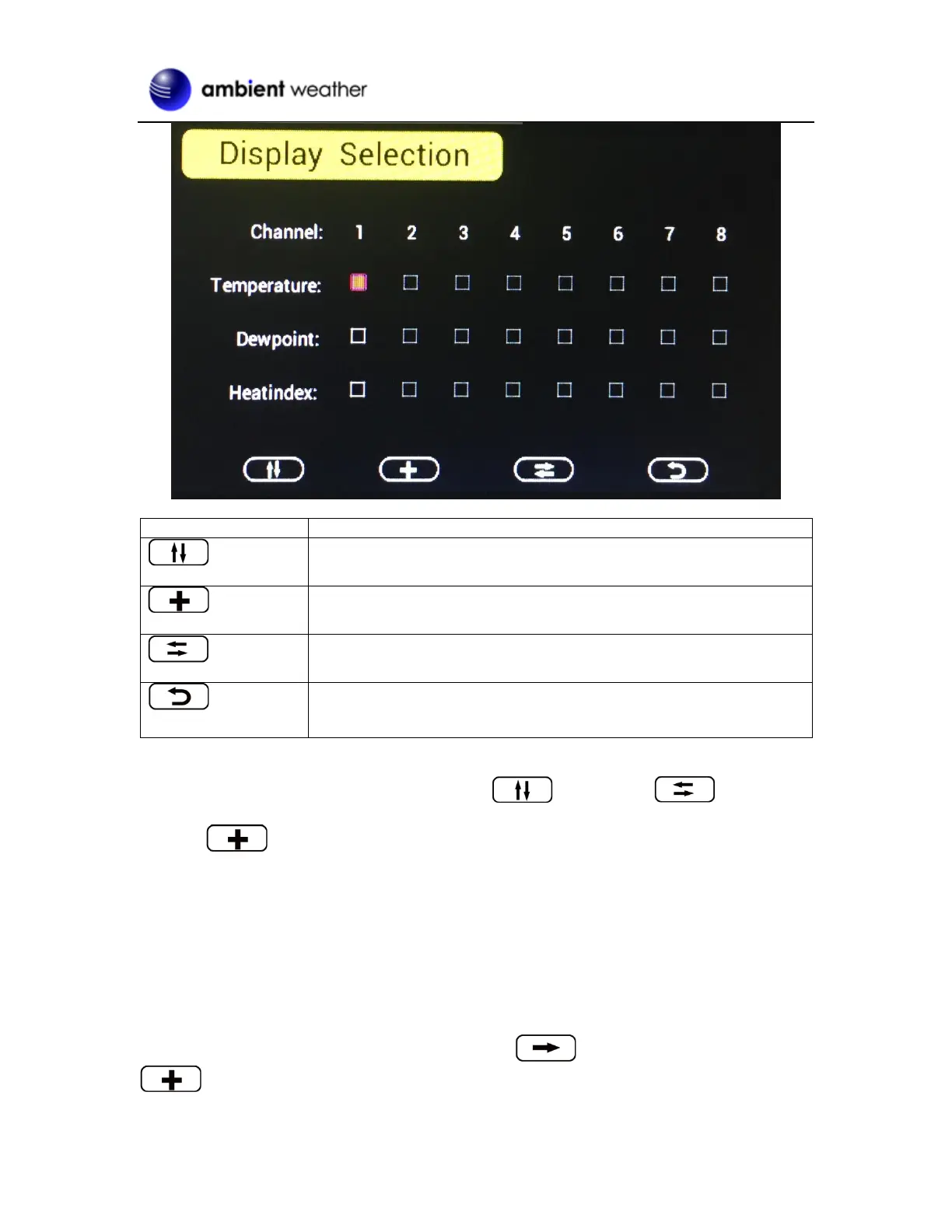
Figure 9
To modify the display parameter, press the up/down and left/right keys to move
the blue cursor to a sensor channel number (1-8) and parameter (temperature, dew point, heat index).
Press the key to display this channel and parameter in the selected area on the main screen.
For example, if you wish to display Channel 1 Dew Point in the CH Area 1, highlight the Channel 1
Dewpoint field.
If you wish to toggle both channel 1 temperature and channel 1 dew point, highlight both the Channel
1 Temperature and Channel 1 Dew Point (reference Figure 9),, and the screen will toggle between the
channel 1 temperature and dew point on the main screen once every 3 seconds.
4.1.2 Graph Time
To change the Graph Time on the main display, scroll to the Graph Time, and select the
key to change between 12, 24, 48 and 72 hours.

 To Next Page
 Loading...