EasyManua.ls Logo

Ametek Reichert XCEL 255 - User Manual

Ametek Reichert XCEL 255
24 pages
Print Icon
To Next Page IconTo Next Page
Loading...
XCEL
255
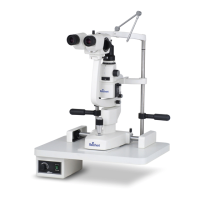
Slit Lamp
Users Guide

Questions and Answers

  • D
    David SmithAug 3, 2025
    How to fix Ametek Reichert XCEL 255 lamp that won't turn on?
    • D
      Dawn FloresAug 3, 2025
      If the lamp on your Ametek Laboratory Equipment won’t turn on, there are several possible causes. First, check the outlet to ensure proper power is being supplied to the Xcel 255 Slit Lamp. Other possible solutions: * Replace the power cord. * Replace the bulb, as it may be blown out. * Replace the power supply.
  • O
    orrbrittneyAug 8, 2025
    What to do if the fixation light does not light up on Ametek Reichert XCEL 255?
    • T
      tmaxwellAug 8, 2025
      If the fixation light on your Ametek Laboratory Equipment does not light up, ensure the fixation light harness is properly seated in the power supply assembly. If that doesn't work, the power supply may be defective and needs replacement.
  • N
    nhaleAug 13, 2025
    Why is the light too dim on my Ametek Reichert XCEL 255?
    • S
      Stacy MartinAug 13, 2025
      If the light on your Ametek Laboratory Equipment is too dim, it may be due to incorrect wattage for the bulb being used, so replace it with the proper bulb. Also, check the bulb installation and ensure the notch lines up with the bulb housing.
  • J
    Joseph IngramAug 18, 2025
    What to do if the slit lamp won’t move on Ametek Laboratory Equipment?
    • R
      Robin SchmidtAug 19, 2025
      If your Ametek Laboratory Equipment slit lamp won’t move, check if the rubber stopper is attached under the joystick and remove it. Also, the base lock screw may be tightened, so loosen it.
  • B
    Brittany MontesAug 23, 2025
    Why is there a double slit visible in microscope of Ametek Laboratory Equipment?
    • M
      manuel10Aug 23, 2025
      If you see a double slit visible in the microscope of your Ametek Laboratory Equipment, install the focusing rod and check to ensure the microscope is focused on it before use. Also, check the bulb and ensure the notch lines up with the bulb housing, as improper installation can cause this issue.
  • C
    Cindy LucasAug 28, 2025
    How to fix rough base movement in Ametek Laboratory Equipment?
    • R
      ryaneduardoAug 28, 2025
      If you are experiencing rough base movement with your Ametek Laboratory Equipment, first check if the rubber stopper is attached under the joystick and remove it. If the problem persists, the bearings or shaft may be damaged, requiring replacement of the base.

Summary

Warnings & Cautions

General Safety Warnings

Critical safety instructions regarding injury, electrical hazards, modifications, and proper usage.

General Cautionary Statements

Important precautions for product damage, ESD sensitivity, cleaning, EMC, and RF interference.

Symbol Information

Instrument & Packaging Symbols

Explains the meaning of various symbols found on the instrument and packaging for safe operation.

Introduction

Indications for Use

Specifies the intended use of the Xcel 255 Slit Lamp for examining the anterior segment of the eye.

Contraindications

States that there are no contraindications for the use of the Xcel 255 Slit Lamp.

Setup

Parts Identification

Identifies and lists the various components of the Xcel 255 Slit Lamp and its accessories.

Package Contents and Accessories

Lists items included in the package and available accessories for the Xcel 255 Slit Lamp.

Unpacking and Initial Installation

Details the steps for unpacking the instrument and installing key components like the Chin Rest Assembly.

Continued Assembly and Connections

Covers further installation procedures, including electrical connections and assembly mounting.

Powering and Disconnecting the Instrument

Instructions on how to apply input power, turn on/off the instrument, and disconnect power safely.

Instructions for Use

Basic Operation and Adjustments

Guides on turning on, using focusing rod, adjusting pupillary distance, and initial slit width settings.

Patient Positioning and Microscope Focus

Steps for positioning the patient, adjusting chinrest height, and aligning the microscope with the cornea.

Illumination, Magnification, and Slit Controls

Explains how to adjust illumination angle, magnification, slit length, filters, and slit rotation.

Cleaning & Maintenance

Routine Cleaning Procedures

Instructions for external cleaning, chinrest preparation, and glide plate cleaning.

Halogen Bulb Replacement

Step-by-step procedure for safely replacing the halogen bulb, including precautions.

Fuse Replacement Procedure

Instructions for safely replacing the fuses in the power input module.

Troubleshooting

Common Issues and Solutions

A table listing common problems, causes, and possible solutions for the slit lamp.

Service Assessment Checklist

A checklist of items to assess to determine if the slit lamp requires servicing.

Specifications

Physical and Electrical Specifications

Provides size, weight, voltage, power input, frequency, fuses, and bulb specifications.

Operational and Microscope Specifications

Outlines environmental conditions and details microscope parameters like magnification and PD range.

Movement Ranges, Disposal, and Software

Specifies movement ranges, table dimensions, disposal guidance, and software revision status.

Guidance Tables

Electromagnetic Emissions Declaration

Table detailing guidance and manufacturer's declaration for electromagnetic emissions.

Electromagnetic Immunity Declaration

Table for guidance and manufacturer's declaration on electromagnetic immunity for the Xcel 255.

RF Emissions and Separation Distances

Guidelines for electromagnetic immunity for non-life-supporting equipment and RF separation distances.

Recommended RF Separation Distances

Table showing recommended separation distances between RF communications equipment and the Xcel 255.

Warranty

Warranty Terms and Claims Procedures

Outlines warranty coverage, limitations, and procedures for filing shortages and transit damage claims.

Ametek Reichert XCEL 255 Specifications

General IconGeneral
Temperature Resolution0.1°C
DisplayLCD
Data Output/InterfaceRS-232
Resolution0.0001 RI
TypeDigital Tonometer and Refractometer

Related product manuals