5
USER’S MANUAL
(AMIKO T60 / T70)
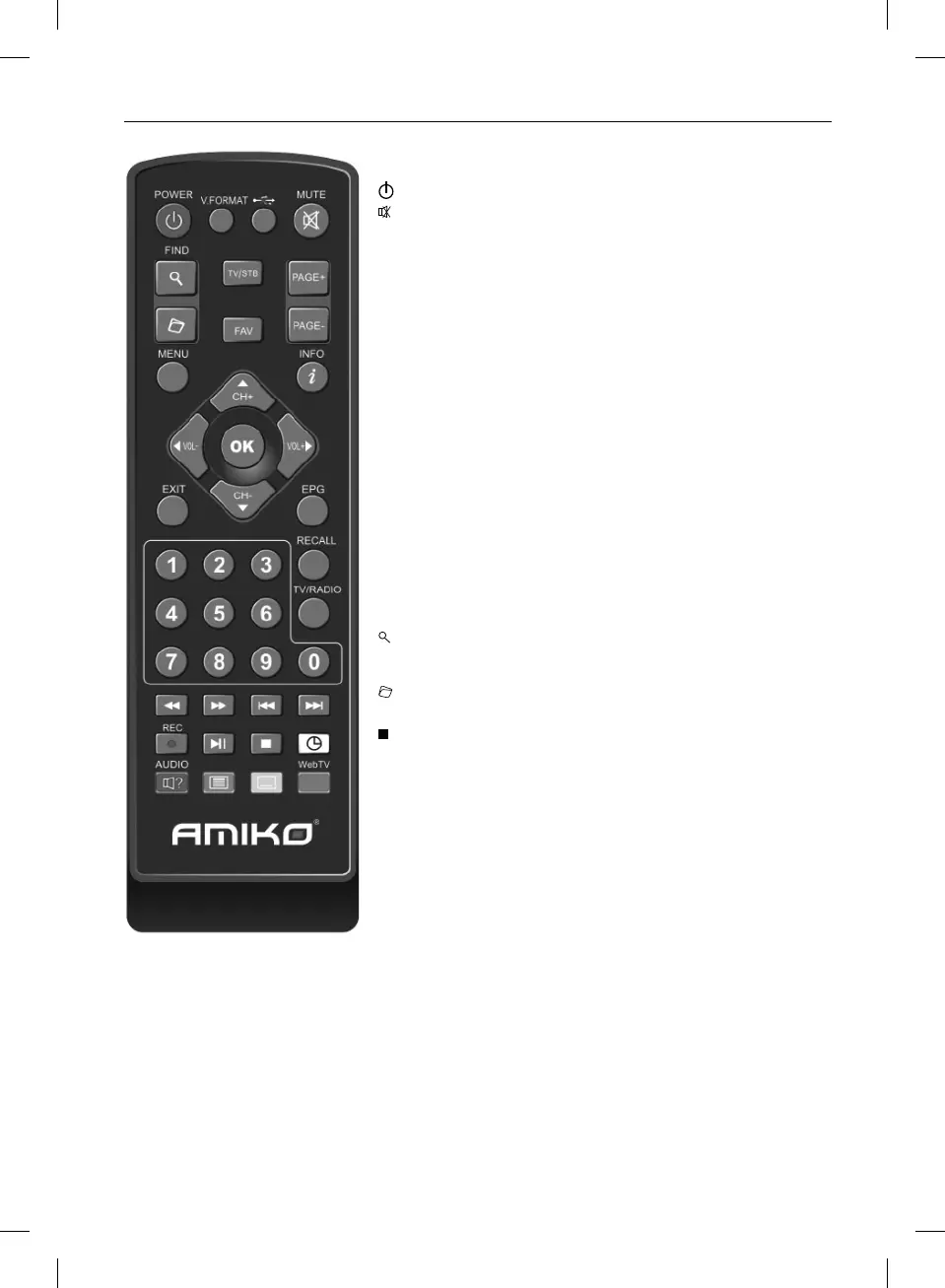
POWER To switch your receiver on from standby or standby to on.
MUTE Used to enable or disable the audio
NUMERIC KEYS Used to select channels or enter programming parameters
TV / RADIO Receiver switches between TV and Radio mode.
(ZOOM) Press key select zoom times, from X1 to X16.
(RECALL) Return to the previous menu or status.
(AUDIO) Audio channels setup, to select audio mode; Left, Right , Stereo, Mono.
INFO To display channel status or various programme information of current
service.
EPG (Electronic Programme Guide) Display the Programmes guide on screen
when available.
MENU Displays the Main Menu on the screen, or return to the previous menu or
status.
EXIT Cancel the user selection and return to the viewing mode from a menu.
OK To select menu option, or to updated on entry.
VOL-, VOL+ KEY To adjust volume level, or to move cursor left or right in the
menu.
CH-, CH+ KEY To change channels, or to move cursor up or down in the menu.
PAGE+/PAGE- To move up the cursor to the next or previous page in the menu or
channel list.
Red Key Has different functions per menu.
TTX (GREEN KEY) Shows teletext information of the current channel supports.
SUBTITLE (YELLOW KEY) Subtitle Display.
(FIND) Use to prompt find channels sort by character.
FAV (FAVOURITE) To set receiver to the favourite server mode, display the
favourite channel.
Archive Press this button to enter the File Manager menu directly.
► Play To play the MP3, JPEG or recording file, or start timeshift function.
Stop To stop MP3/JPEG player, recording file , Time Shift, or playback.
G Record To start recording.
◄◄
Fast Backward To start Fast Backward function.
►► Fast Forward To start Fast Forward function .
V.FORMAT Press VFORMAT button to switch the display mode among „Auto-> by
native TV<->1080i->1080p etc.
TV/STB Receiver switches between TV and receive mode.



 To Next Page