6
USER’S MANUAL
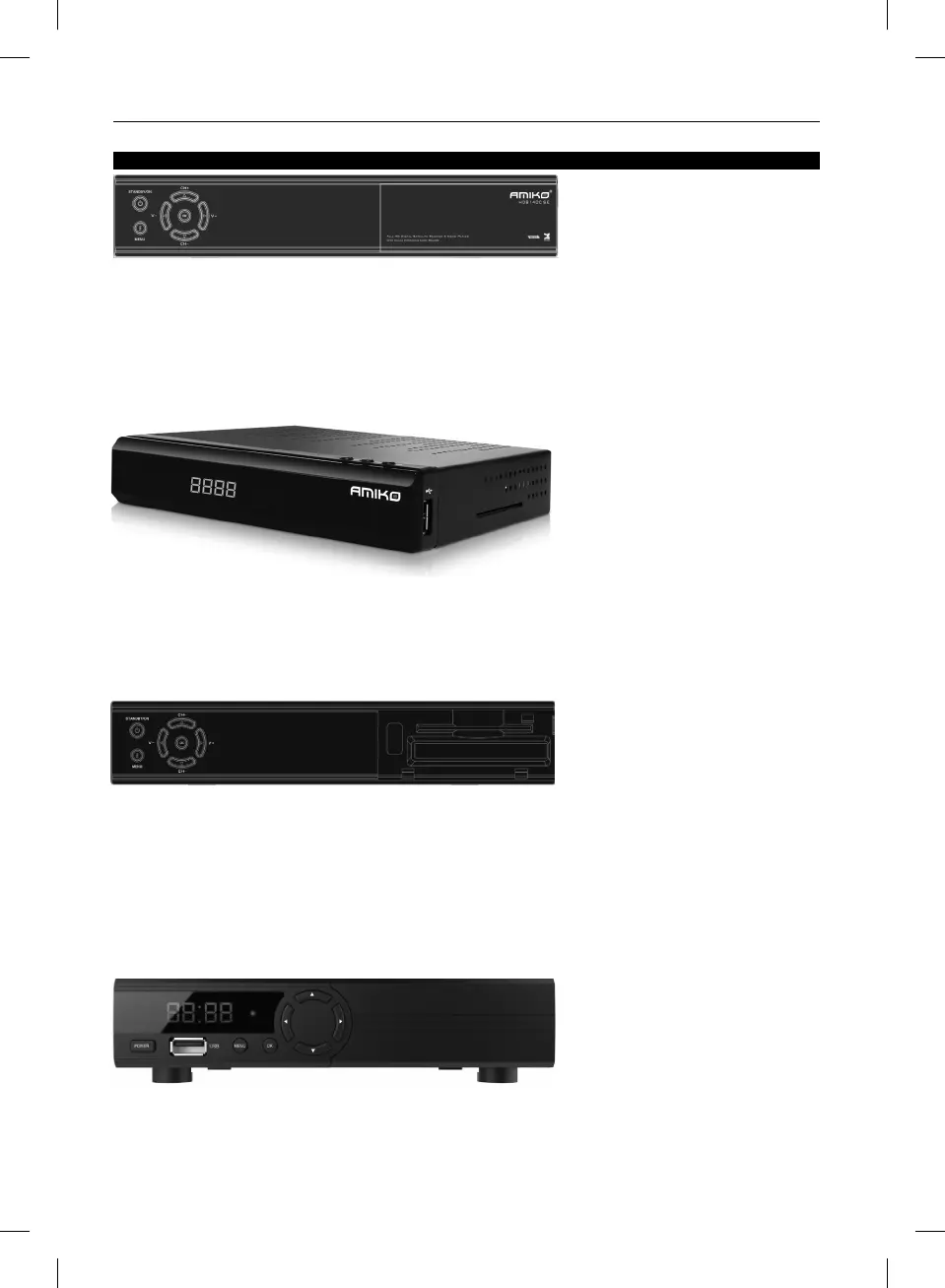
5. FRONT PANEL
AMIKO HD8140C SE
AMIKO HD8142
AMIKO HD8155
AMIKO HD8265+
STANDBY KEY: To switch the receiver power on/stand by.
MENU KEY: To enter the Main Menu.
OK KEY: To see TV/Radio channel list, or to confirm in the menu.
V-/V+ KEY: To adjust volume level, or to move cursor left or right in the menu.
CH-/CH+ KEY: To change channels, or to move cursor up or down in the menu.
POWER Indicator: Lit whilst the receiver is powered on and at standby mode.
Signal Indicator: When received signal is strong, the signal indicator is lit.
Card Slot: One CA Interface for Conax.
Display: (LED type) Indicates operating status of receiver.
Remote Sensor: Detects infrared signal from remote control unit.
POWER Indicator: Lit whilst the receiver is powered on and at standby mode.
Signal Indicator: When received signal is strong, the signal indicator is lit.
USB: USB 2.0 Host, connect to USB hard disk, flash disk, WiFi dongle, 3G dongle. (On the right side of the receiver)
Display: (LED type) Indicates operating status of receiver.
POWER KEY: To switch the receiver power on/stand by.
CH-/CH+ KEY: To change channels, or to move cursor up or down in the menu.
Card Slot: One slot CA Interface for Conax Smartcard (on left side).
POWER KEY: To switch the receiver power on/stand by.
MENU KEY: To enter the Main Menu.
OK KEY: To see TV/Radio channel list, or to confirm in the menu.
V-/V+ KEY: To adjust volume level, or to move cursor left or right in the menu.
CH-/CH+ KEY: To change channels, or to move cursor up or down in the menu.
Remote Sensor: Detects infrared signal from remote control unit.
POWER Indicator: Lit whilst the receiver is powered on and at standby mode.
Signal Indicator: When received signal is strong, the signal indicator is lit.
Card Slot: One CA Interface for Conax.
USB A: USB 2.0 Host, connect to USB hard disk, or flash disk,and 3G dongles.
Display: (LED type) Indicates operating status of receiver.
POWER KEY: To switch the receiver power on/stand by.
MENU KEY: To enter the Main Menu.
OK KEY: To see TV/Radio channel list, or to confirm in the menu.
LEFT/RIGHT KEY: To adjust volume level, or to move cursor left or right in the menu.
UP/DOWN KEY: To change channels, or to move cursor up or down in the menu.
Remote Sensor: Detects infrared signal from remote control unit.



 To Next Page