6. REAR PANEL
9
USER’S MANUAL
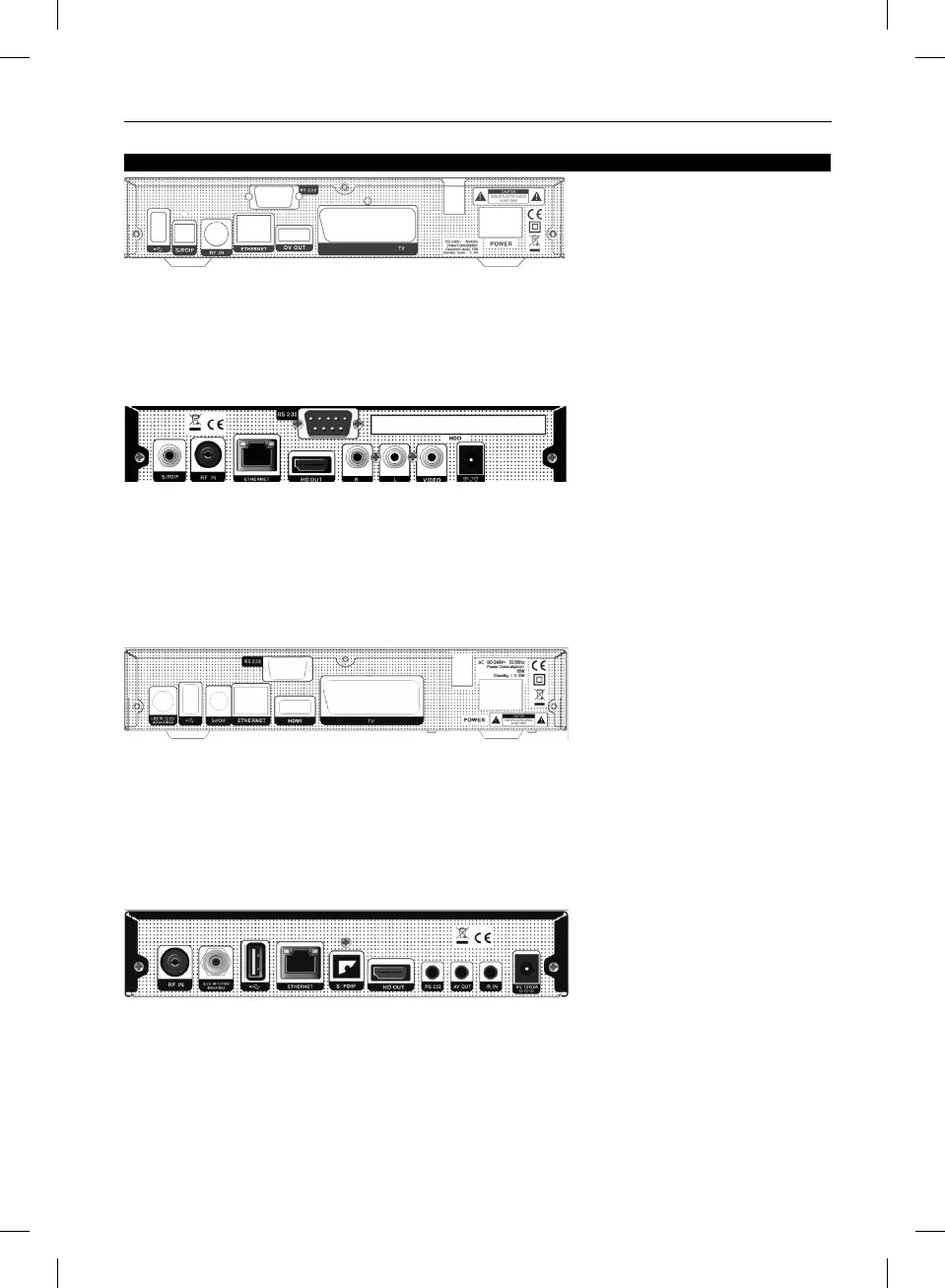
AMIKO HD8140C SE
AMIKO HD8142
AMIKO HD8155
RF IN: This port is to connect the coaxial cable from Cable Antenna.
S/PDIF: Digital Audio interface, connect to AV amplifier S/PDIF input terminal.
USB: USB 2.0 Host, connect to USB hard disk, or flash disk,and wifi dongles.
TV: This is used to connect your TV through SCART cable.
DV OUT: Audio and Video output socket for TV set with DV OUT Input Jack only.
RS 232 SERIAL PORT: This is used to connect your receiver to a computer through a serial cable.
Ethernet: Network port, you can get a new software updates from this port.
POWER ON/OFF SWITCH: To switch ON/OFF the receiver power supply.
RF IN: This port is to connect the coaxial cable from Cable Antenna.
Ethernet: Network port, you can enjoy the network application function via this port, or you can get new software updates or new
games.
HD OUT: Audio and Video output socket for TV set with HDMI Input Jack only.
RS 232 SERIALPORT: This is used to connect your receiver to a computer through a serial cable.
VIDEO: This RCA connector is used to connect any external video.
AUDIO R/L: These RCA connectors are used to connect any external audio amp or system.
S/PDIF: Digital Audio interface, connect to AV amplifier S/PDIF input terminal.
HDD: To connect internal HDD.
DC 12V: This is used to connect an external 12V adapter.
Please refer to the diagram above for all possible connections of your receiver
Do not connect the unit to the mains socket until all other connections have been made and checked.
LNB IN 13/18V 400mA MAX: This port is to connect the coaxial cable from LNB of your Dish.
S/PDIF: Digital Audio interface, connect to AV amplifier S/PDIF input terminal.
HDMI: Audio and Video output socket for TV set with HDMI Input Jack only.
RS 232: This is used to connect your receiver to a computer through a serial cable.
Ethernet: Network port, you can get a new software updates from this port.
TV: This SCART connector is used to connect TV using SCART cable.
POWER ON/OFF SWITCH: To switch ON/OFF the receiver power supply.
USB: USB 2.0 Host, connect to USB hard disk, or flash disk,and 3G dongles.
AMIKO HD8265+
Please refer to the diagram above for all possible connections of your receiver
Do not connect the unit to the mains socket until all other connections have been made and checked.
LNB IN 13/18V 400mA MAX: This port is to connect the coaxial cable from LNB of your Dish.
RF IN: This port is to connect the coaxial cable from Terrestrial/Cable Antenna.
S/PDIF: Digital Audio interface, connect to AV amplifier S/PDIF input terminal.
USB B: USB 2.0 Host, connect to USB hard disk, or flash disk,and 3G dongles.
AV OUT: This RCA connector is used to connect any external video and audio.
HD OUT: Audio and Video output socket for TV set with HDMI Input Jack only.
RS 232 SERIAL PORT: This is used to connect your receiver to a computer through a serial cable.
Ethernet: Network port, you can get a new software updates from this port.
IR IN: Connect an External IR-Sensor (Infrared).
DC 12V: This is used to connect an external 12V adapter.



 To Next Page