12. Upon (re)-connection, Sailfish will recognize new log files available for download.
Automatic downloads can be enabled in Sailfish, but this is not the default setting.
13. New log files may be viewed, plotted, and exported in various formats using the Data
Manager tab in Sailfish.
2.3 Connecting a GPS Listener
Sailfish has the ability to connect to an external GPS listener so that GPS location data may be
sent to an instrument. To set up an external listener, follow these steps:
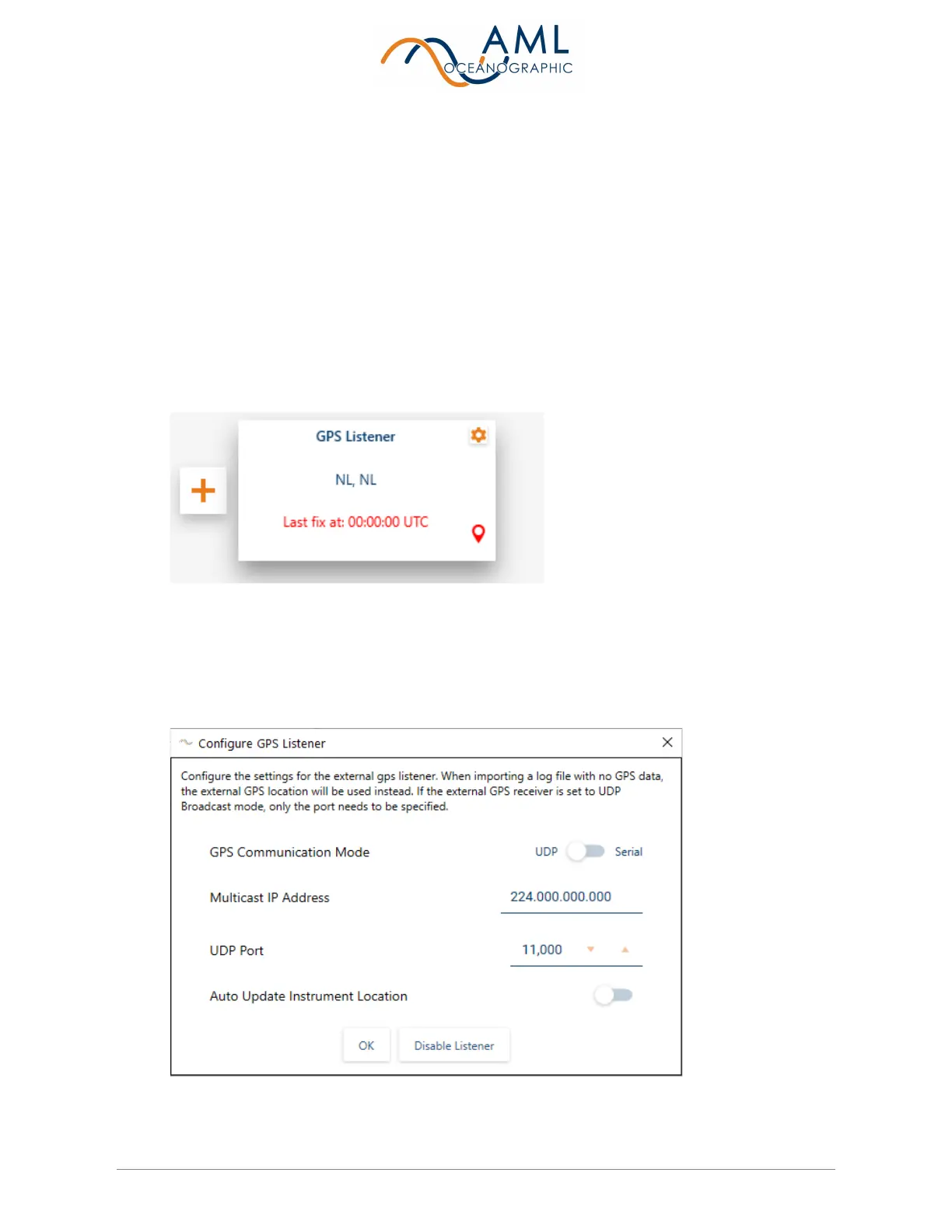
1. Navigate to the Devices page and click on the ‘Add Listener’ button. Select ‘GPS
Listener.
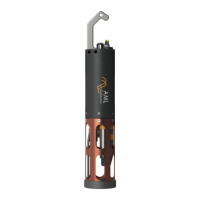
2. To configure the GPS listener settings, click the ‘Gear Icon’ on the listener tile.
3. Configure the settings according to your external GPS listener device. Both serial and
UDP connections are supported. Sailfish will remember your GPS listener settings and
automatically connect next time you add the listener.


 To Next Page